| Default database folder
| \Microsoft Access 2016\Application Settings\General
|
| Number of files in the Recent list
| \Microsoft Access 2016\Application Settings\General
|
| Number of folders in the Recent Folders list
| \Microsoft Access 2016\Application Settings\General
|
| Cursor movement
| \Microsoft Access 2016\Application Settings\International
|
| Default direction
| \Microsoft Access 2016\Application Settings\International
|
| General Alignment
| \Microsoft Access 2016\Application Settings\International
|
| Configure CNG cipher chaining mode
| \Microsoft Access 2016\Application Settings\Security\Cryptography
|
| Set CNG cipher algorithm
| \Microsoft Access 2016\Application Settings\Security\Cryptography
|
| Set CNG cipher key length
| \Microsoft Access 2016\Application Settings\Security\Cryptography
|
| Set CNG password spin count
| \Microsoft Access 2016\Application Settings\Security\Cryptography
|
| Set parameters for CNG context
| \Microsoft Access 2016\Application Settings\Security\Cryptography
|
| Specify CNG hash algorithm
| \Microsoft Access 2016\Application Settings\Security\Cryptography
|
| Specify CNG random number generator algorithm
| \Microsoft Access 2016\Application Settings\Security\Cryptography
|
| Specify CNG salt length
| \Microsoft Access 2016\Application Settings\Security\Cryptography
|
| Specify encryption compatibility
| \Microsoft Access 2016\Application Settings\Security\Cryptography
|
| Block macros from running in Office files from the Internet
| \Microsoft Access 2016\Application Settings\Security\Trust Center
|
| Disable all application add-ins
| \Microsoft Access 2016\Application Settings\Security\Trust Center
|
| Disable Trust Bar Notification for unsigned application add-ins and block them
| \Microsoft Access 2016\Application Settings\Security\Trust Center
|
| Require that application add-ins are signed by Trusted Publisher
| \Microsoft Access 2016\Application Settings\Security\Trust Center
|
| Set maximum number of trust records to preserve
| \Microsoft Access 2016\Application Settings\Security\Trust Center
|
| Set maximum number of trusted documents
| \Microsoft Access 2016\Application Settings\Security\Trust Center
|
| Turn off trusted documents
| \Microsoft Access 2016\Application Settings\Security\Trust Center
|
| Turn off Trusted Documents on the network
| \Microsoft Access 2016\Application Settings\Security\Trust Center
|
| VBA Macro Notification Settings
| \Microsoft Access 2016\Application Settings\Security\Trust Center
|
| Allow Trusted Locations on the network
| \Microsoft Access 2016\Application Settings\Security\Trust Center\Trusted Locations
|
| Disable all trusted locations
| \Microsoft Access 2016\Application Settings\Security\Trust Center\Trusted Locations
|
| Trusted Location #1
| \Microsoft Access 2016\Application Settings\Security\Trust Center\Trusted Locations
|
| Trusted Location #10
| \Microsoft Access 2016\Application Settings\Security\Trust Center\Trusted Locations
|
| Trusted Location #11
| \Microsoft Access 2016\Application Settings\Security\Trust Center\Trusted Locations
|
| Trusted Location #12
| \Microsoft Access 2016\Application Settings\Security\Trust Center\Trusted Locations
|
| Trusted Location #13
| \Microsoft Access 2016\Application Settings\Security\Trust Center\Trusted Locations
|
| Trusted Location #14
| \Microsoft Access 2016\Application Settings\Security\Trust Center\Trusted Locations
|
| Trusted Location #15
| \Microsoft Access 2016\Application Settings\Security\Trust Center\Trusted Locations
|
| Trusted Location #16
| \Microsoft Access 2016\Application Settings\Security\Trust Center\Trusted Locations
|
| Trusted Location #17
| \Microsoft Access 2016\Application Settings\Security\Trust Center\Trusted Locations
|
| Trusted Location #18
| \Microsoft Access 2016\Application Settings\Security\Trust Center\Trusted Locations
|
| Trusted Location #19
| \Microsoft Access 2016\Application Settings\Security\Trust Center\Trusted Locations
|
| Trusted Location #2
| \Microsoft Access 2016\Application Settings\Security\Trust Center\Trusted Locations
|
| Trusted Location #20
| \Microsoft Access 2016\Application Settings\Security\Trust Center\Trusted Locations
|
| Trusted Location #3
| \Microsoft Access 2016\Application Settings\Security\Trust Center\Trusted Locations
|
| Trusted Location #4
| \Microsoft Access 2016\Application Settings\Security\Trust Center\Trusted Locations
|
| Trusted Location #5
| \Microsoft Access 2016\Application Settings\Security\Trust Center\Trusted Locations
|
| Trusted Location #6
| \Microsoft Access 2016\Application Settings\Security\Trust Center\Trusted Locations
|
| Trusted Location #7
| \Microsoft Access 2016\Application Settings\Security\Trust Center\Trusted Locations
|
| Trusted Location #8
| \Microsoft Access 2016\Application Settings\Security\Trust Center\Trusted Locations
|
| Trusted Location #9
| \Microsoft Access 2016\Application Settings\Security\Trust Center\Trusted Locations
|
| Followed hyperlink color
| \Microsoft Access 2016\Application Settings\Web Options…\General
|
| Hyperlink color
| \Microsoft Access 2016\Application Settings\Web Options…\General
|
| Underline hyperlinks
| \Microsoft Access 2016\Application Settings\Web Options…\General
|
| List of error messages to customize
| \Microsoft Access 2016\Customizable Error Messages
|
| Disable commands
| \Microsoft Access 2016\Disable Items in User Interface\Custom
|
| Disable shortcut keys
| \Microsoft Access 2016\Disable Items in User Interface\Custom
|
| Disable commands
| \Microsoft Access 2016\Disable Items in User Interface\Predefined
|
| Disable shortcut keys
| \Microsoft Access 2016\Disable Items in User Interface\Predefined
|
| Block all unmanaged add-ins
| \Microsoft Access 2016\Miscellaneous
|
| Clear cache on close
| \Microsoft Access 2016\Miscellaneous
|
| Default file format
| \Microsoft Access 2016\Miscellaneous
|
| Do not prompt to convert older databases
| \Microsoft Access 2016\Miscellaneous
|
| List of managed add-ins
| \Microsoft Access 2016\Miscellaneous
|
| Never cache data
| \Microsoft Access 2016\Miscellaneous
|
| Personal templates path for Access
| \Microsoft Access 2016\Miscellaneous
|
| Show custom templates tab by default in Access on the Office Start screen and in File | New
| \Microsoft Access 2016\Miscellaneous
|
| Use Access 2007 compatible cache
| \Microsoft Access 2016\Miscellaneous
|
| Modal Trust Decision Only
| \Microsoft Access 2016\Tools | Security
|
| Path to shared Workgroup information file for secured MDB files
| \Microsoft Access 2016\Tools | Security\Workgroup Administrator…
|
| List of error messages to customize
| \Microsoft Excel 2016\Customizable Error Messages
|
| Do not show data extraction options when opening corrupt workbooks
| \Microsoft Excel 2016\Data Recovery
|
| Disable commands
| \Microsoft Excel 2016\Disable Items in User Interface\Custom
|
| Disable shortcut keys
| \Microsoft Excel 2016\Disable Items in User Interface\Custom
|
| Disable commands
| \Microsoft Excel 2016\Disable Items in User Interface\Predefined
|
| Disable shortcut keys
| \Microsoft Excel 2016\Disable Items in User Interface\Predefined
|
| Alert before overwriting cells
| \Microsoft Excel 2016\Excel Options\Advanced
|
| Allow formatting and labels to track data points
| \Microsoft Excel 2016\Excel Options\Advanced
|
| Alternate startup file location
| \Microsoft Excel 2016\Excel Options\Advanced
|
| Ask to update automatic links
| \Microsoft Excel 2016\Excel Options\Advanced
|
| Automatically Flash Fill
| \Microsoft Excel 2016\Excel Options\Advanced
|
| Automatically insert a decimal point
| \Microsoft Excel 2016\Excel Options\Advanced
|
| Comments
| \Microsoft Excel 2016\Excel Options\Advanced
|
| Cursor movement
| \Microsoft Excel 2016\Excel Options\Advanced
|
| Cut and copy objects with cells
| \Microsoft Excel 2016\Excel Options\Advanced
|
| Default sheet direction
| \Microsoft Excel 2016\Excel Options\Advanced
|
| Edit directly in cell
| \Microsoft Excel 2016\Excel Options\Advanced
|
| Enable AutoComplete for cell values
| \Microsoft Excel 2016\Excel Options\Advanced
|
| Enable automatic percent entry
| \Microsoft Excel 2016\Excel Options\Advanced
|
| Enable fill handle and cell drag-and-drop
| \Microsoft Excel 2016\Excel Options\Advanced
|
| Extend data range formats and formulas
| \Microsoft Excel 2016\Excel Options\Advanced
|
| Function tooltips
| \Microsoft Excel 2016\Excel Options\Advanced
|
| Ignore other applications
| \Microsoft Excel 2016\Excel Options\Advanced
|
| Microsoft Excel menu or Help key
| \Microsoft Excel 2016\Excel Options\Advanced
|
| Move selection after Enter
| \Microsoft Excel 2016\Excel Options\Advanced
|
| Move selection after Enter direction
| \Microsoft Excel 2016\Excel Options\Advanced
|
| Number of folders in the Recent Folders list
| \Microsoft Excel 2016\Excel Options\Advanced
|
| Number of workbooks in the Recent Workbooks list
| \Microsoft Excel 2016\Excel Options\Advanced
|
| Show Alert if Excel is not the default for its associated file types
| \Microsoft Excel 2016\Excel Options\Advanced
|
| Show control characters
| \Microsoft Excel 2016\Excel Options\Advanced
|
| Show Formula bar in Full View
| \Microsoft Excel 2016\Excel Options\Advanced
|
| Show Formula bar in Normal View
| \Microsoft Excel 2016\Excel Options\Advanced
|
| Show Insert Options buttons
| \Microsoft Excel 2016\Excel Options\Advanced
|
| Show names
| \Microsoft Excel 2016\Excel Options\Advanced
|
| Show Paste Options button when content is pasted
| \Microsoft Excel 2016\Excel Options\Advanced
|
| Show values
| \Microsoft Excel 2016\Excel Options\Advanced
|
| Transition navigation keys
| \Microsoft Excel 2016\Excel Options\Advanced
|
| Zoom on roll with IntelliMouse
| \Microsoft Excel 2016\Excel Options\Advanced
|
| Load pictures from Web pages not created in Excel
| \Microsoft Excel 2016\Excel Options\Advanced\Web Options…\General
|
| Display Developer tab in the Ribbon
| \Microsoft Excel 2016\Excel Options\Customize Ribbon
|
| R1C1 reference style
| \Microsoft Excel 2016\Excel Options\Formulas
|
| Default Sheets
| \Microsoft Excel 2016\Excel Options\General
|
| Enable Live Preview
| \Microsoft Excel 2016\Excel Options\General
|
| Font
| \Microsoft Excel 2016\Excel Options\General
|
| Show all windows in the Taskbar
| \Microsoft Excel 2016\Excel Options\General
|
| Show Mini Toolbar on selection
| \Microsoft Excel 2016\Excel Options\General
|
| Show Quick Analysis options on selection
| \Microsoft Excel 2016\Excel Options\General
|
| Include new rows and columns in table
| \Microsoft Excel 2016\Excel Options\Proofing\Autocorrect Options
|
| Internet and network paths as hyperlinks
| \Microsoft Excel 2016\Excel Options\Proofing\Autocorrect Options
|
| AutoRecover delay
| \Microsoft Excel 2016\Excel Options\Save
|
| AutoRecover save location
| \Microsoft Excel 2016\Excel Options\Save
|
| AutoRecover time
| \Microsoft Excel 2016\Excel Options\Save
|
| Default file format
| \Microsoft Excel 2016\Excel Options\Save
|
| Default file location
| \Microsoft Excel 2016\Excel Options\Save
|
| Disable AutoRepublish
| \Microsoft Excel 2016\Excel Options\Save
|
| Do not show AutoRepublish warning alert
| \Microsoft Excel 2016\Excel Options\Save
|
| Keep the last AutoSaved versions of files for the next session
| \Microsoft Excel 2016\Excel Options\Save
|
| Prompt for workbook properties
| \Microsoft Excel 2016\Excel Options\Save
|
| Save AutoRecover info
| \Microsoft Excel 2016\Excel Options\Save
|
| Suppress file format compatibility dialog box for OpenDocument Spreadsheet format
| \Microsoft Excel 2016\Excel Options\Save
|
| Force file extension to match file type
| \Microsoft Excel 2016\Excel Options\Security
|
| Perform file validation on pivot caches
| \Microsoft Excel 2016\Excel Options\Security
|
| Scan encrypted macros in Excel Open XML workbooks
| \Microsoft Excel 2016\Excel Options\Security
|
| Turn off file validation
| \Microsoft Excel 2016\Excel Options\Security
|
| WEBSERVICE Function Notification Settings
| \Microsoft Excel 2016\Excel Options\Security
|
| Configure CNG cipher chaining mode
| \Microsoft Excel 2016\Excel Options\Security\Cryptography
|
| Set CNG cipher algorithm
| \Microsoft Excel 2016\Excel Options\Security\Cryptography
|
| Set CNG cipher key length
| \Microsoft Excel 2016\Excel Options\Security\Cryptography
|
| Set CNG password spin count
| \Microsoft Excel 2016\Excel Options\Security\Cryptography
|
| Set parameters for CNG context
| \Microsoft Excel 2016\Excel Options\Security\Cryptography
|
| Specify CNG hash algorithm
| \Microsoft Excel 2016\Excel Options\Security\Cryptography
|
| Specify CNG random number generator algorithm
| \Microsoft Excel 2016\Excel Options\Security\Cryptography
|
| Specify CNG salt length
| \Microsoft Excel 2016\Excel Options\Security\Cryptography
|
| Specify encryption compatibility
| \Microsoft Excel 2016\Excel Options\Security\Cryptography
|
| Use new key on password change
| \Microsoft Excel 2016\Excel Options\Security\Cryptography
|
| Block macros from running in Office files from the Internet
| \Microsoft Excel 2016\Excel Options\Security\Trust Center
|
| Disable all application add-ins
| \Microsoft Excel 2016\Excel Options\Security\Trust Center
|
| Disable Trust Bar Notification for unsigned application add-ins and block them
| \Microsoft Excel 2016\Excel Options\Security\Trust Center
|
| Require that application add-ins are signed by Trusted Publisher
| \Microsoft Excel 2016\Excel Options\Security\Trust Center
|
| Set maximum number of trust records to preserve
| \Microsoft Excel 2016\Excel Options\Security\Trust Center
|
| Set maximum number of trusted documents
| \Microsoft Excel 2016\Excel Options\Security\Trust Center
|
| Store macro in Personal Macro Workbook by default
| \Microsoft Excel 2016\Excel Options\Security\Trust Center
|
| Trust access to Visual Basic Project
| \Microsoft Excel 2016\Excel Options\Security\Trust Center
|
| Turn off trusted documents
| \Microsoft Excel 2016\Excel Options\Security\Trust Center
|
| Turn off Trusted Documents on the network
| \Microsoft Excel 2016\Excel Options\Security\Trust Center
|
| VBA Macro Notification Settings
| \Microsoft Excel 2016\Excel Options\Security\Trust Center
|
| dBase III / IV files
| \Microsoft Excel 2016\Excel Options\Security\Trust Center\File Block Settings
|
| Dif and Sylk files
| \Microsoft Excel 2016\Excel Options\Security\Trust Center\File Block Settings
|
| Excel 2 macrosheets and add-in files
| \Microsoft Excel 2016\Excel Options\Security\Trust Center\File Block Settings
|
| Excel 2 worksheets
| \Microsoft Excel 2016\Excel Options\Security\Trust Center\File Block Settings
|
| Excel 2007 and later add-in files
| \Microsoft Excel 2016\Excel Options\Security\Trust Center\File Block Settings
|
| Excel 2007 and later binary workbooks
| \Microsoft Excel 2016\Excel Options\Security\Trust Center\File Block Settings
|
| Excel 2007 and later macro-enabled workbooks and templates
| \Microsoft Excel 2016\Excel Options\Security\Trust Center\File Block Settings
|
| Excel 2007 and later workbooks and templates
| \Microsoft Excel 2016\Excel Options\Security\Trust Center\File Block Settings
|
| Excel 3 macrosheets and add-in files
| \Microsoft Excel 2016\Excel Options\Security\Trust Center\File Block Settings
|
| Excel 3 worksheets
| \Microsoft Excel 2016\Excel Options\Security\Trust Center\File Block Settings
|
| Excel 4 macrosheets and add-in files
| \Microsoft Excel 2016\Excel Options\Security\Trust Center\File Block Settings
|
| Excel 4 workbooks
| \Microsoft Excel 2016\Excel Options\Security\Trust Center\File Block Settings
|
| Excel 4 worksheets
| \Microsoft Excel 2016\Excel Options\Security\Trust Center\File Block Settings
|
| Excel 95 workbooks
| \Microsoft Excel 2016\Excel Options\Security\Trust Center\File Block Settings
|
| Excel 95-97 workbooks and templates
| \Microsoft Excel 2016\Excel Options\Security\Trust Center\File Block Settings
|
| Excel 97-2003 add-in files
| \Microsoft Excel 2016\Excel Options\Security\Trust Center\File Block Settings
|
| Excel 97-2003 workbooks and templates
| \Microsoft Excel 2016\Excel Options\Security\Trust Center\File Block Settings
|
| Excel add-in files
| \Microsoft Excel 2016\Excel Options\Security\Trust Center\File Block Settings
|
| Legacy converters for Excel
| \Microsoft Excel 2016\Excel Options\Security\Trust Center\File Block Settings
|
| Microsoft Office data connection files
| \Microsoft Excel 2016\Excel Options\Security\Trust Center\File Block Settings
|
| Microsoft Office Open XML converters for Excel
| \Microsoft Excel 2016\Excel Options\Security\Trust Center\File Block Settings
|
| Microsoft Office query files
| \Microsoft Excel 2016\Excel Options\Security\Trust Center\File Block Settings
|
| Offline cube files
| \Microsoft Excel 2016\Excel Options\Security\Trust Center\File Block Settings
|
| OpenDocument Spreadsheet files
| \Microsoft Excel 2016\Excel Options\Security\Trust Center\File Block Settings
|
| Other data source files
| \Microsoft Excel 2016\Excel Options\Security\Trust Center\File Block Settings
|
| Set default file block behavior
| \Microsoft Excel 2016\Excel Options\Security\Trust Center\File Block Settings
|
| Text files
| \Microsoft Excel 2016\Excel Options\Security\Trust Center\File Block Settings
|
| Web pages and Excel 2003 XML spreadsheets
| \Microsoft Excel 2016\Excel Options\Security\Trust Center\File Block Settings
|
| XML files
| \Microsoft Excel 2016\Excel Options\Security\Trust Center\File Block Settings
|
| Do not open files from the Internet zone in Protected View
| \Microsoft Excel 2016\Excel Options\Security\Trust Center\Protected View
|
| Do not open files in unsafe locations in Protected View
| \Microsoft Excel 2016\Excel Options\Security\Trust Center\Protected View
|
| Open files on local Intranet UNC in Protected View
| \Microsoft Excel 2016\Excel Options\Security\Trust Center\Protected View
|
| Set document behavior if file validation fails
| \Microsoft Excel 2016\Excel Options\Security\Trust Center\Protected View
|
| Turn off Protected View for attachments opened from Outlook
| \Microsoft Excel 2016\Excel Options\Security\Trust Center\Protected View
|
| Allow Trusted Locations on the network
| \Microsoft Excel 2016\Excel Options\Security\Trust Center\Trusted Locations
|
| Disable all trusted locations
| \Microsoft Excel 2016\Excel Options\Security\Trust Center\Trusted Locations
|
| Trusted Location #1
| \Microsoft Excel 2016\Excel Options\Security\Trust Center\Trusted Locations
|
| Trusted Location #10
| \Microsoft Excel 2016\Excel Options\Security\Trust Center\Trusted Locations
|
| Trusted Location #11
| \Microsoft Excel 2016\Excel Options\Security\Trust Center\Trusted Locations
|
| Trusted Location #12
| \Microsoft Excel 2016\Excel Options\Security\Trust Center\Trusted Locations
|
| Trusted Location #13
| \Microsoft Excel 2016\Excel Options\Security\Trust Center\Trusted Locations
|
| Trusted Location #14
| \Microsoft Excel 2016\Excel Options\Security\Trust Center\Trusted Locations
|
| Trusted Location #15
| \Microsoft Excel 2016\Excel Options\Security\Trust Center\Trusted Locations
|
| Trusted Location #16
| \Microsoft Excel 2016\Excel Options\Security\Trust Center\Trusted Locations
|
| Trusted Location #17
| \Microsoft Excel 2016\Excel Options\Security\Trust Center\Trusted Locations
|
| Trusted Location #18
| \Microsoft Excel 2016\Excel Options\Security\Trust Center\Trusted Locations
|
| Trusted Location #19
| \Microsoft Excel 2016\Excel Options\Security\Trust Center\Trusted Locations
|
| Trusted Location #2
| \Microsoft Excel 2016\Excel Options\Security\Trust Center\Trusted Locations
|
| Trusted Location #20
| \Microsoft Excel 2016\Excel Options\Security\Trust Center\Trusted Locations
|
| Trusted Location #3
| \Microsoft Excel 2016\Excel Options\Security\Trust Center\Trusted Locations
|
| Trusted Location #4
| \Microsoft Excel 2016\Excel Options\Security\Trust Center\Trusted Locations
|
| Trusted Location #5
| \Microsoft Excel 2016\Excel Options\Security\Trust Center\Trusted Locations
|
| Trusted Location #6
| \Microsoft Excel 2016\Excel Options\Security\Trust Center\Trusted Locations
|
| Trusted Location #7
| \Microsoft Excel 2016\Excel Options\Security\Trust Center\Trusted Locations
|
| Trusted Location #8
| \Microsoft Excel 2016\Excel Options\Security\Trust Center\Trusted Locations
|
| Trusted Location #9
| \Microsoft Excel 2016\Excel Options\Security\Trust Center\Trusted Locations
|
| Check for accessibility issues while editing
| \Microsoft Excel 2016\File tab\Check Accessibility
|
| Stop checking for alt text accessibility information
| \Microsoft Excel 2016\File tab\Check Accessibility
|
| Stop checking for blank table rows used as formatting
| \Microsoft Excel 2016\File tab\Check Accessibility
|
| Stop checking for merged cells
| \Microsoft Excel 2016\File tab\Check Accessibility
|
| Stop checking for table header accessibility information
| \Microsoft Excel 2016\File tab\Check Accessibility
|
| Stop checking to ensure hyperlink text is meaningful
| \Microsoft Excel 2016\File tab\Check Accessibility
|
| Stop checking to ensure non-default sheet names
| \Microsoft Excel 2016\File tab\Check Accessibility
|
| Stop checking to ensure workbooks allow programmatic access
| \Microsoft Excel 2016\File tab\Check Accessibility
|
| Remove Ideas button from the Ribbon
| \Microsoft Excel 2016\Intelligent Services
|
| Block all unmanaged add-ins
| \Microsoft Excel 2016\Miscellaneous
|
| Disable the Office Start screen for Excel
| \Microsoft Excel 2016\Miscellaneous
|
| Do not cache network files locally
| \Microsoft Excel 2016\Miscellaneous
|
| Enable four-digit year display
| \Microsoft Excel 2016\Miscellaneous
|
| Graph gallery path
| \Microsoft Excel 2016\Miscellaneous
|
| List of managed add-ins
| \Microsoft Excel 2016\Miscellaneous
|
| OLAP PivotTable User Defined Function (UDF) security setting
| \Microsoft Excel 2016\Miscellaneous
|
| Personal templates path for Excel
| \Microsoft Excel 2016\Miscellaneous
|
| Show custom templates tab by default in Excel on the Office Start screen and in File | New
| \Microsoft Excel 2016\Miscellaneous
|
| Turn off file synchronization via SOAP over HTTP
| \Microsoft Excel 2016\Miscellaneous\Server Settings
|
| [Deprecated] Don’t AutoSave files in Excel
| \Microsoft Office 2016\AutoSave
|
| [Deprecated] Don’t AutoSave files in PowerPoint
| \Microsoft Office 2016\AutoSave
|
| [Deprecated] Don’t AutoSave files in Word
| \Microsoft Office 2016\AutoSave
|
| Turn off AutoSave by default in Excel
| \Microsoft Office 2016\AutoSave
|
| Turn off AutoSave by default in PowerPoint
| \Microsoft Office 2016\AutoSave
|
| Turn off AutoSave by default in Word
| \Microsoft Office 2016\AutoSave
|
| Set maximum database instances limit
| \Microsoft Office 2016\Business Data\Database
|
| Set maximum database timeout limit
| \Microsoft Office 2016\Business Data\Database
|
| Set the database default instances limit
| \Microsoft Office 2016\Business Data\Database
|
| Set the database default timeout
| \Microsoft Office 2016\Business Data\Database
|
| Set errors cleanup interval
| \Microsoft Office 2016\Business Data\Synchronization
|
| Set maximum number of retries when synchronization fails
| \Microsoft Office 2016\Business Data\Synchronization
|
| Set maximum sleep interval
| \Microsoft Office 2016\Business Data\Synchronization
|
| Set query items limit
| \Microsoft Office 2016\Business Data\Synchronization
|
| Set query processing timeout limit
| \Microsoft Office 2016\Business Data\Synchronization
|
| Set refresh frequency limit
| \Microsoft Office 2016\Business Data\Synchronization
|
| Set subscription refresh retry interval
| \Microsoft Office 2016\Business Data\Synchronization
|
| Set the cleanup interval
| \Microsoft Office 2016\Business Data\Synchronization
|
| Set maximum web service default timeout
| \Microsoft Office 2016\Business Data\Web Service
|
| Set maximum web service return size limit
| \Microsoft Office 2016\Business Data\Web Service
|
| Set web service default return size limit
| \Microsoft Office 2016\Business Data\Web Service
|
| Set web service default timeout
| \Microsoft Office 2016\Business Data\Web Service
|
| Default subject for a review request
| \Microsoft Office 2016\Collaboration Settings
|
| Do not prompt users to share Excel workbooks when sending for review
| \Microsoft Office 2016\Collaboration Settings
|
| Max number of documents being reviewed using ’send for review‘
| \Microsoft Office 2016\Collaboration Settings
|
| Max number of documents being reviewed using ad hoc review
| \Microsoft Office 2016\Collaboration Settings
|
| Outlook: ’send for review‘
| \Microsoft Office 2016\Collaboration Settings
|
| Outlook: Ad hoc reviewing
| \Microsoft Office 2016\Collaboration Settings
|
| Prompt for sending reviewed document to author
| \Microsoft Office 2016\Collaboration Settings
|
| When choosing ‚Send for Review…‘
| \Microsoft Office 2016\Collaboration Settings
|
| Set document synchronization timeout
| \Microsoft Office 2016\Collaboration Settings\Co-authoring
|
| With a simple Web discussions link
| \Microsoft Office 2016\Collaboration Settings\Default message text for a reply…
|
| With a Web discussions link
| \Microsoft Office 2016\Collaboration Settings\Default message text for a reply…
|
| With just a simple Web discussions link
| \Microsoft Office 2016\Collaboration Settings\Default message text for a reply…
|
| With just an attachment
| \Microsoft Office 2016\Collaboration Settings\Default message text for a reply…
|
| Only containing a link
| \Microsoft Office 2016\Collaboration Settings\Default message text for a review request…
|
| Only containing an attachment
| \Microsoft Office 2016\Collaboration Settings\Default message text for a review request…
|
| With a link and an attachment
| \Microsoft Office 2016\Collaboration Settings\Default message text for a review request…
|
| With a simple Web discussions link
| \Microsoft Office 2016\Collaboration Settings\Default message text for a review request…
|
| With a simple Web discussions link and an attachment
| \Microsoft Office 2016\Collaboration Settings\Default message text for a review request…
|
| With a Web discussions link
| \Microsoft Office 2016\Collaboration Settings\Default message text for a review request…
|
| With a Web discussions link and an attachment
| \Microsoft Office 2016\Collaboration Settings\Default message text for a review request…
|
| Configure presence icons
| \Microsoft Office 2016\Contact Card
|
| Display legacy GAL dialog
| \Microsoft Office 2016\Contact Card
|
| Do not display Hover Menu
| \Microsoft Office 2016\Contact Card
|
| Do not display photograph
| \Microsoft Office 2016\Contact Card
|
| Remove Member Of tab
| \Microsoft Office 2016\Contact Card
|
| Remove Organization tab
| \Microsoft Office 2016\Contact Card
|
| Turn off click to IM option
| \Microsoft Office 2016\Contact Card
|
| Turn off click to telephone
| \Microsoft Office 2016\Contact Card
|
| Turn off presence integration
| \Microsoft Office 2016\Contact Card
|
| Remove Calendar Line
| \Microsoft Office 2016\Contact Card\Contact Tab
|
| Remove Location Line
| \Microsoft Office 2016\Contact Card\Contact Tab
|
| Replace AD – Birthday
| \Microsoft Office 2016\Contact Card\Contact Tab
|
| Replace AD – Company
| \Microsoft Office 2016\Contact Card\Contact Tab
|
| Replace AD – E-mail
| \Microsoft Office 2016\Contact Card\Contact Tab
|
| Replace AD – Home
| \Microsoft Office 2016\Contact Card\Contact Tab
|
| Replace AD – Home Address
| \Microsoft Office 2016\Contact Card\Contact Tab
|
| Replace AD – Home2
| \Microsoft Office 2016\Contact Card\Contact Tab
|
| Replace AD – IM
| \Microsoft Office 2016\Contact Card\Contact Tab
|
| Replace AD – Mobile
| \Microsoft Office 2016\Contact Card\Contact Tab
|
| Replace AD – Office
| \Microsoft Office 2016\Contact Card\Contact Tab
|
| Replace AD – Other
| \Microsoft Office 2016\Contact Card\Contact Tab
|
| Replace AD – Other Address
| \Microsoft Office 2016\Contact Card\Contact Tab
|
| Replace AD – Profile
| \Microsoft Office 2016\Contact Card\Contact Tab
|
| Replace AD – Work
| \Microsoft Office 2016\Contact Card\Contact Tab
|
| Replace AD – Work Address
| \Microsoft Office 2016\Contact Card\Contact Tab
|
| Replace AD – Work2
| \Microsoft Office 2016\Contact Card\Contact Tab
|
| Replace AD – WorkFax
| \Microsoft Office 2016\Contact Card\Contact Tab
|
| Replace Label – Birthday
| \Microsoft Office 2016\Contact Card\Contact Tab
|
| Replace Label – Company
| \Microsoft Office 2016\Contact Card\Contact Tab
|
| Replace Label – E-mail
| \Microsoft Office 2016\Contact Card\Contact Tab
|
| Replace Label – Home
| \Microsoft Office 2016\Contact Card\Contact Tab
|
| Replace Label – Home Address
| \Microsoft Office 2016\Contact Card\Contact Tab
|
| Replace Label – Home2
| \Microsoft Office 2016\Contact Card\Contact Tab
|
| Replace Label – IM
| \Microsoft Office 2016\Contact Card\Contact Tab
|
| Replace Label – Mobile
| \Microsoft Office 2016\Contact Card\Contact Tab
|
| Replace Label – Office
| \Microsoft Office 2016\Contact Card\Contact Tab
|
| Replace Label – Other
| \Microsoft Office 2016\Contact Card\Contact Tab
|
| Replace Label – Other Address
| \Microsoft Office 2016\Contact Card\Contact Tab
|
| Replace Label – Profile
| \Microsoft Office 2016\Contact Card\Contact Tab
|
| Replace Label – Work
| \Microsoft Office 2016\Contact Card\Contact Tab
|
| Replace Label – Work Address
| \Microsoft Office 2016\Contact Card\Contact Tab
|
| Replace Label – Work2
| \Microsoft Office 2016\Contact Card\Contact Tab
|
| Replace Label – WorkFax
| \Microsoft Office 2016\Contact Card\Contact Tab
|
| Replace MAPI – Birthday
| \Microsoft Office 2016\Contact Card\Contact Tab
|
| Replace MAPI – Company
| \Microsoft Office 2016\Contact Card\Contact Tab
|
| Replace MAPI – E-mail
| \Microsoft Office 2016\Contact Card\Contact Tab
|
| Replace MAPI – Home
| \Microsoft Office 2016\Contact Card\Contact Tab
|
| Replace MAPI – Home Address
| \Microsoft Office 2016\Contact Card\Contact Tab
|
| Replace MAPI – Home2
| \Microsoft Office 2016\Contact Card\Contact Tab
|
| Replace MAPI – IM
| \Microsoft Office 2016\Contact Card\Contact Tab
|
| Replace MAPI – Mobile
| \Microsoft Office 2016\Contact Card\Contact Tab
|
| Replace MAPI – Office
| \Microsoft Office 2016\Contact Card\Contact Tab
|
| Replace MAPI – Other
| \Microsoft Office 2016\Contact Card\Contact Tab
|
| Replace MAPI – Other Address
| \Microsoft Office 2016\Contact Card\Contact Tab
|
| Replace MAPI – Profile
| \Microsoft Office 2016\Contact Card\Contact Tab
|
| Replace MAPI – Work
| \Microsoft Office 2016\Contact Card\Contact Tab
|
| Replace MAPI – Work Address
| \Microsoft Office 2016\Contact Card\Contact Tab
|
| Replace MAPI – Work2
| \Microsoft Office 2016\Contact Card\Contact Tab
|
| Replace MAPI – WorkFax
| \Microsoft Office 2016\Contact Card\Contact Tab
|
| Base URL
| \Microsoft Office 2016\Customizable Error Messages
|
| Default button text
| \Microsoft Office 2016\Customizable Error Messages
|
| Default save prompt text
| \Microsoft Office 2016\Customizable Error Messages
|
| List of error messages to customize
| \Microsoft Office 2016\Customizable Error Messages
|
| Hide built-in shape style presets
| \Microsoft Office 2016\Disable Items in User Interface
|
| Tooltip for disabled toolbar buttons and menu items
| \Microsoft Office 2016\Disable Items in User Interface
|
| Turn off screen clipping
| \Microsoft Office 2016\Disable Items in User Interface
|
| Enable DLP on application boot
| \Microsoft Office 2016\DLP
|
| Disable Document Information Panel
| \Microsoft Office 2016\Document Information Panel
|
| Document Information Panel Beaconing UI
| \Microsoft Office 2016\Document Information Panel
|
| Offline Mode for Document Information Panel
| \Microsoft Office 2016\Document Information Panel
|
| Trust Local Solution
| \Microsoft Office 2016\Document Information Panel
|
| Hide missing component download hyperlinks
| \Microsoft Office 2016\Downloading Framework Components
|
| Set download location for Microsoft .NET Framework 2.0
| \Microsoft Office 2016\Downloading Framework Components
|
| Set download location for Microsoft .NET Framework 2.0 Language Pack
| \Microsoft Office 2016\Downloading Framework Components
|
| Places Bar Location 1
| \Microsoft Office 2016\File Open/Save dialog box\Places Bar Locations
|
| Places Bar Location 10
| \Microsoft Office 2016\File Open/Save dialog box\Places Bar Locations
|
| Places Bar Location 2
| \Microsoft Office 2016\File Open/Save dialog box\Places Bar Locations
|
| Places Bar Location 3
| \Microsoft Office 2016\File Open/Save dialog box\Places Bar Locations
|
| Places Bar Location 4
| \Microsoft Office 2016\File Open/Save dialog box\Places Bar Locations
|
| Places Bar Location 5
| \Microsoft Office 2016\File Open/Save dialog box\Places Bar Locations
|
| Places Bar Location 6
| \Microsoft Office 2016\File Open/Save dialog box\Places Bar Locations
|
| Places Bar Location 7
| \Microsoft Office 2016\File Open/Save dialog box\Places Bar Locations
|
| Places Bar Location 8
| \Microsoft Office 2016\File Open/Save dialog box\Places Bar Locations
|
| Places Bar Location 9
| \Microsoft Office 2016\File Open/Save dialog box\Places Bar Locations
|
| Activate Restricted Browsing
| \Microsoft Office 2016\File Open/Save dialog box\Restricted Browsing
|
| Approve Locations
| \Microsoft Office 2016\File Open/Save dialog box\Restricted Browsing
|
| Disable First Run Movie
| \Microsoft Office 2016\First Run
|
| Disable Office First Run on application boot
| \Microsoft Office 2016\First Run
|
| Allow roaming of all user customizations
| \Microsoft Office 2016\Global Options\Customize
|
| Allow roaming of all user customizations
| \Microsoft Office 2016\Global Options\Customize
|
| Disable UI extending from documents and templates
| \Microsoft Office 2016\Global Options\Customize
|
| Do not show ScreenTips on toolbars
| \Microsoft Office 2016\Global Options\Customize
|
| Large icons
| \Microsoft Office 2016\Global Options\Customize
|
| List font names in their font
| \Microsoft Office 2016\Global Options\Customize
|
| Menu animations
| \Microsoft Office 2016\Global Options\Customize
|
| Show shortcut keys in ScreenTips
| \Microsoft Office 2016\Global Options\Customize
|
| Turn off all user customizations
| \Microsoft Office 2016\Global Options\Customize
|
| Turn off user customizations via UI
| \Microsoft Office 2016\Global Options\Customize
|
| Automatic Discovery
| \Microsoft Office 2016\Global Options\Customize\Shared Workspace
|
| Disable user from setting personal site as default location
| \Microsoft Office 2016\Global Options\Customize\Shared Workspace
|
| Site 1:
| \Microsoft Office 2016\Global Options\Customize\Shared Workspace\Define Shared Workspace URL’s
|
| Chart Templates Server Location
| \Microsoft Office 2016\Graph settings
|
| Enable MS Graph as Default Chart Tool in PowerPoint and Word
| \Microsoft Office 2016\Graph settings
|
| Graph gallery path
| \Microsoft Office 2016\Graph settings
|
| Federated search for help
| \Microsoft Office 2016\Help
|
| Set comment fields for Outlook Contacts Dictionary
| \Microsoft Office 2016\IME (Japanese)
|
| Set comment fields for Outlook Global Address List Dictionary
| \Microsoft Office 2016\IME (Japanese)
|
| Set update interval for Outlook Contacts Dictionary
| \Microsoft Office 2016\IME (Japanese)
|
| Set update interval for Outlook Global Address List Dictionary
| \Microsoft Office 2016\IME (Japanese)
|
| Turn off Outlook name dictionaries update
| \Microsoft Office 2016\IME (Japanese)
|
| Turn off SharePoint dictionary update
| \Microsoft Office 2016\IME (Japanese)
|
| Stop reporting error messages
| \Microsoft Office 2016\Improved Error Reporting
|
| Stop reporting non-critical errors
| \Microsoft Office 2016\Improved Error Reporting
|
| Notify users if they do not have proofing tools for a language they use
| \Microsoft Office 2016\Language Preferences
|
| Change or delete link to language pack download site
| \Microsoft Office 2016\Language Preferences\Display Language
|
| Change or delete link to the proofing tools download site
| \Microsoft Office 2016\Language Preferences\Display Language
|
| Display help in
| \Microsoft Office 2016\Language Preferences\Display Language
|
| Display menus and dialog boxes in
| \Microsoft Office 2016\Language Preferences\Display Language
|
| Primary Editing Language
| \Microsoft Office 2016\Language Preferences\Editing Languages
|
| Afrikaans
| \Microsoft Office 2016\Language Preferences\Editing Languages\Enabled Editing Languages
|
| Albanian
| \Microsoft Office 2016\Language Preferences\Editing Languages\Enabled Editing Languages
|
| Alsatian
| \Microsoft Office 2016\Language Preferences\Editing Languages\Enabled Editing Languages
|
| Amharic
| \Microsoft Office 2016\Language Preferences\Editing Languages\Enabled Editing Languages
|
| Arabic (Algeria)
| \Microsoft Office 2016\Language Preferences\Editing Languages\Enabled Editing Languages
|
| Arabic (Bahrain)
| \Microsoft Office 2016\Language Preferences\Editing Languages\Enabled Editing Languages
|
| Arabic (Egypt)
| \Microsoft Office 2016\Language Preferences\Editing Languages\Enabled Editing Languages
|
| Arabic (Iraq)
| \Microsoft Office 2016\Language Preferences\Editing Languages\Enabled Editing Languages
|
| Arabic (Jordan)
| \Microsoft Office 2016\Language Preferences\Editing Languages\Enabled Editing Languages
|
| Arabic (Kuwait)
| \Microsoft Office 2016\Language Preferences\Editing Languages\Enabled Editing Languages
|
| Arabic (Lebanon)
| \Microsoft Office 2016\Language Preferences\Editing Languages\Enabled Editing Languages
|
| Arabic (Libya)
| \Microsoft Office 2016\Language Preferences\Editing Languages\Enabled Editing Languages
|
| Arabic (Morocco)
| \Microsoft Office 2016\Language Preferences\Editing Languages\Enabled Editing Languages
|
| Arabic (Oman)
| \Microsoft Office 2016\Language Preferences\Editing Languages\Enabled Editing Languages
|
| Arabic (Qatar)
| \Microsoft Office 2016\Language Preferences\Editing Languages\Enabled Editing Languages
|
| Arabic (Saudi Arabia)
| \Microsoft Office 2016\Language Preferences\Editing Languages\Enabled Editing Languages
|
| Arabic (Syria)
| \Microsoft Office 2016\Language Preferences\Editing Languages\Enabled Editing Languages
|
| Arabic (Tunisia)
| \Microsoft Office 2016\Language Preferences\Editing Languages\Enabled Editing Languages
|
| Arabic (U.A.E.)
| \Microsoft Office 2016\Language Preferences\Editing Languages\Enabled Editing Languages
|
| Arabic (Yemen)
| \Microsoft Office 2016\Language Preferences\Editing Languages\Enabled Editing Languages
|
| Armenian (Armenia)
| \Microsoft Office 2016\Language Preferences\Editing Languages\Enabled Editing Languages
|
| Assamese (India)
| \Microsoft Office 2016\Language Preferences\Editing Languages\Enabled Editing Languages
|
| Azerbaijani (Cyrillic)
| \Microsoft Office 2016\Language Preferences\Editing Languages\Enabled Editing Languages
|
| Azerbaijani (Latin)
| \Microsoft Office 2016\Language Preferences\Editing Languages\Enabled Editing Languages
|
| Bangla (Bangladesh)
| \Microsoft Office 2016\Language Preferences\Editing Languages\Enabled Editing Languages
|
| Bangla (India)
| \Microsoft Office 2016\Language Preferences\Editing Languages\Enabled Editing Languages
|
| Bashkir
| \Microsoft Office 2016\Language Preferences\Editing Languages\Enabled Editing Languages
|
| Basque
| \Microsoft Office 2016\Language Preferences\Editing Languages\Enabled Editing Languages
|
| Belarusian
| \Microsoft Office 2016\Language Preferences\Editing Languages\Enabled Editing Languages
|
| Bosnian (Cyrillic, Bosnia and Herzegovina)
| \Microsoft Office 2016\Language Preferences\Editing Languages\Enabled Editing Languages
|
| Bosnian (Latin, Bosnia and Herzegovina)
| \Microsoft Office 2016\Language Preferences\Editing Languages\Enabled Editing Languages
|
| Breton
| \Microsoft Office 2016\Language Preferences\Editing Languages\Enabled Editing Languages
|
| Bulgarian
| \Microsoft Office 2016\Language Preferences\Editing Languages\Enabled Editing Languages
|
| Burmese
| \Microsoft Office 2016\Language Preferences\Editing Languages\Enabled Editing Languages
|
| Catalan
| \Microsoft Office 2016\Language Preferences\Editing Languages\Enabled Editing Languages
|
| Central Kurdish (Iraq)
| \Microsoft Office 2016\Language Preferences\Editing Languages\Enabled Editing Languages
|
| Cherokee
| \Microsoft Office 2016\Language Preferences\Editing Languages\Enabled Editing Languages
|
| Chinese (Hong Kong S.A.R.)
| \Microsoft Office 2016\Language Preferences\Editing Languages\Enabled Editing Languages
|
| Chinese (Macao S.A.R.)
| \Microsoft Office 2016\Language Preferences\Editing Languages\Enabled Editing Languages
|
| Chinese (PRC)
| \Microsoft Office 2016\Language Preferences\Editing Languages\Enabled Editing Languages
|
| Chinese (Singapore)
| \Microsoft Office 2016\Language Preferences\Editing Languages\Enabled Editing Languages
|
| Chinese (Taiwan)
| \Microsoft Office 2016\Language Preferences\Editing Languages\Enabled Editing Languages
|
| Corsican
| \Microsoft Office 2016\Language Preferences\Editing Languages\Enabled Editing Languages
|
| Croatian (Bosnia and Herzegovina)
| \Microsoft Office 2016\Language Preferences\Editing Languages\Enabled Editing Languages
|
| Croatian (Croatia)
| \Microsoft Office 2016\Language Preferences\Editing Languages\Enabled Editing Languages
|
| Czech
| \Microsoft Office 2016\Language Preferences\Editing Languages\Enabled Editing Languages
|
| Danish
| \Microsoft Office 2016\Language Preferences\Editing Languages\Enabled Editing Languages
|
| Dari
| \Microsoft Office 2016\Language Preferences\Editing Languages\Enabled Editing Languages
|
| Divehi
| \Microsoft Office 2016\Language Preferences\Editing Languages\Enabled Editing Languages
|
| Dutch (Belgium)
| \Microsoft Office 2016\Language Preferences\Editing Languages\Enabled Editing Languages
|
| Dutch (Netherlands)
| \Microsoft Office 2016\Language Preferences\Editing Languages\Enabled Editing Languages
|
| Edo
| \Microsoft Office 2016\Language Preferences\Editing Languages\Enabled Editing Languages
|
| English (Australia)
| \Microsoft Office 2016\Language Preferences\Editing Languages\Enabled Editing Languages
|
| English (Belize)
| \Microsoft Office 2016\Language Preferences\Editing Languages\Enabled Editing Languages
|
| English (Canada)
| \Microsoft Office 2016\Language Preferences\Editing Languages\Enabled Editing Languages
|
| English (Caribbean)
| \Microsoft Office 2016\Language Preferences\Editing Languages\Enabled Editing Languages
|
| English (Hong Kong S.A.R.)
| \Microsoft Office 2016\Language Preferences\Editing Languages\Enabled Editing Languages
|
| English (India)
| \Microsoft Office 2016\Language Preferences\Editing Languages\Enabled Editing Languages
|
| English (Indonesia)
| \Microsoft Office 2016\Language Preferences\Editing Languages\Enabled Editing Languages
|
| English (Ireland)
| \Microsoft Office 2016\Language Preferences\Editing Languages\Enabled Editing Languages
|
| English (Jamaica)
| \Microsoft Office 2016\Language Preferences\Editing Languages\Enabled Editing Languages
|
| English (Malaysia)
| \Microsoft Office 2016\Language Preferences\Editing Languages\Enabled Editing Languages
|
| English (New Zealand)
| \Microsoft Office 2016\Language Preferences\Editing Languages\Enabled Editing Languages
|
| English (Philippines)
| \Microsoft Office 2016\Language Preferences\Editing Languages\Enabled Editing Languages
|
| English (Singapore)
| \Microsoft Office 2016\Language Preferences\Editing Languages\Enabled Editing Languages
|
| English (South Africa)
| \Microsoft Office 2016\Language Preferences\Editing Languages\Enabled Editing Languages
|
| English (Trinidad and Tobago)
| \Microsoft Office 2016\Language Preferences\Editing Languages\Enabled Editing Languages
|
| English (U.K.)
| \Microsoft Office 2016\Language Preferences\Editing Languages\Enabled Editing Languages
|
| English (U.S.)
| \Microsoft Office 2016\Language Preferences\Editing Languages\Enabled Editing Languages
|
| English (Zimbabwe)
| \Microsoft Office 2016\Language Preferences\Editing Languages\Enabled Editing Languages
|
| Estonian
| \Microsoft Office 2016\Language Preferences\Editing Languages\Enabled Editing Languages
|
| Faeroese
| \Microsoft Office 2016\Language Preferences\Editing Languages\Enabled Editing Languages
|
| Filipino
| \Microsoft Office 2016\Language Preferences\Editing Languages\Enabled Editing Languages
|
| Finnish
| \Microsoft Office 2016\Language Preferences\Editing Languages\Enabled Editing Languages
|
| French (Belgium)
| \Microsoft Office 2016\Language Preferences\Editing Languages\Enabled Editing Languages
|
| French (Cameroon)
| \Microsoft Office 2016\Language Preferences\Editing Languages\Enabled Editing Languages
|
| French (Canada)
| \Microsoft Office 2016\Language Preferences\Editing Languages\Enabled Editing Languages
|
| French (Caribbean)
| \Microsoft Office 2016\Language Preferences\Editing Languages\Enabled Editing Languages
|
| French (Congo (DRC))
| \Microsoft Office 2016\Language Preferences\Editing Languages\Enabled Editing Languages
|
| French (Côte d’Ivoire)
| \Microsoft Office 2016\Language Preferences\Editing Languages\Enabled Editing Languages
|
| French (France)
| \Microsoft Office 2016\Language Preferences\Editing Languages\Enabled Editing Languages
|
| French (Haiti)
| \Microsoft Office 2016\Language Preferences\Editing Languages\Enabled Editing Languages
|
| French (Luxembourg)
| \Microsoft Office 2016\Language Preferences\Editing Languages\Enabled Editing Languages
|
| French (Mali)
| \Microsoft Office 2016\Language Preferences\Editing Languages\Enabled Editing Languages
|
| French (Monaco)
| \Microsoft Office 2016\Language Preferences\Editing Languages\Enabled Editing Languages
|
| French (Morocco)
| \Microsoft Office 2016\Language Preferences\Editing Languages\Enabled Editing Languages
|
| French (Reunion)
| \Microsoft Office 2016\Language Preferences\Editing Languages\Enabled Editing Languages
|
| French (Senegal)
| \Microsoft Office 2016\Language Preferences\Editing Languages\Enabled Editing Languages
|
| French (Switzerland)
| \Microsoft Office 2016\Language Preferences\Editing Languages\Enabled Editing Languages
|
| Frisian (Netherlands)
| \Microsoft Office 2016\Language Preferences\Editing Languages\Enabled Editing Languages
|
| Fulfulde
| \Microsoft Office 2016\Language Preferences\Editing Languages\Enabled Editing Languages
|
| Galician
| \Microsoft Office 2016\Language Preferences\Editing Languages\Enabled Editing Languages
|
| Georgian
| \Microsoft Office 2016\Language Preferences\Editing Languages\Enabled Editing Languages
|
| German (Austria)
| \Microsoft Office 2016\Language Preferences\Editing Languages\Enabled Editing Languages
|
| German (Germany)
| \Microsoft Office 2016\Language Preferences\Editing Languages\Enabled Editing Languages
|
| German (Liechtenstein)
| \Microsoft Office 2016\Language Preferences\Editing Languages\Enabled Editing Languages
|
| German (Luxembourg)
| \Microsoft Office 2016\Language Preferences\Editing Languages\Enabled Editing Languages
|
| German (Switzerland)
| \Microsoft Office 2016\Language Preferences\Editing Languages\Enabled Editing Languages
|
| Greek
| \Microsoft Office 2016\Language Preferences\Editing Languages\Enabled Editing Languages
|
| Greenlandic
| \Microsoft Office 2016\Language Preferences\Editing Languages\Enabled Editing Languages
|
| Guarani
| \Microsoft Office 2016\Language Preferences\Editing Languages\Enabled Editing Languages
|
| Gujarati
| \Microsoft Office 2016\Language Preferences\Editing Languages\Enabled Editing Languages
|
| Hausa (Latin)
| \Microsoft Office 2016\Language Preferences\Editing Languages\Enabled Editing Languages
|
| Hawaiian
| \Microsoft Office 2016\Language Preferences\Editing Languages\Enabled Editing Languages
|
| Hebrew (Israel)
| \Microsoft Office 2016\Language Preferences\Editing Languages\Enabled Editing Languages
|
| Hindi
| \Microsoft Office 2016\Language Preferences\Editing Languages\Enabled Editing Languages
|
| Hungarian
| \Microsoft Office 2016\Language Preferences\Editing Languages\Enabled Editing Languages
|
| Ibibio
| \Microsoft Office 2016\Language Preferences\Editing Languages\Enabled Editing Languages
|
| Icelandic
| \Microsoft Office 2016\Language Preferences\Editing Languages\Enabled Editing Languages
|
| Igbo
| \Microsoft Office 2016\Language Preferences\Editing Languages\Enabled Editing Languages
|
| Indonesian
| \Microsoft Office 2016\Language Preferences\Editing Languages\Enabled Editing Languages
|
| Inuktitut (Latin)
| \Microsoft Office 2016\Language Preferences\Editing Languages\Enabled Editing Languages
|
| Inuktitut (Syllabics)
| \Microsoft Office 2016\Language Preferences\Editing Languages\Enabled Editing Languages
|
| Irish (Ireland)
| \Microsoft Office 2016\Language Preferences\Editing Languages\Enabled Editing Languages
|
| isiXhosa
| \Microsoft Office 2016\Language Preferences\Editing Languages\Enabled Editing Languages
|
| isiZulu
| \Microsoft Office 2016\Language Preferences\Editing Languages\Enabled Editing Languages
|
| Italian (Italy)
| \Microsoft Office 2016\Language Preferences\Editing Languages\Enabled Editing Languages
|
| Italian (Switzerland)
| \Microsoft Office 2016\Language Preferences\Editing Languages\Enabled Editing Languages
|
| Japanese
| \Microsoft Office 2016\Language Preferences\Editing Languages\Enabled Editing Languages
|
| K’iche
| \Microsoft Office 2016\Language Preferences\Editing Languages\Enabled Editing Languages
|
| Kannada
| \Microsoft Office 2016\Language Preferences\Editing Languages\Enabled Editing Languages
|
| Kanuri
| \Microsoft Office 2016\Language Preferences\Editing Languages\Enabled Editing Languages
|
| Kashmiri (Arabic)
| \Microsoft Office 2016\Language Preferences\Editing Languages\Enabled Editing Languages
|
| Kashmiri (Devanagari)
| \Microsoft Office 2016\Language Preferences\Editing Languages\Enabled Editing Languages
|
| Kazakh
| \Microsoft Office 2016\Language Preferences\Editing Languages\Enabled Editing Languages
|
| Khmer
| \Microsoft Office 2016\Language Preferences\Editing Languages\Enabled Editing Languages
|
| Kinyarwanda
| \Microsoft Office 2016\Language Preferences\Editing Languages\Enabled Editing Languages
|
| Konkani
| \Microsoft Office 2016\Language Preferences\Editing Languages\Enabled Editing Languages
|
| Korean
| \Microsoft Office 2016\Language Preferences\Editing Languages\Enabled Editing Languages
|
| Kyrgyz
| \Microsoft Office 2016\Language Preferences\Editing Languages\Enabled Editing Languages
|
| Lao
| \Microsoft Office 2016\Language Preferences\Editing Languages\Enabled Editing Languages
|
| Latin
| \Microsoft Office 2016\Language Preferences\Editing Languages\Enabled Editing Languages
|
| Latvian
| \Microsoft Office 2016\Language Preferences\Editing Languages\Enabled Editing Languages
|
| Lithuanian
| \Microsoft Office 2016\Language Preferences\Editing Languages\Enabled Editing Languages
|
| Lower Sorbian
| \Microsoft Office 2016\Language Preferences\Editing Languages\Enabled Editing Languages
|
| Luxembourgish (Luxembourg)
| \Microsoft Office 2016\Language Preferences\Editing Languages\Enabled Editing Languages
|
| Macedonian
| \Microsoft Office 2016\Language Preferences\Editing Languages\Enabled Editing Languages
|
| Malay (Brunei)
| \Microsoft Office 2016\Language Preferences\Editing Languages\Enabled Editing Languages
|
| Malay (Malaysia)
| \Microsoft Office 2016\Language Preferences\Editing Languages\Enabled Editing Languages
|
| Malayalam
| \Microsoft Office 2016\Language Preferences\Editing Languages\Enabled Editing Languages
|
| Maltese
| \Microsoft Office 2016\Language Preferences\Editing Languages\Enabled Editing Languages
|
| Manipuri
| \Microsoft Office 2016\Language Preferences\Editing Languages\Enabled Editing Languages
|
| Maori
| \Microsoft Office 2016\Language Preferences\Editing Languages\Enabled Editing Languages
|
| Mapudungun
| \Microsoft Office 2016\Language Preferences\Editing Languages\Enabled Editing Languages
|
| Marathi
| \Microsoft Office 2016\Language Preferences\Editing Languages\Enabled Editing Languages
|
| Mohawk
| \Microsoft Office 2016\Language Preferences\Editing Languages\Enabled Editing Languages
|
| Mongolian (Cyrillic)
| \Microsoft Office 2016\Language Preferences\Editing Languages\Enabled Editing Languages
|
| Mongolian (Traditional Mongolian)
| \Microsoft Office 2016\Language Preferences\Editing Languages\Enabled Editing Languages
|
| Nepali (India)
| \Microsoft Office 2016\Language Preferences\Editing Languages\Enabled Editing Languages
|
| Nepali (Nepal)
| \Microsoft Office 2016\Language Preferences\Editing Languages\Enabled Editing Languages
|
| Norwegian (Bokmål)
| \Microsoft Office 2016\Language Preferences\Editing Languages\Enabled Editing Languages
|
| Norwegian (Nynorsk)
| \Microsoft Office 2016\Language Preferences\Editing Languages\Enabled Editing Languages
|
| Occitan
| \Microsoft Office 2016\Language Preferences\Editing Languages\Enabled Editing Languages
|
| Odia
| \Microsoft Office 2016\Language Preferences\Editing Languages\Enabled Editing Languages
|
| Oromo
| \Microsoft Office 2016\Language Preferences\Editing Languages\Enabled Editing Languages
|
| Papiamentu
| \Microsoft Office 2016\Language Preferences\Editing Languages\Enabled Editing Languages
|
| Pashto
| \Microsoft Office 2016\Language Preferences\Editing Languages\Enabled Editing Languages
|
| Persian
| \Microsoft Office 2016\Language Preferences\Editing Languages\Enabled Editing Languages
|
| Polish
| \Microsoft Office 2016\Language Preferences\Editing Languages\Enabled Editing Languages
|
| Portuguese (Brazil)
| \Microsoft Office 2016\Language Preferences\Editing Languages\Enabled Editing Languages
|
| Portuguese (Portugal)
| \Microsoft Office 2016\Language Preferences\Editing Languages\Enabled Editing Languages
|
| Punjabi
| \Microsoft Office 2016\Language Preferences\Editing Languages\Enabled Editing Languages
|
| Punjabi (Pakistan)
| \Microsoft Office 2016\Language Preferences\Editing Languages\Enabled Editing Languages
|
| Quechua (Bolivia)
| \Microsoft Office 2016\Language Preferences\Editing Languages\Enabled Editing Languages
|
| Quechua (Ecuador)
| \Microsoft Office 2016\Language Preferences\Editing Languages\Enabled Editing Languages
|
| Quechua (Peru)
| \Microsoft Office 2016\Language Preferences\Editing Languages\Enabled Editing Languages
|
| Romanian (Moldova)
| \Microsoft Office 2016\Language Preferences\Editing Languages\Enabled Editing Languages
|
| Romanian (Romania)
| \Microsoft Office 2016\Language Preferences\Editing Languages\Enabled Editing Languages
|
| Romansh (Switzerland)
| \Microsoft Office 2016\Language Preferences\Editing Languages\Enabled Editing Languages
|
| Russian (Moldova)
| \Microsoft Office 2016\Language Preferences\Editing Languages\Enabled Editing Languages
|
| Russian (Russia)
| \Microsoft Office 2016\Language Preferences\Editing Languages\Enabled Editing Languages
|
| Sakha
| \Microsoft Office 2016\Language Preferences\Editing Languages\Enabled Editing Languages
|
| Sami, Inari (Finland)
| \Microsoft Office 2016\Language Preferences\Editing Languages\Enabled Editing Languages
|
| Sami, Lule (Norway)
| \Microsoft Office 2016\Language Preferences\Editing Languages\Enabled Editing Languages
|
| Sami, Lule (Sweden)
| \Microsoft Office 2016\Language Preferences\Editing Languages\Enabled Editing Languages
|
| Sami, Northern (Finland)
| \Microsoft Office 2016\Language Preferences\Editing Languages\Enabled Editing Languages
|
| Sami, Northern (Norway)
| \Microsoft Office 2016\Language Preferences\Editing Languages\Enabled Editing Languages
|
| Sami, Northern (Sweden)
| \Microsoft Office 2016\Language Preferences\Editing Languages\Enabled Editing Languages
|
| Sami, Skolt (Finland)
| \Microsoft Office 2016\Language Preferences\Editing Languages\Enabled Editing Languages
|
| Sami, Southern (Norway)
| \Microsoft Office 2016\Language Preferences\Editing Languages\Enabled Editing Languages
|
| Sami, Southern (Sweden)
| \Microsoft Office 2016\Language Preferences\Editing Languages\Enabled Editing Languages
|
| Sanskrit
| \Microsoft Office 2016\Language Preferences\Editing Languages\Enabled Editing Languages
|
| Scottish Gaelic (United Kingdom)
| \Microsoft Office 2016\Language Preferences\Editing Languages\Enabled Editing Languages
|
| Serbian (Cyrillic, Bosnia and Herzegovina)
| \Microsoft Office 2016\Language Preferences\Editing Languages\Enabled Editing Languages
|
| Serbian (Cyrillic, Montenegro)
| \Microsoft Office 2016\Language Preferences\Editing Languages\Enabled Editing Languages
|
| Serbian (Cyrillic, Serbia and Montenegro (Former))
| \Microsoft Office 2016\Language Preferences\Editing Languages\Enabled Editing Languages
|
| Serbian (Cyrillic, Serbia)
| \Microsoft Office 2016\Language Preferences\Editing Languages\Enabled Editing Languages
|
| Serbian (Latin, Bosnia and Herzegovina)
| \Microsoft Office 2016\Language Preferences\Editing Languages\Enabled Editing Languages
|
| Serbian (Latin, Montenegro)
| \Microsoft Office 2016\Language Preferences\Editing Languages\Enabled Editing Languages
|
| Serbian (Latin, Serbia and Montenegro (Former))
| \Microsoft Office 2016\Language Preferences\Editing Languages\Enabled Editing Languages
|
| Serbian (Latin, Serbia)
| \Microsoft Office 2016\Language Preferences\Editing Languages\Enabled Editing Languages
|
| Sesotho
| \Microsoft Office 2016\Language Preferences\Editing Languages\Enabled Editing Languages
|
| Sesotho sa Leboa
| \Microsoft Office 2016\Language Preferences\Editing Languages\Enabled Editing Languages
|
| Setswana
| \Microsoft Office 2016\Language Preferences\Editing Languages\Enabled Editing Languages
|
| Sindhi (Arabic)
| \Microsoft Office 2016\Language Preferences\Editing Languages\Enabled Editing Languages
|
| Sindhi (Devanagari)
| \Microsoft Office 2016\Language Preferences\Editing Languages\Enabled Editing Languages
|
| Sinhala
| \Microsoft Office 2016\Language Preferences\Editing Languages\Enabled Editing Languages
|
| Slovak
| \Microsoft Office 2016\Language Preferences\Editing Languages\Enabled Editing Languages
|
| Slovenian
| \Microsoft Office 2016\Language Preferences\Editing Languages\Enabled Editing Languages
|
| Somali
| \Microsoft Office 2016\Language Preferences\Editing Languages\Enabled Editing Languages
|
| Spanish (Argentina)
| \Microsoft Office 2016\Language Preferences\Editing Languages\Enabled Editing Languages
|
| Spanish (Bolivia)
| \Microsoft Office 2016\Language Preferences\Editing Languages\Enabled Editing Languages
|
| Spanish (Chile)
| \Microsoft Office 2016\Language Preferences\Editing Languages\Enabled Editing Languages
|
| Spanish (Colombia)
| \Microsoft Office 2016\Language Preferences\Editing Languages\Enabled Editing Languages
|
| Spanish (Costa Rica)
| \Microsoft Office 2016\Language Preferences\Editing Languages\Enabled Editing Languages
|
| Spanish (Dominican Republic)
| \Microsoft Office 2016\Language Preferences\Editing Languages\Enabled Editing Languages
|
| Spanish (Ecuador)
| \Microsoft Office 2016\Language Preferences\Editing Languages\Enabled Editing Languages
|
| Spanish (El Salvador)
| \Microsoft Office 2016\Language Preferences\Editing Languages\Enabled Editing Languages
|
| Spanish (Guatemala)
| \Microsoft Office 2016\Language Preferences\Editing Languages\Enabled Editing Languages
|
| Spanish (Honduras)
| \Microsoft Office 2016\Language Preferences\Editing Languages\Enabled Editing Languages
|
| Spanish (Mexico)
| \Microsoft Office 2016\Language Preferences\Editing Languages\Enabled Editing Languages
|
| Spanish (Nicaragua)
| \Microsoft Office 2016\Language Preferences\Editing Languages\Enabled Editing Languages
|
| Spanish (Panama)
| \Microsoft Office 2016\Language Preferences\Editing Languages\Enabled Editing Languages
|
| Spanish (Paraguay)
| \Microsoft Office 2016\Language Preferences\Editing Languages\Enabled Editing Languages
|
| Spanish (Peru)
| \Microsoft Office 2016\Language Preferences\Editing Languages\Enabled Editing Languages
|
| Spanish (Puerto Rico)
| \Microsoft Office 2016\Language Preferences\Editing Languages\Enabled Editing Languages
|
| Spanish (Spain)
| \Microsoft Office 2016\Language Preferences\Editing Languages\Enabled Editing Languages
|
| Spanish (United States)
| \Microsoft Office 2016\Language Preferences\Editing Languages\Enabled Editing Languages
|
| Spanish (Uruguay)
| \Microsoft Office 2016\Language Preferences\Editing Languages\Enabled Editing Languages
|
| Spanish (Venezuela)
| \Microsoft Office 2016\Language Preferences\Editing Languages\Enabled Editing Languages
|
| Swahili
| \Microsoft Office 2016\Language Preferences\Editing Languages\Enabled Editing Languages
|
| Swedish (Finland)
| \Microsoft Office 2016\Language Preferences\Editing Languages\Enabled Editing Languages
|
| Swedish (Sweden)
| \Microsoft Office 2016\Language Preferences\Editing Languages\Enabled Editing Languages
|
| Syriac
| \Microsoft Office 2016\Language Preferences\Editing Languages\Enabled Editing Languages
|
| Tajik
| \Microsoft Office 2016\Language Preferences\Editing Languages\Enabled Editing Languages
|
| Tamazight (Arabic, Morocco)
| \Microsoft Office 2016\Language Preferences\Editing Languages\Enabled Editing Languages
|
| Tamazight (Latin, Algeria)
| \Microsoft Office 2016\Language Preferences\Editing Languages\Enabled Editing Languages
|
| Tamil
| \Microsoft Office 2016\Language Preferences\Editing Languages\Enabled Editing Languages
|
| Tatar
| \Microsoft Office 2016\Language Preferences\Editing Languages\Enabled Editing Languages
|
| Telugu
| \Microsoft Office 2016\Language Preferences\Editing Languages\Enabled Editing Languages
|
| Thai
| \Microsoft Office 2016\Language Preferences\Editing Languages\Enabled Editing Languages
|
| Tibetan (PRC)
| \Microsoft Office 2016\Language Preferences\Editing Languages\Enabled Editing Languages
|
| Tigrinya (Eritrea)
| \Microsoft Office 2016\Language Preferences\Editing Languages\Enabled Editing Languages
|
| Tigrinya (Ethiopia)
| \Microsoft Office 2016\Language Preferences\Editing Languages\Enabled Editing Languages
|
| Turkish
| \Microsoft Office 2016\Language Preferences\Editing Languages\Enabled Editing Languages
|
| Turkmen
| \Microsoft Office 2016\Language Preferences\Editing Languages\Enabled Editing Languages
|
| Ukrainian
| \Microsoft Office 2016\Language Preferences\Editing Languages\Enabled Editing Languages
|
| Upper Sorbian
| \Microsoft Office 2016\Language Preferences\Editing Languages\Enabled Editing Languages
|
| Urdu
| \Microsoft Office 2016\Language Preferences\Editing Languages\Enabled Editing Languages
|
| Uyghur (PRC)
| \Microsoft Office 2016\Language Preferences\Editing Languages\Enabled Editing Languages
|
| Uzbek (Cyrillic)
| \Microsoft Office 2016\Language Preferences\Editing Languages\Enabled Editing Languages
|
| Uzbek (Latin)
| \Microsoft Office 2016\Language Preferences\Editing Languages\Enabled Editing Languages
|
| Valencian
| \Microsoft Office 2016\Language Preferences\Editing Languages\Enabled Editing Languages
|
| Venda
| \Microsoft Office 2016\Language Preferences\Editing Languages\Enabled Editing Languages
|
| Vietnamese
| \Microsoft Office 2016\Language Preferences\Editing Languages\Enabled Editing Languages
|
| Welsh
| \Microsoft Office 2016\Language Preferences\Editing Languages\Enabled Editing Languages
|
| Wolof
| \Microsoft Office 2016\Language Preferences\Editing Languages\Enabled Editing Languages
|
| Xitsonga
| \Microsoft Office 2016\Language Preferences\Editing Languages\Enabled Editing Languages
|
| Yi (PRC)
| \Microsoft Office 2016\Language Preferences\Editing Languages\Enabled Editing Languages
|
| Yiddish
| \Microsoft Office 2016\Language Preferences\Editing Languages\Enabled Editing Languages
|
| Yoruba
| \Microsoft Office 2016\Language Preferences\Editing Languages\Enabled Editing Languages
|
| Turn off Coming Soon
| \Microsoft Office 2016\Language Preferences\Other
|
| Active Directory timeout for querying one entry for group expansion
| \Microsoft Office 2016\Manage Restricted Permissions
|
| Additional permissions request URL
| \Microsoft Office 2016\Manage Restricted Permissions
|
| Allow users with earlier versions of Office to read with browsers…
| \Microsoft Office 2016\Manage Restricted Permissions
|
| Always expand groups in Office when restricting permission for documents
| \Microsoft Office 2016\Manage Restricted Permissions
|
| Always require users to connect to verify permission
| \Microsoft Office 2016\Manage Restricted Permissions
|
| Never allow users to specify groups when restricting permission for documents
| \Microsoft Office 2016\Manage Restricted Permissions
|
| Prevent users from changing permissions on rights managed content
| \Microsoft Office 2016\Manage Restricted Permissions
|
| Specify Permission Policy Default Server for Quick Access Toolbar
| \Microsoft Office 2016\Manage Restricted Permissions
|
| Turn off Information Rights Management user interface
| \Microsoft Office 2016\Manage Restricted Permissions
|
| URL for location of document templates displayed when applications do not recognize rights-managed documents
| \Microsoft Office 2016\Manage Restricted Permissions
|
| Check-out to local disk
| \Microsoft Office 2016\Microsoft Office Document Cache
|
| Delete files from Office Document Cache
| \Microsoft Office 2016\Microsoft Office Document Cache
|
| Office document cache location
| \Microsoft Office 2016\Microsoft Office Document Cache
|
| Open documents from Office Document Cache first
| \Microsoft Office 2016\Microsoft Office Document Cache
|
| Save checked-out files to a local folder
| \Microsoft Office 2016\Microsoft Office Document Cache
|
| Disable built-in color variations
| \Microsoft Office 2016\Microsoft Office SmartArt
|
| Disable built-in graphics
| \Microsoft Office 2016\Microsoft Office SmartArt
|
| Disable Built-in Quick Styles
| \Microsoft Office 2016\Microsoft Office SmartArt
|
| Error Severity Level
| \Microsoft Office 2016\Microsoft Office SmartArt
|
| Log File Entries Number
| \Microsoft Office 2016\Microsoft Office SmartArt
|
| Log File Maximum Size
| \Microsoft Office 2016\Microsoft Office SmartArt
|
| Disable inclusion of document properties in PDF and XPS output
| \Microsoft Office 2016\Microsoft Save As PDF and XPS add-ins
|
| Disable Microsoft Save As PDF and XPS add-ins
| \Microsoft Office 2016\Microsoft Save As PDF and XPS add-ins
|
| Enforce PDF compliance with ISO 19005-1 (PDF/A)
| \Microsoft Office 2016\Microsoft Save As PDF and XPS add-ins
|
| Block signing into Office
| \Microsoft Office 2016\Miscellaneous
|
| Change destination URL for SharePoint hyperlink
| \Microsoft Office 2016\Miscellaneous
|
| Control Blogging
| \Microsoft Office 2016\Miscellaneous
|
| Disable Clipboard Toolbar triggers
| \Microsoft Office 2016\Miscellaneous
|
| Disable Microsoft Office shared drawing code for blip caching
| \Microsoft Office 2016\Miscellaneous
|
| Disable Microsoft Office shared drawing code for metafile rendering
| \Microsoft Office 2016\Miscellaneous
|
| Disable Office animations
| \Microsoft Office 2016\Miscellaneous
|
| Disable Office Backgrounds
| \Microsoft Office 2016\Miscellaneous
|
| Disable the Office Start screen for all Office applications
| \Microsoft Office 2016\Miscellaneous
|
| Disable web view in the Office file dialog boxes
| \Microsoft Office 2016\Miscellaneous
|
| Disallow Convert Document (Excel, PowerPoint, Word)
| \Microsoft Office 2016\Miscellaneous
|
| Do not automatically hyperlink screenshots
| \Microsoft Office 2016\Miscellaneous
|
| Do not display paths in alerts
| \Microsoft Office 2016\Miscellaneous
|
| Do not track document editing time
| \Microsoft Office 2016\Miscellaneous
|
| Do not upload media files
| \Microsoft Office 2016\Miscellaneous
|
| Do not use hardware graphics acceleration
| \Microsoft Office 2016\Miscellaneous
|
| Do not validate printers before using them
| \Microsoft Office 2016\Miscellaneous
|
| Emulate tabs with spaces when exporting HTML
| \Microsoft Office 2016\Miscellaneous
|
| Enable Smart Resume
| \Microsoft Office 2016\Miscellaneous
|
| Enable Workflows on My Site
| \Microsoft Office 2016\Miscellaneous
|
| Graphic filter legacy mode
| \Microsoft Office 2016\Miscellaneous
|
| Hide file locations when opening or saving files
| \Microsoft Office 2016\Miscellaneous
|
| Hide the Learn more about SharePoint Hyperlink
| \Microsoft Office 2016\Miscellaneous
|
| Home Workflow Library
| \Microsoft Office 2016\Miscellaneous
|
| Increase the visibility of Accessibility Checker violations
| \Microsoft Office 2016\Miscellaneous
|
| Most Recently Used Template List Length
| \Microsoft Office 2016\Miscellaneous
|
| Open Office file links in Office Online
| \Microsoft Office 2016\Miscellaneous
|
| Print ticket safe mode
| \Microsoft Office 2016\Miscellaneous
|
| Provide feedback with sound
| \Microsoft Office 2016\Miscellaneous
|
| SharePoint Product Name
| \Microsoft Office 2016\Miscellaneous
|
| Show additional sharing choices under the File tab
| \Microsoft Office 2016\Miscellaneous
|
| Show LinkedIn features in Office applications
| \Microsoft Office 2016\Miscellaneous
|
| Show OneDrive Sign In
| \Microsoft Office 2016\Miscellaneous
|
| Show Paste Options button when content is pasted
| \Microsoft Office 2016\Miscellaneous
|
| Show Screen Tips
| \Microsoft Office 2016\Miscellaneous
|
| Show the Custom tab as the default tab when creating a new file
| \Microsoft Office 2016\Miscellaneous
|
| Suppress recommended settings dialog
| \Microsoft Office 2016\Miscellaneous
|
| Take users to a custom File menu tab
| \Microsoft Office 2016\Miscellaneous
|
| Use legacy translation features
| \Microsoft Office 2016\Miscellaneous
|
| Use local user name and initials values regardless of signed-in user
| \Microsoft Office 2016\Miscellaneous
|
| Use system font instead of the Office default UI font
| \Microsoft Office 2016\Miscellaneous
|
| Web Folders: Managing pairs of Web pages and folders
| \Microsoft Office 2016\Miscellaneous
|
| Workflow Cache 1
| \Microsoft Office 2016\Miscellaneous\Workflow Cache
|
| Workflow Cache 10
| \Microsoft Office 2016\Miscellaneous\Workflow Cache
|
| Workflow Cache 11
| \Microsoft Office 2016\Miscellaneous\Workflow Cache
|
| Workflow Cache 12
| \Microsoft Office 2016\Miscellaneous\Workflow Cache
|
| Workflow Cache 13
| \Microsoft Office 2016\Miscellaneous\Workflow Cache
|
| Workflow Cache 14
| \Microsoft Office 2016\Miscellaneous\Workflow Cache
|
| Workflow Cache 15
| \Microsoft Office 2016\Miscellaneous\Workflow Cache
|
| Workflow Cache 2
| \Microsoft Office 2016\Miscellaneous\Workflow Cache
|
| Workflow Cache 3
| \Microsoft Office 2016\Miscellaneous\Workflow Cache
|
| Workflow Cache 4
| \Microsoft Office 2016\Miscellaneous\Workflow Cache
|
| Workflow Cache 5
| \Microsoft Office 2016\Miscellaneous\Workflow Cache
|
| Workflow Cache 6
| \Microsoft Office 2016\Miscellaneous\Workflow Cache
|
| Workflow Cache 7
| \Microsoft Office 2016\Miscellaneous\Workflow Cache
|
| Workflow Cache 8
| \Microsoft Office 2016\Miscellaneous\Workflow Cache
|
| Workflow Cache 9
| \Microsoft Office 2016\Miscellaneous\Workflow Cache
|
| Block opening of pre-release versions of file formats new to Excel 2016 through the Compatibility Pack for Office 2016 and Excel 2016 Converter
| \Microsoft Office 2016\Office 2016 Converters
|
| Block opening of pre-release versions of file formats new to PowerPoint 2016 through the Compatibility Pack for Office 2016 and PowerPoint 2016 Converter
| \Microsoft Office 2016\Office 2016 Converters
|
| Prevent users from adding online presentation services in PowerPoint and Word
| \Microsoft Office 2016\Present Online
|
| Remove Office Presentation Service from the list of online presentation services in PowerPoint and Word
| \Microsoft Office 2016\Present Online
|
| Restrict programmatic access for creating online presentations in PowerPoint and Word
| \Microsoft Office 2016\Present Online
|
| Configure presentation service in PowerPoint and Word 1
| \Microsoft Office 2016\Present Online\Presentation Services
|
| Configure presentation service in PowerPoint and Word 10
| \Microsoft Office 2016\Present Online\Presentation Services
|
| Configure presentation service in PowerPoint and Word 2
| \Microsoft Office 2016\Present Online\Presentation Services
|
| Configure presentation service in PowerPoint and Word 3
| \Microsoft Office 2016\Present Online\Presentation Services
|
| Configure presentation service in PowerPoint and Word 4
| \Microsoft Office 2016\Present Online\Presentation Services
|
| Configure presentation service in PowerPoint and Word 5
| \Microsoft Office 2016\Present Online\Presentation Services
|
| Configure presentation service in PowerPoint and Word 6
| \Microsoft Office 2016\Present Online\Presentation Services
|
| Configure presentation service in PowerPoint and Word 7
| \Microsoft Office 2016\Present Online\Presentation Services
|
| Configure presentation service in PowerPoint and Word 8
| \Microsoft Office 2016\Present Online\Presentation Services
|
| Configure presentation service in PowerPoint and Word 9
| \Microsoft Office 2016\Present Online\Presentation Services
|
| Allow including screenshot with Office Feedback
| \Microsoft Office 2016\Privacy\Trust Center
|
| Allow the use of additional optional connected experiences in Office
| \Microsoft Office 2016\Privacy\Trust Center
|
| Allow the use of connected experiences in Office
| \Microsoft Office 2016\Privacy\Trust Center
|
| Allow the use of connected experiences in Office that analyze content
| \Microsoft Office 2016\Privacy\Trust Center
|
| Allow the use of connected experiences in Office that download online content
| \Microsoft Office 2016\Privacy\Trust Center
|
| Automatically receive small updates to improve reliability
| \Microsoft Office 2016\Privacy\Trust Center
|
| Configure the level of client software diagnostic data sent by Office to Microsoft
| \Microsoft Office 2016\Privacy\Trust Center
|
| Disable Opt-in Wizard on first run
| \Microsoft Office 2016\Privacy\Trust Center
|
| Enable Customer Experience Improvement Program
| \Microsoft Office 2016\Privacy\Trust Center
|
| Send Office Feedback
| \Microsoft Office 2016\Privacy\Trust Center
|
| Send personal information
| \Microsoft Office 2016\Privacy\Trust Center
|
| Allow add-in usage data to be generated and collected by the Readiness Toolkit
| \Microsoft Office 2016\Readiness Toolkit
|
| Specify custom labels to use with the Readiness Toolkit
| \Microsoft Office 2016\Readiness Toolkit
|
| ActiveX Control Initialization
| \Microsoft Office 2016\Security Settings
|
| Allow file extensions for OLE embedding
| \Microsoft Office 2016\Security Settings
|
| Automation Security
| \Microsoft Office 2016\Security Settings
|
| Block additional file extensions for OLE embedding
| \Microsoft Office 2016\Security Settings
|
| Check ActiveX objects
| \Microsoft Office 2016\Security Settings
|
| Check Excel RTD servers
| \Microsoft Office 2016\Security Settings
|
| Check OLE objects
| \Microsoft Office 2016\Security Settings
|
| Check OWC data source providers
| \Microsoft Office 2016\Security Settings
|
| Disable All ActiveX
| \Microsoft Office 2016\Security Settings
|
| Disable all Trust Bar notifications for security issues
| \Microsoft Office 2016\Security Settings
|
| Disable password to open UI
| \Microsoft Office 2016\Security Settings
|
| Disable VBA for Office applications
| \Microsoft Office 2016\Security Settings
|
| Enable Minimizing VBA Project Digital Signature Invalidation
| \Microsoft Office 2016\Security Settings
|
| Encrypt document properties
| \Microsoft Office 2016\Security Settings
|
| Encryption type for password protected Office 97-2003 files
| \Microsoft Office 2016\Security Settings
|
| Encryption type for password protected Office Open XML files
| \Microsoft Office 2016\Security Settings
|
| Load Controls in Forms3
| \Microsoft Office 2016\Security Settings
|
| Macro Runtime Scan Scope
| \Microsoft Office 2016\Security Settings
|
| Prevent Word and Excel from loading managed code extensions
| \Microsoft Office 2016\Security Settings
|
| Protect document metadata for password protected files
| \Microsoft Office 2016\Security Settings
|
| Protect document metadata for rights managed Office Open XML Files
| \Microsoft Office 2016\Security Settings
|
| Set minimum password length
| \Microsoft Office 2016\Security Settings
|
| Set password hash format as ISO-compliant
| \Microsoft Office 2016\Security Settings
|
| Set password rules domain timeout
| \Microsoft Office 2016\Security Settings
|
| Set password rules level
| \Microsoft Office 2016\Security Settings
|
| Suppress hyperlink warnings
| \Microsoft Office 2016\Security Settings
|
| Turn off error reporting for files that fail file validation
| \Microsoft Office 2016\Security Settings
|
| Turn off PDF encryption setting UI
| \Microsoft Office 2016\Security Settings
|
| Check the XAdES portions of a digital signature
| \Microsoft Office 2016\Security Settings\Digital Signatures
|
| Configure invalid DSA public key size
| \Microsoft Office 2016\Security Settings\Digital Signatures
|
| Configure invalid hashing algorithm
| \Microsoft Office 2016\Security Settings\Digital Signatures
|
| Configure invalid RSA public key size
| \Microsoft Office 2016\Security Settings\Digital Signatures
|
| Configure legacy DSA public key size
| \Microsoft Office 2016\Security Settings\Digital Signatures
|
| Configure legacy hashing algorithm
| \Microsoft Office 2016\Security Settings\Digital Signatures
|
| Configure legacy RSA public key size
| \Microsoft Office 2016\Security Settings\Digital Signatures
|
| Configure minimum DSA public key size
| \Microsoft Office 2016\Security Settings\Digital Signatures
|
| Configure minimum RSA public key size
| \Microsoft Office 2016\Security Settings\Digital Signatures
|
| Configure time stamping hashing algorithm
| \Microsoft Office 2016\Security Settings\Digital Signatures
|
| Display alternative certificate providers
| \Microsoft Office 2016\Security Settings\Digital Signatures
|
| Do not allow expired certificates when validating signatures
| \Microsoft Office 2016\Security Settings\Digital Signatures
|
| Requested XAdES level for signature generation
| \Microsoft Office 2016\Security Settings\Digital Signatures
|
| Require OCSP at signature generation time
| \Microsoft Office 2016\Security Settings\Digital Signatures
|
| Select digital signature hashing algorithm
| \Microsoft Office 2016\Security Settings\Digital Signatures
|
| Set signature verification level
| \Microsoft Office 2016\Security Settings\Digital Signatures
|
| Set timestamp server timeout
| \Microsoft Office 2016\Security Settings\Digital Signatures
|
| Specify filtering for certificate issuers
| \Microsoft Office 2016\Security Settings\Digital Signatures
|
| Specify minimum XAdES level for digital signature generation
| \Microsoft Office 2016\Security Settings\Digital Signatures
|
| Specify timestamp server name
| \Microsoft Office 2016\Security Settings\Digital Signatures
|
| Escrow Key #1
| \Microsoft Office 2016\Security Settings\Escrow Certificates
|
| Escrow Key #10
| \Microsoft Office 2016\Security Settings\Escrow Certificates
|
| Escrow Key #11
| \Microsoft Office 2016\Security Settings\Escrow Certificates
|
| Escrow Key #12
| \Microsoft Office 2016\Security Settings\Escrow Certificates
|
| Escrow Key #13
| \Microsoft Office 2016\Security Settings\Escrow Certificates
|
| Escrow Key #14
| \Microsoft Office 2016\Security Settings\Escrow Certificates
|
| Escrow Key #15
| \Microsoft Office 2016\Security Settings\Escrow Certificates
|
| Escrow Key #16
| \Microsoft Office 2016\Security Settings\Escrow Certificates
|
| Escrow Key #17
| \Microsoft Office 2016\Security Settings\Escrow Certificates
|
| Escrow Key #18
| \Microsoft Office 2016\Security Settings\Escrow Certificates
|
| Escrow Key #19
| \Microsoft Office 2016\Security Settings\Escrow Certificates
|
| Escrow Key #2
| \Microsoft Office 2016\Security Settings\Escrow Certificates
|
| Escrow Key #20
| \Microsoft Office 2016\Security Settings\Escrow Certificates
|
| Escrow Key #3
| \Microsoft Office 2016\Security Settings\Escrow Certificates
|
| Escrow Key #4
| \Microsoft Office 2016\Security Settings\Escrow Certificates
|
| Escrow Key #5
| \Microsoft Office 2016\Security Settings\Escrow Certificates
|
| Escrow Key #6
| \Microsoft Office 2016\Security Settings\Escrow Certificates
|
| Escrow Key #7
| \Microsoft Office 2016\Security Settings\Escrow Certificates
|
| Escrow Key #8
| \Microsoft Office 2016\Security Settings\Escrow Certificates
|
| Escrow Key #9
| \Microsoft Office 2016\Security Settings\Escrow Certificates
|
| Allow mix of policy and user locations
| \Microsoft Office 2016\Security Settings\Trust Center
|
| Set the minimum operating system for verifying agile VBA signatures
| \Microsoft Office 2016\Security Settings\Trust Center
|
| Trust legacy VBA signatures
| \Microsoft Office 2016\Security Settings\Trust Center
|
| Trusted Location #1
| \Microsoft Office 2016\Security Settings\Trust Center
|
| Trusted Location #10
| \Microsoft Office 2016\Security Settings\Trust Center
|
| Trusted Location #11
| \Microsoft Office 2016\Security Settings\Trust Center
|
| Trusted Location #12
| \Microsoft Office 2016\Security Settings\Trust Center
|
| Trusted Location #13
| \Microsoft Office 2016\Security Settings\Trust Center
|
| Trusted Location #14
| \Microsoft Office 2016\Security Settings\Trust Center
|
| Trusted Location #15
| \Microsoft Office 2016\Security Settings\Trust Center
|
| Trusted Location #16
| \Microsoft Office 2016\Security Settings\Trust Center
|
| Trusted Location #17
| \Microsoft Office 2016\Security Settings\Trust Center
|
| Trusted Location #18
| \Microsoft Office 2016\Security Settings\Trust Center
|
| Trusted Location #19
| \Microsoft Office 2016\Security Settings\Trust Center
|
| Trusted Location #2
| \Microsoft Office 2016\Security Settings\Trust Center
|
| Trusted Location #20
| \Microsoft Office 2016\Security Settings\Trust Center
|
| Trusted Location #3
| \Microsoft Office 2016\Security Settings\Trust Center
|
| Trusted Location #4
| \Microsoft Office 2016\Security Settings\Trust Center
|
| Trusted Location #5
| \Microsoft Office 2016\Security Settings\Trust Center
|
| Trusted Location #6
| \Microsoft Office 2016\Security Settings\Trust Center
|
| Trusted Location #7
| \Microsoft Office 2016\Security Settings\Trust Center
|
| Trusted Location #8
| \Microsoft Office 2016\Security Settings\Trust Center
|
| Trusted Location #9
| \Microsoft Office 2016\Security Settings\Trust Center
|
| Unsafe Location #1
| \Microsoft Office 2016\Security Settings\Trust Center\Protected View
|
| Unsafe Location #10
| \Microsoft Office 2016\Security Settings\Trust Center\Protected View
|
| Unsafe Location #11
| \Microsoft Office 2016\Security Settings\Trust Center\Protected View
|
| Unsafe Location #12
| \Microsoft Office 2016\Security Settings\Trust Center\Protected View
|
| Unsafe Location #13
| \Microsoft Office 2016\Security Settings\Trust Center\Protected View
|
| Unsafe Location #14
| \Microsoft Office 2016\Security Settings\Trust Center\Protected View
|
| Unsafe Location #15
| \Microsoft Office 2016\Security Settings\Trust Center\Protected View
|
| Unsafe Location #16
| \Microsoft Office 2016\Security Settings\Trust Center\Protected View
|
| Unsafe Location #17
| \Microsoft Office 2016\Security Settings\Trust Center\Protected View
|
| Unsafe Location #18
| \Microsoft Office 2016\Security Settings\Trust Center\Protected View
|
| Unsafe Location #19
| \Microsoft Office 2016\Security Settings\Trust Center\Protected View
|
| Unsafe Location #2
| \Microsoft Office 2016\Security Settings\Trust Center\Protected View
|
| Unsafe Location #20
| \Microsoft Office 2016\Security Settings\Trust Center\Protected View
|
| Unsafe Location #3
| \Microsoft Office 2016\Security Settings\Trust Center\Protected View
|
| Unsafe Location #4
| \Microsoft Office 2016\Security Settings\Trust Center\Protected View
|
| Unsafe Location #5
| \Microsoft Office 2016\Security Settings\Trust Center\Protected View
|
| Unsafe Location #6
| \Microsoft Office 2016\Security Settings\Trust Center\Protected View
|
| Unsafe Location #7
| \Microsoft Office 2016\Security Settings\Trust Center\Protected View
|
| Unsafe Location #8
| \Microsoft Office 2016\Security Settings\Trust Center\Protected View
|
| Unsafe Location #9
| \Microsoft Office 2016\Security Settings\Trust Center\Protected View
|
| Allow Unsecure web add-ins and Catalogs
| \Microsoft Office 2016\Security Settings\Trust Center\Trusted Catalogs
|
| Block the Office Store
| \Microsoft Office 2016\Security Settings\Trust Center\Trusted Catalogs
|
| Block Web Add-ins
| \Microsoft Office 2016\Security Settings\Trust Center\Trusted Catalogs
|
| Default Shared Folder Location
| \Microsoft Office 2016\Security Settings\Trust Center\Trusted Catalogs
|
| Default SharePoint Catalog Location
| \Microsoft Office 2016\Security Settings\Trust Center\Trusted Catalogs
|
| Trusted Catalog Location #1
| \Microsoft Office 2016\Security Settings\Trust Center\Trusted Catalogs
|
| Trusted Catalog Location #10
| \Microsoft Office 2016\Security Settings\Trust Center\Trusted Catalogs
|
| Trusted Catalog Location #2
| \Microsoft Office 2016\Security Settings\Trust Center\Trusted Catalogs
|
| Trusted Catalog Location #3
| \Microsoft Office 2016\Security Settings\Trust Center\Trusted Catalogs
|
| Trusted Catalog Location #4
| \Microsoft Office 2016\Security Settings\Trust Center\Trusted Catalogs
|
| Trusted Catalog Location #5
| \Microsoft Office 2016\Security Settings\Trust Center\Trusted Catalogs
|
| Trusted Catalog Location #6
| \Microsoft Office 2016\Security Settings\Trust Center\Trusted Catalogs
|
| Trusted Catalog Location #7
| \Microsoft Office 2016\Security Settings\Trust Center\Trusted Catalogs
|
| Trusted Catalog Location #8
| \Microsoft Office 2016\Security Settings\Trust Center\Trusted Catalogs
|
| Trusted Catalog Location #9
| \Microsoft Office 2016\Security Settings\Trust Center\Trusted Catalogs
|
| AD attribute containing Personal Site URL
| \Microsoft Office 2016\Server Settings
|
| Allow file synchronization via SOAP over HTTP only on domain networks
| \Microsoft Office 2016\Server Settings
|
| Catalog Refresh Period
| \Microsoft Office 2016\Server Settings
|
| Disable the Office client from polling the SharePoint Server for published links
| \Microsoft Office 2016\Server Settings
|
| Disable the user from setting the Personal Site URL
| \Microsoft Office 2016\Server Settings
|
| Folder name for Published Links
| \Microsoft Office 2016\Server Settings
|
| Frequency for polling the server to download published links
| \Microsoft Office 2016\Server Settings
|
| Length AD Attribute containing Personal Site URL
| \Microsoft Office 2016\Server Settings
|
| Turn on file synchronization via SOAP over HTTP
| \Microsoft Office 2016\Server Settings
|
| Enable Colleague Import Outlook Add-in to work with Microsoft SharePoint Server
| \Microsoft Office 2016\Server Settings\SharePoint Server
|
| Maximum number of days to scan from today to determine the user’s colleagues for recommendation
| \Microsoft Office 2016\Server Settings\SharePoint Server
|
| Maximum number of items to scan from today to determine the user’s colleagues for recommendation
| \Microsoft Office 2016\Server Settings\SharePoint Server
|
| Maximum number of recipients in an Outlook item to scan to determine the user’s colleagues for recommendation
| \Microsoft Office 2016\Server Settings\SharePoint Server
|
| Maximum number of rows fetched per request while populating a lookup in the SharePoint list control
| \Microsoft Office 2016\Server Settings\SharePoint Server
|
| Minimum time before starting Colleague recommendation scan
| \Microsoft Office 2016\Server Settings\SharePoint Server
|
| Minimum time to wait before rescanning the Outlook mailbox for new colleague recommendations
| \Microsoft Office 2016\Server Settings\SharePoint Server
|
| Disable Roaming Office User Settings
| \Microsoft Office 2016\Services
|
| Disable Internet Fax feature
| \Microsoft Office 2016\Services\Fax
|
| Disallow custom cover sheet
| \Microsoft Office 2016\Services\Fax
|
| Enterprise templates path
| \Microsoft Office 2016\Shared paths
|
| Set User path for the label page size update files
| \Microsoft Office 2016\Shared paths
|
| Set Workgroup path for label page size update files
| \Microsoft Office 2016\Shared paths
|
| Shared themes path
| \Microsoft Office 2016\Shared paths
|
| User queries path
| \Microsoft Office 2016\Shared paths
|
| User templates path
| \Microsoft Office 2016\Shared paths
|
| Web Query dialog box home page
| \Microsoft Office 2016\Shared paths
|
| Workgroup building blocks path
| \Microsoft Office 2016\Shared paths
|
| Workgroup templates path
| \Microsoft Office 2016\Shared paths
|
| EKU filtering
| \Microsoft Office 2016\Signing
|
| Legacy format signatures
| \Microsoft Office 2016\Signing
|
| Set default image directory
| \Microsoft Office 2016\Signing
|
| Suppress external signature services menu item
| \Microsoft Office 2016\Signing
|
| Suppress Office Signing Providers
| \Microsoft Office 2016\Signing
|
| Completely disable the Smart Documents feature in Word and Excel
| \Microsoft Office 2016\Smart Documents (Word, Excel)
|
| Disable Smart Document’s use of manifests
| \Microsoft Office 2016\Smart Documents (Word, Excel)
|
| Automatically activate Office with federated organization credentials
| \Microsoft Office 2016\Subscription Activation
|
| Do not show „Manage Account“ link for subscription licenses.
| \Microsoft Office 2016\Subscription Activation
|
| Office applications to exclude from Office Telemetry Agent reporting
| \Microsoft Office 2016\Telemetry Dashboard
|
| Office solutions to exclude from Office Telemetry Agent reporting
| \Microsoft Office 2016\Telemetry Dashboard
|
| Specify custom tags for Office telemetry data
| \Microsoft Office 2016\Telemetry Dashboard
|
| Specify the UNC path to store Office telemetry data
| \Microsoft Office 2016\Telemetry Dashboard
|
| Turn on data uploading for Office Telemetry Agent
| \Microsoft Office 2016\Telemetry Dashboard
|
| Turn on privacy settings in Office Telemetry Agent
| \Microsoft Office 2016\Telemetry Dashboard
|
| Turn on telemetry data collection
| \Microsoft Office 2016\Telemetry Dashboard
|
| Capitalize first letter of sentence
| \Microsoft Office 2016\Tools | AutoCorrect Options… (Excel, PowerPoint and Access)
|
| Capitalize names of days
| \Microsoft Office 2016\Tools | AutoCorrect Options… (Excel, PowerPoint and Access)
|
| Correct accidental use of cAPS LOCK key
| \Microsoft Office 2016\Tools | AutoCorrect Options… (Excel, PowerPoint and Access)
|
| Correct TWo INitial CApitals
| \Microsoft Office 2016\Tools | AutoCorrect Options… (Excel, PowerPoint and Access)
|
| Replace text as you type
| \Microsoft Office 2016\Tools | AutoCorrect Options… (Excel, PowerPoint and Access)
|
| Show AutoCorrect Options buttons
| \Microsoft Office 2016\Tools | AutoCorrect Options… (Excel, PowerPoint and Access)
|
| Check for new actions URL
| \Microsoft Office 2016\Tools | AutoCorrect Options… (Excel, PowerPoint and Access)\Additional Actions
|
| Enable additional actions in Excel
| \Microsoft Office 2016\Tools | AutoCorrect Options… (Excel, PowerPoint and Access)\Additional Actions
|
| More actions URL
| \Microsoft Office 2016\Tools | AutoCorrect Options… (Excel, PowerPoint and Access)\Additional Actions
|
| Conversion Service Options
| \Microsoft Office 2016\Tools | Options | General | Service Options…\Conversion Service
|
| Online Content Options
| \Microsoft Office 2016\Tools | Options | General | Service Options…\Online Content
|
| Service Level Options
| \Microsoft Office 2016\Tools | Options | General | Service Options…\Online Content
|
| PowerPoint Designer Options
| \Microsoft Office 2016\Tools | Options | General | Service Options…\PowerPoint Designer
|
| Disable web templates in File | New and on the Office Start screen
| \Microsoft Office 2016\Tools | Options | General | Web Options…
|
| Hide all Office-provided templates on the Office Start screen and in File | New
| \Microsoft Office 2016\Tools | Options | General | Web Options…
|
| Hide dynamic lifecycle messages
| \Microsoft Office 2016\Tools | Options | General | Web Options…
|
| Allow PNG as an output format
| \Microsoft Office 2016\Tools | Options | General | Web Options…\Browsers
|
| Allow PNG as an output format
| \Microsoft Office 2016\Tools | Options | General | Web Options…\Browsers
|
| Rely on VML for displaying graphics in browsers
| \Microsoft Office 2016\Tools | Options | General | Web Options…\Browsers
|
| Target monitor
| \Microsoft Office 2016\Tools | Options | General | Web Options…\Browsers
|
| Default or specific encoding
| \Microsoft Office 2016\Tools | Options | General | Web Options…\Encoding
|
| Check if Office is the default editor for Web pages created in Office
| \Microsoft Office 2016\Tools | Options | General | Web Options…\Files
|
| Open Office document directly in Office application
| \Microsoft Office 2016\Tools | Options | General | Web Options…\Files
|
| Open Office documents as read/write while browsing
| \Microsoft Office 2016\Tools | Options | General | Web Options…\Files
|
| Organize supporting files in a folder
| \Microsoft Office 2016\Tools | Options | General | Web Options…\Files
|
| Update links on save
| \Microsoft Office 2016\Tools | Options | General | Web Options…\Files
|
| Use long file names whenever possible
| \Microsoft Office 2016\Tools | Options | General | Web Options…\Files
|
| Rely on CSS for font formatting
| \Microsoft Office 2016\Tools | Options | General | Web Options…\General
|
| Allow accented uppercase in French
| \Microsoft Office 2016\Tools | Options | Spelling
|
| Arabic modes
| \Microsoft Office 2016\Tools | Options | Spelling
|
| Combine aux verb/adj.
| \Microsoft Office 2016\Tools | Options | Spelling
|
| Flag Repeated Words
| \Microsoft Office 2016\Tools | Options | Spelling
|
| German: Use post-reform rules
| \Microsoft Office 2016\Tools | Options | Spelling
|
| Hebrew mode
| \Microsoft Office 2016\Tools | Options | Spelling
|
| Ignore Internet and file addresses
| \Microsoft Office 2016\Tools | Options | Spelling
|
| Ignore words in UPPERCASE
| \Microsoft Office 2016\Tools | Options | Spelling
|
| Ignore words with numbers
| \Microsoft Office 2016\Tools | Options | Spelling
|
| Process compound nouns
| \Microsoft Office 2016\Tools | Options | Spelling
|
| Suggest from main dictionary only
| \Microsoft Office 2016\Tools | Options | Spelling
|
| Use auto-change list
| \Microsoft Office 2016\Tools | Options | Spelling
|
| Improve Proofing Tools
| \Microsoft Office 2016\Tools | Options | Spelling\Proofing Data Collection
|
| Allow Web Archives to be saved in any HTML encoding
| \Microsoft Office 2016\Web Archives
|
| Default format for ‚Publish‘
| \Microsoft Office 2016\Web Archives
|
| PowerPoint: web page format compatibility
| \Microsoft Office 2016\Web Archives
|
| PowerPoint: Save an additional version of the presentation for older browsers
| \Microsoft Office 2016\Web Archives
|
| Save new Web pages as Web archives
| \Microsoft Office 2016\Web Archives
|
| Web Archive encoding
| \Microsoft Office 2016\Web Archives
|
| Don’t show the What’s New information for Excel
| \Microsoft Office 2016\What’s New
|
| Don’t show the What’s New information for OneNote
| \Microsoft Office 2016\What’s New
|
| Don’t show the What’s New information for Outlook
| \Microsoft Office 2016\What’s New
|
| Don’t show the What’s New information for PowerPoint
| \Microsoft Office 2016\What’s New
|
| Don’t show the What’s New information for Visio
| \Microsoft Office 2016\What’s New
|
| Don’t show the What’s New information for Word
| \Microsoft Office 2016\What’s New
|
| Block all unmanaged add-ins
| \Microsoft OneNote 2016\OneNote Options\Add-ins
|
| Disable installed OneNote Add-ins
| \Microsoft OneNote 2016\OneNote Options\Add-ins
|
| Disable OneNote COM API
| \Microsoft OneNote 2016\OneNote Options\Add-ins
|
| List of managed add-ins
| \Microsoft OneNote 2016\OneNote Options\Add-ins
|
| Choose default codec to be used for Video notebook
| \Microsoft OneNote 2016\OneNote Options\Audio and Video
|
| Disable audio search
| \Microsoft OneNote 2016\OneNote Options\Audio and Video
|
| Disable Linked Audio feature
| \Microsoft OneNote 2016\OneNote Options\Audio and Video
|
| Rewind from start of paragraph by the following number of seconds
| \Microsoft OneNote 2016\OneNote Options\Audio and Video
|
| Specify number of bits to sample when recording
| \Microsoft OneNote 2016\OneNote Options\Audio and Video
|
| Specify number of channels to record
| \Microsoft OneNote 2016\OneNote Options\Audio and Video
|
| Specify rate to sample audio (bits/second)
| \Microsoft OneNote 2016\OneNote Options\Audio and Video
|
| Automatically back up my notebook…
| \Microsoft OneNote 2016\OneNote Options\Backup
|
| Number of backup copies to keep
| \Microsoft OneNote 2016\OneNote Options\Backup
|
| Navigation bar appears on the right
| \Microsoft OneNote 2016\OneNote Options\Display
|
| Page tabs appear on the left
| \Microsoft OneNote 2016\OneNote Options\Display
|
| Show Note Containers
| \Microsoft OneNote 2016\OneNote Options\Display
|
| Vertical scroll bar appears on left
| \Microsoft OneNote 2016\OneNote Options\Display
|
| Auto Bullet Recognition
| \Microsoft OneNote 2016\OneNote Options\Editing
|
| Auto Keyboard Switching
| \Microsoft OneNote 2016\OneNote Options\Editing
|
| Auto Numbering Recognition
| \Microsoft OneNote 2016\OneNote Options\Editing
|
| Default Font Name
| \Microsoft OneNote 2016\OneNote Options\Editing
|
| Default Font Size
| \Microsoft OneNote 2016\OneNote Options\Editing
|
| Include link to source when pasting from the Internet
| \Microsoft OneNote 2016\OneNote Options\Editing
|
| Show Paste Options buttons
| \Microsoft OneNote 2016\OneNote Options\Editing
|
| Turn off auto calculator
| \Microsoft OneNote 2016\OneNote Options\Editing
|
| Turn off link creation with [[ ]]
| \Microsoft OneNote 2016\OneNote Options\Editing
|
| Add signature to OneNote email messages
| \Microsoft OneNote 2016\OneNote Options\E-mail
|
| Allow OneNote e-mail attachments
| \Microsoft OneNote 2016\OneNote Options\E-mail
|
| Attach embedded files to the email message as separate files
| \Microsoft OneNote 2016\OneNote Options\E-mail
|
| Use this signature for OneNote email
| \Microsoft OneNote 2016\OneNote Options\E-mail
|
| Copy items when moving them
| \Microsoft OneNote 2016\OneNote Options\Note Flags
|
| Show dimmed tagged notes in the Tags Summary task pane
| \Microsoft OneNote 2016\OneNote Options\Note Flags
|
| Add OneNote icon to notification area
| \Microsoft OneNote 2016\OneNote Options\Other
|
| Default unit of measurement used in OneNote
| \Microsoft OneNote 2016\OneNote Options\Other
|
| Disable embedded files
| \Microsoft OneNote 2016\OneNote Options\Other
|
| Disable OCR
| \Microsoft OneNote 2016\OneNote Options\Other
|
| Disable OneNote screen clipping notifications
| \Microsoft OneNote 2016\OneNote Options\Other
|
| Disable OneNote Screen Clippings
| \Microsoft OneNote 2016\OneNote Options\Other
|
| Embedded File Size Limit
| \Microsoft OneNote 2016\OneNote Options\Other
|
| Embedded Files Blocked Extensions
| \Microsoft OneNote 2016\OneNote Options\Other
|
| Load a notebook on first boot
| \Microsoft OneNote 2016\OneNote Options\Other
|
| Notebook Presence
| \Microsoft OneNote 2016\OneNote Options\Other
|
| Number of days before warning that server is inaccessible
| \Microsoft OneNote 2016\OneNote Options\Other
|
| Set UNC interval to poll for changes on file servers
| \Microsoft OneNote 2016\OneNote Options\Other
|
| SharePoint sync interval for notebooks stored on SharePoint
| \Microsoft OneNote 2016\OneNote Options\Other
|
| Turn off OneNote auto-linked note taking
| \Microsoft OneNote 2016\OneNote Options\Other
|
| Disable password protected sections
| \Microsoft OneNote 2016\OneNote Options\Password
|
| Disallows add-ons access to password protected sections
| \Microsoft OneNote 2016\OneNote Options\Password
|
| Lock password protected sections after user hasn’t worked on them for a time
| \Microsoft OneNote 2016\OneNote Options\Password
|
| Lock password protected sections as soon as I navigate away from them
| \Microsoft OneNote 2016\OneNote Options\Password
|
| Automatically switch between Pen and Selection Tool
| \Microsoft OneNote 2016\OneNote Options\Pen
|
| Create all new pages with rule lines
| \Microsoft OneNote 2016\OneNote Options\Pen
|
| Disable scratch out
| \Microsoft OneNote 2016\OneNote Options\Pen
|
| Show Tablet PC Input Panel on OneNote pages
| \Microsoft OneNote 2016\OneNote Options\Pen
|
| Use pen pressure sensitivity
| \Microsoft OneNote 2016\OneNote Options\Pen
|
| Enable ability to optimize OneNote files…
| \Microsoft OneNote 2016\OneNote Options\Save
|
| Location of Backup Folder
| \Microsoft OneNote 2016\OneNote Options\Save
|
| Location of unfiled notes section
| \Microsoft OneNote 2016\OneNote Options\Save
|
| Notebook Root
| \Microsoft OneNote 2016\OneNote Options\Save
|
| Percentage of unused disk space to allow in sections
| \Microsoft OneNote 2016\OneNote Options\Save
|
| Configure CNG cipher chaining mode
| \Microsoft OneNote 2016\OneNote Options\Security\Cryptography
|
| Set CNG cipher algorithm
| \Microsoft OneNote 2016\OneNote Options\Security\Cryptography
|
| Set CNG cipher key length
| \Microsoft OneNote 2016\OneNote Options\Security\Cryptography
|
| Set CNG password spin count
| \Microsoft OneNote 2016\OneNote Options\Security\Cryptography
|
| Set parameters for CNG context
| \Microsoft OneNote 2016\OneNote Options\Security\Cryptography
|
| Specify CNG hash algorithm
| \Microsoft OneNote 2016\OneNote Options\Security\Cryptography
|
| Specify CNG random number generator algorithm
| \Microsoft OneNote 2016\OneNote Options\Security\Cryptography
|
| Specify CNG salt length
| \Microsoft OneNote 2016\OneNote Options\Security\Cryptography
|
| Specify encryption compatibility
| \Microsoft OneNote 2016\OneNote Options\Security\Cryptography
|
| Disable Outlook send email to OneNote option
| \Microsoft OneNote 2016\OneNote Options\Send to OneNote
|
| OneNote Spelling Options
| \Microsoft OneNote 2016\OneNote Options\Spelling
|
| Days all Version History items are „safe“ from pruning
| \Microsoft OneNote 2016\OneNote Options\Versions and Recyle Bin
|
| Days back to keep in version history
| \Microsoft OneNote 2016\OneNote Options\Versions and Recyle Bin
|
| Days back to keep items in recycle bin
| \Microsoft OneNote 2016\OneNote Options\Versions and Recyle Bin
|
| Days of hourly versions not to prune after Days Back
| \Microsoft OneNote 2016\OneNote Options\Versions and Recyle Bin
|
| Do not prune versions over time
| \Microsoft OneNote 2016\OneNote Options\Versions and Recyle Bin
|
| Maximum number of once-per-day version history items kept
| \Microsoft OneNote 2016\OneNote Options\Versions and Recyle Bin
|
| Turn off Versions and Notebook Recycle Bin in shared notebooks
| \Microsoft OneNote 2016\OneNote Options\Versions and Recyle Bin
|
| Prevent saving credentials for Basic Authentication policy
| \Microsoft Outlook 2016\Account Settings\E-mail
|
| Specify Offline Address Book path
| \Microsoft Outlook 2016\Account Settings\E-mail
|
| Automatically configure only the first profile based on Active Directory primary SMTP address
| \Microsoft Outlook 2016\Account Settings\Exchange
|
| Automatically configure profile based on Active Directory Primary SMTP address
| \Microsoft Outlook 2016\Account Settings\Exchange
|
| Cached Exchange low bandwidth threshold
| \Microsoft Outlook 2016\Account Settings\Exchange
|
| Configure Outlook Anywhere user interface options
| \Microsoft Outlook 2016\Account Settings\Exchange
|
| Disable AutoDiscover
| \Microsoft Outlook 2016\Account Settings\Exchange
|
| Disable connection fallback between protocols
| \Microsoft Outlook 2016\Account Settings\Exchange
|
| Do not allow an OST file to be created
| \Microsoft Outlook 2016\Account Settings\Exchange
|
| Do not allow users to change permissions on folders
| \Microsoft Outlook 2016\Account Settings\Exchange
|
| Do not create new OST file on upgrade
| \Microsoft Outlook 2016\Account Settings\Exchange
|
| Do not display Folder Size button on folder properties dialog box
| \Microsoft Outlook 2016\Account Settings\Exchange
|
| Do not validate personal Contact Groups when sending e-mail messages
| \Microsoft Outlook 2016\Account Settings\Exchange
|
| Enable RPC encryption
| \Microsoft Outlook 2016\Account Settings\Exchange
|
| Exchange Unicode Mode – Ignore OST Format
| \Microsoft Outlook 2016\Account Settings\Exchange
|
| Exchange Unicode Mode – Silent OST format change
| \Microsoft Outlook 2016\Account Settings\Exchange
|
| Exchange Unicode Mode – Turn off ANSI mode
| \Microsoft Outlook 2016\Account Settings\Exchange
|
| Only connect if Proxy Server certificate has this principal name
| \Microsoft Outlook 2016\Account Settings\Exchange
|
| Prevent adding non-default Exchange accounts
| \Microsoft Outlook 2016\Account Settings\Exchange
|
| Prevent copying or moving items between accounts
| \Microsoft Outlook 2016\Account Settings\Exchange
|
| Prevent personal Microsoft accounts from using MAPI
| \Microsoft Outlook 2016\Account Settings\Exchange
|
| RPC Proxy Authentication Setting
| \Microsoft Outlook 2016\Account Settings\Exchange
|
| RPC Proxy Server Name
| \Microsoft Outlook 2016\Account Settings\Exchange
|
| RPC/HTTP Connection Flags
| \Microsoft Outlook 2016\Account Settings\Exchange
|
| Set maximum number of Exchange accounts per profile
| \Microsoft Outlook 2016\Account Settings\Exchange
|
| Synchronizing data in shared folders
| \Microsoft Outlook 2016\Account Settings\Exchange
|
| Turn off Hierarchical Address Book
| \Microsoft Outlook 2016\Account Settings\Exchange
|
| Turn off Hierarchical Address Book department selection
| \Microsoft Outlook 2016\Account Settings\Exchange
|
| Turn off Hierarchical Address Book search
| \Microsoft Outlook 2016\Account Settings\Exchange
|
| Use legacy Change Password authentication dialog boxes
| \Microsoft Outlook 2016\Account Settings\Exchange
|
| EAS Sync Frequency
| \Microsoft Outlook 2016\Account Settings\Exchange ActiveSync
|
| Cached Exchange Mode (File | Cached Exchange Mode)
| \Microsoft Outlook 2016\Account Settings\Exchange\Cached Exchange Mode
|
| Disable Exchange Fast Access
| \Microsoft Outlook 2016\Account Settings\Exchange\Cached Exchange Mode
|
| Disallow Download Full Items
| \Microsoft Outlook 2016\Account Settings\Exchange\Cached Exchange Mode
|
| Disallow Download Headers
| \Microsoft Outlook 2016\Account Settings\Exchange\Cached Exchange Mode
|
| Disallow Download Headers then Full Items
| \Microsoft Outlook 2016\Account Settings\Exchange\Cached Exchange Mode
|
| Disallow On Slow Connections Only Download Headers
| \Microsoft Outlook 2016\Account Settings\Exchange\Cached Exchange Mode
|
| Do not sync in Cached Exchange mode when users click Send/Receive or F9
| \Microsoft Outlook 2016\Account Settings\Exchange\Cached Exchange Mode
|
| Download Public Folder Favorites
| \Microsoft Outlook 2016\Account Settings\Exchange\Cached Exchange Mode
|
| Download shared non-mail folders
| \Microsoft Outlook 2016\Account Settings\Exchange\Cached Exchange Mode
|
| Enter maximum seconds to wait to sync changes
| \Microsoft Outlook 2016\Account Settings\Exchange\Cached Exchange Mode
|
| Enter seconds to wait to download changes from server
| \Microsoft Outlook 2016\Account Settings\Exchange\Cached Exchange Mode
|
| Enter seconds to wait to upload changes to server
| \Microsoft Outlook 2016\Account Settings\Exchange\Cached Exchange Mode
|
| Use Cached Exchange Mode for new and existing Outlook profiles
| \Microsoft Outlook 2016\Account Settings\Exchange\Cached Exchange Mode
|
| Use the Online Global Address List for Nickname Resolution
| \Microsoft Outlook 2016\Account Settings\Exchange\Cached Exchange Mode
|
| Offline Address Book: Limit manual OAB downloads
| \Microsoft Outlook 2016\Account Settings\Exchange\Offline Address Book
|
| Offline Address Book: Limit number of incremental OAB downloads
| \Microsoft Outlook 2016\Account Settings\Exchange\Offline Address Book
|
| Offline Address Book: Prompt before Downloading Full OAB
| \Microsoft Outlook 2016\Account Settings\Exchange\Offline Address Book
|
| Return e-mail alias if it exactly matches the provided e-mail address when searching OAB
| \Microsoft Outlook 2016\Account Settings\Exchange\Offline Address Book
|
| Turn on purge when switching folders
| \Microsoft Outlook 2016\Account Settings\IMAP
|
| Automatically download attachments
| \Microsoft Outlook 2016\Account Settings\Internet Calendars
|
| Default Internet Calendar subscriptions
| \Microsoft Outlook 2016\Account Settings\Internet Calendars
|
| Disable roaming of Internet Calendars
| \Microsoft Outlook 2016\Account Settings\Internet Calendars
|
| Do not include Internet Calendar integration in Outlook
| \Microsoft Outlook 2016\Account Settings\Internet Calendars
|
| Override published sync interval
| \Microsoft Outlook 2016\Account Settings\Internet Calendars
|
| Automatically download enclosures
| \Microsoft Outlook 2016\Account Settings\RSS Feeds
|
| Default RSS Feeds
| \Microsoft Outlook 2016\Account Settings\RSS Feeds
|
| Do not roam users‘ RSS Feeds
| \Microsoft Outlook 2016\Account Settings\RSS Feeds
|
| Download full text of articles as HTML attachments
| \Microsoft Outlook 2016\Account Settings\RSS Feeds
|
| Override published sync interval
| \Microsoft Outlook 2016\Account Settings\RSS Feeds
|
| Run rules on RSS items
| \Microsoft Outlook 2016\Account Settings\RSS Feeds
|
| Synchronize Outlook RSS Feeds with Common Feed List
| \Microsoft Outlook 2016\Account Settings\RSS Feeds
|
| Turn off RSS feature
| \Microsoft Outlook 2016\Account Settings\RSS Feeds
|
| Default SharePoint lists
| \Microsoft Outlook 2016\Account Settings\SharePoint Lists
|
| Define custom label for SharePoint store
| \Microsoft Outlook 2016\Account Settings\SharePoint Lists
|
| Do not allow Sharepoint-Outlook integration
| \Microsoft Outlook 2016\Account Settings\SharePoint Lists
|
| Do not roam users‘ SharePoint lists
| \Microsoft Outlook 2016\Account Settings\SharePoint Lists
|
| Log SharePoint sync requests and responses
| \Microsoft Outlook 2016\Account Settings\SharePoint Lists
|
| Modify number of changed items included in SharePoint client page download
| \Microsoft Outlook 2016\Account Settings\SharePoint Lists
|
| Override published sync interval
| \Microsoft Outlook 2016\Account Settings\SharePoint Lists
|
| List of error messages to customize
| \Microsoft Outlook 2016\Customizable Error Messages
|
| Disable command bar buttons and menu items
| \Microsoft Outlook 2016\Disable Items in User Interface\Custom
|
| Disable shortcut keys
| \Microsoft Outlook 2016\Disable Items in User Interface\Custom
|
| Disable Quick Steps Gallery
| \Microsoft Outlook 2016\Disable Items in User Interface\Predefined
|
| Calendar Folder Home Page
| \Microsoft Outlook 2016\Folder Home Pages for Outlook Special Folders
|
| Contacts Folder Home Page
| \Microsoft Outlook 2016\Folder Home Pages for Outlook Special Folders
|
| Deleted Items Folder Home Page
| \Microsoft Outlook 2016\Folder Home Pages for Outlook Special Folders
|
| Do not allow Home Page URL to be set in folder Properties
| \Microsoft Outlook 2016\Folder Home Pages for Outlook Special Folders
|
| Drafts Folder Home Page
| \Microsoft Outlook 2016\Folder Home Pages for Outlook Special Folders
|
| Inbox Folder Home Page
| \Microsoft Outlook 2016\Folder Home Pages for Outlook Special Folders
|
| Journal Folder Home Page
| \Microsoft Outlook 2016\Folder Home Pages for Outlook Special Folders
|
| Notes Folder Home Page
| \Microsoft Outlook 2016\Folder Home Pages for Outlook Special Folders
|
| Outbox Folder Home Page
| \Microsoft Outlook 2016\Folder Home Pages for Outlook Special Folders
|
| RSS Folder Home Page
| \Microsoft Outlook 2016\Folder Home Pages for Outlook Special Folders
|
| Sent Items Folder Home Page
| \Microsoft Outlook 2016\Folder Home Pages for Outlook Special Folders
|
| Tasks Folder Home Page
| \Microsoft Outlook 2016\Folder Home Pages for Outlook Special Folders
|
| Configure form regions permissions
| \Microsoft Outlook 2016\Form Region Settings
|
| Locked form regions
| \Microsoft Outlook 2016\Form Region Settings
|
| Do not promote InfoPath forms properties into Outlook properties
| \Microsoft Outlook 2016\InfoPath Integration
|
| Default servers and data for Meeting Workspaces
| \Microsoft Outlook 2016\Meeting Workspace
|
| Disable user entries to server list
| \Microsoft Outlook 2016\Meeting Workspace
|
| Change the limit for the number of characters in Friendly Name
| \Microsoft Outlook 2016\MIME to MAPI Conversion
|
| Change the limit for the number of MIME body parts
| \Microsoft Outlook 2016\MIME to MAPI Conversion
|
| Change the limit for the number of MIME headers
| \Microsoft Outlook 2016\MIME to MAPI Conversion
|
| Change the limit for the number of nested embedded messages
| \Microsoft Outlook 2016\MIME to MAPI Conversion
|
| Change the limit for the number of recipients
| \Microsoft Outlook 2016\MIME to MAPI Conversion
|
| Add new categories
| \Microsoft Outlook 2016\Miscellaneous
|
| Block all unmanaged add-ins
| \Microsoft Outlook 2016\Miscellaneous
|
| Disable VLV Browsing on LDAP servers
| \Microsoft Outlook 2016\Miscellaneous
|
| Disable Windows event logging for Outlook add-ins
| \Microsoft Outlook 2016\Miscellaneous
|
| Do not display „Open this task“ button for workflow tasks
| \Microsoft Outlook 2016\Miscellaneous
|
| Do not download rights permission license information for IRM e-mail during Exchange folder sync
| \Microsoft Outlook 2016\Miscellaneous
|
| Do not expand Contact Groups
| \Microsoft Outlook 2016\Miscellaneous
|
| Do not show unread message count on Windows Welcome screen
| \Microsoft Outlook 2016\Miscellaneous
|
| Extend Outlook Autosave to include encrypted e-mail messages
| \Microsoft Outlook 2016\Miscellaneous
|
| List of managed add-ins
| \Microsoft Outlook 2016\Miscellaneous
|
| Managing Categories during e-mail exchanges
| \Microsoft Outlook 2016\Miscellaneous
|
| Prevent MAPI services from being added
| \Microsoft Outlook 2016\Miscellaneous
|
| Prevent users from adding e-mail account types
| \Microsoft Outlook 2016\Miscellaneous
|
| Prevent users from making changes to Outlook profiles
| \Microsoft Outlook 2016\Miscellaneous
|
| Set the time-out interval for Outlook people search
| \Microsoft Outlook 2016\Miscellaneous
|
| Specify delay before sending people search request
| \Microsoft Outlook 2016\Miscellaneous
|
| Configure fast shutdown behavior
| \Microsoft Outlook 2016\Miscellaneous\Miscellaneous
|
| Configure fast shutdown behavior for add-ins
| \Microsoft Outlook 2016\Miscellaneous\Miscellaneous
|
| Prevent shutdown if external references exist
| \Microsoft Outlook 2016\Miscellaneous\Miscellaneous
|
| Default location for OST files
| \Microsoft Outlook 2016\Miscellaneous\PST Settings
|
| Default location for PST files
| \Microsoft Outlook 2016\Miscellaneous\PST Settings
|
| Do not send meeting forward notifications
| \Microsoft Outlook 2016\Miscellaneous\PST Settings
|
| Large PST: Absolute maximum size
| \Microsoft Outlook 2016\Miscellaneous\PST Settings
|
| Large PST: Size to disable adding new content
| \Microsoft Outlook 2016\Miscellaneous\PST Settings
|
| Legacy PST: Absolute maximum size
| \Microsoft Outlook 2016\Miscellaneous\PST Settings
|
| Legacy PST: Size to disable adding new content
| \Microsoft Outlook 2016\Miscellaneous\PST Settings
|
| Permanently remove all deleted content from PST and OST files
| \Microsoft Outlook 2016\Miscellaneous\PST Settings
|
| Preferred PST Mode (Unicode/ANSI)
| \Microsoft Outlook 2016\Miscellaneous\PST Settings
|
| Prevent users from adding new content to existing PST files
| \Microsoft Outlook 2016\Miscellaneous\PST Settings
|
| Prevent users from adding PSTs to Outlook profiles and/or prevent using Sharing-Exclusive PSTs
| \Microsoft Outlook 2016\Miscellaneous\PST Settings
|
| PST Null Data on Delete
| \Microsoft Outlook 2016\Miscellaneous\PST Settings
|
| Upgrade only the default store
| \Microsoft Outlook 2016\Miscellaneous\PST Settings
|
| Internet and network paths into hyperlinks
| \Microsoft Outlook 2016\Outlook Options
|
| Display Developer tab in the Ribbon
| \Microsoft Outlook 2016\Outlook Options\Customize Ribbon
|
| Disable shared mail folder caching
| \Microsoft Outlook 2016\Outlook Options\Delegates
|
| Store deleted items in owner’s mailbox instead of delegate’s mailbox
| \Microsoft Outlook 2016\Outlook Options\Delegates
|
| Do not allow signatures for e-mail messages
| \Microsoft Outlook 2016\Outlook Options\Mail Format
|
| Auto-select encoding for outgoing messages
| \Microsoft Outlook 2016\Outlook Options\Mail Format\International Options
|
| Disable Internationalized Domain Names (IDN) in Outlook
| \Microsoft Outlook 2016\Outlook Options\Mail Format\International Options
|
| Encoding for outgoing messages
| \Microsoft Outlook 2016\Outlook Options\Mail Format\International Options
|
| English message headers and flags
| \Microsoft Outlook 2016\Outlook Options\Mail Format\International Options
|
| Euro encoding for outgoing messages
| \Microsoft Outlook 2016\Outlook Options\Mail Format\International Options
|
| Outlook Rich Text options
| \Microsoft Outlook 2016\Outlook Options\Mail Format\Internet Formatting
|
| Plain text options
| \Microsoft Outlook 2016\Outlook Options\Mail Format\Internet Formatting
|
| Set message format
| \Microsoft Outlook 2016\Outlook Options\Mail Format\Internet Formatting\Message Format
|
| Stationery Fonts
| \Microsoft Outlook 2016\Outlook Options\Mail Format\Stationery and Fonts
|
| Mail account options
| \Microsoft Outlook 2016\Outlook Options\Mail Setup
|
| Disable Reading Pane Compose
| \Microsoft Outlook 2016\Outlook Options\Mail\Compose Messages
|
| Force selection of account before sending
| \Microsoft Outlook 2016\Outlook Options\Mail\Compose Messages
|
| Outlook Protection Rules
| \Microsoft Outlook 2016\Outlook Options\Mail\Compose Messages
|
| Disable online mode for Get Diagnostics.
| \Microsoft Outlook 2016\Outlook Options\Other
|
| Disable Preview Place.
| \Microsoft Outlook 2016\Outlook Options\Other
|
| Do not display the reading pane
| \Microsoft Outlook 2016\Outlook Options\Other
|
| Do not download photos from the Active Directory
| \Microsoft Outlook 2016\Outlook Options\Other
|
| Empty the Deleted Items folder when Outlook closes
| \Microsoft Outlook 2016\Outlook Options\Other
|
| Hide photo link
| \Microsoft Outlook 2016\Outlook Options\Other
|
| Hide the Office Store button
| \Microsoft Outlook 2016\Outlook Options\Other
|
| Make Outlook the default program for E-mail, Contacts, and Calendar
| \Microsoft Outlook 2016\Outlook Options\Other
|
| Reading Pane
| \Microsoft Outlook 2016\Outlook Options\Other
|
| Show Mini Toolbar on selection
| \Microsoft Outlook 2016\Outlook Options\Other
|
| Sort folders alphabetically
| \Microsoft Outlook 2016\Outlook Options\Other
|
| Do not allow folders in non-default stores to be set as folder home pages
| \Microsoft Outlook 2016\Outlook Options\Other\Advanced
|
| Do not allow Outlook object model scripts to run for public folders
| \Microsoft Outlook 2016\Outlook Options\Other\Advanced
|
| Do not allow Outlook object model scripts to run for shared folders
| \Microsoft Outlook 2016\Outlook Options\Other\Advanced
|
| Enable mail logging (troubleshooting)
| \Microsoft Outlook 2016\Outlook Options\Other\Advanced
|
| Minimize Outlook to the system tray
| \Microsoft Outlook 2016\Outlook Options\Other\Advanced
|
| Prevent saving sync conflicts
| \Microsoft Outlook 2016\Outlook Options\Other\Advanced
|
| Save calendar sync conflicts
| \Microsoft Outlook 2016\Outlook Options\Other\Advanced
|
| Save RSS conflicts
| \Microsoft Outlook 2016\Outlook Options\Other\Advanced
|
| Turn on logging for all conflicts
| \Microsoft Outlook 2016\Outlook Options\Other\Advanced
|
| Use Unicode format when dragging e-mail message to file system
| \Microsoft Outlook 2016\Outlook Options\Other\Advanced
|
| Warn before permanently deleting items
| \Microsoft Outlook 2016\Outlook Options\Other\Advanced
|
| Reminders
| \Microsoft Outlook 2016\Outlook Options\Other\Advanced\Reminder Options
|
| AutoArchive Settings
| \Microsoft Outlook 2016\Outlook Options\Other\AutoArchive
|
| Change the criteria that Outlook uses to archive different item types
| \Microsoft Outlook 2016\Outlook Options\Other\AutoArchive
|
| Disable File|Archive
| \Microsoft Outlook 2016\Outlook Options\Other\AutoArchive
|
| Polling Out-of-office Web service
| \Microsoft Outlook 2016\Outlook Options\Out of Office Assistant
|
| Allow attendees to propose new times for meetings you organize
| \Microsoft Outlook 2016\Outlook Options\Preferences\Calendar Options
|
| Calendar item defaults
| \Microsoft Outlook 2016\Outlook Options\Preferences\Calendar Options
|
| Calendar week numbers
| \Microsoft Outlook 2016\Outlook Options\Preferences\Calendar Options
|
| Control Calendar Sharing
| \Microsoft Outlook 2016\Outlook Options\Preferences\Calendar Options
|
| Disable Weather Bar
| \Microsoft Outlook 2016\Outlook Options\Preferences\Calendar Options
|
| Do not display reminders on Calendar items by default
| \Microsoft Outlook 2016\Outlook Options\Preferences\Calendar Options
|
| Do not regenerate meetings
| \Microsoft Outlook 2016\Outlook Options\Preferences\Calendar Options
|
| Enable down-level meeting text
| \Microsoft Outlook 2016\Outlook Options\Preferences\Calendar Options
|
| End appointments and meetings early
| \Microsoft Outlook 2016\Outlook Options\Preferences\Calendar Options
|
| First day of the week
| \Microsoft Outlook 2016\Outlook Options\Preferences\Calendar Options
|
| First week of year
| \Microsoft Outlook 2016\Outlook Options\Preferences\Calendar Options
|
| Hide lucky days when using Rokuyou (Japanese) calendar
| \Microsoft Outlook 2016\Outlook Options\Preferences\Calendar Options
|
| Hide Send Latest Version button
| \Microsoft Outlook 2016\Outlook Options\Preferences\Calendar Options
|
| Include appointments only within working hours
| \Microsoft Outlook 2016\Outlook Options\Preferences\Calendar Options
|
| Reduce the end time of long appointments and meetings by a specified number of minutes
| \Microsoft Outlook 2016\Outlook Options\Preferences\Calendar Options
|
| Reduce the end time of short appointments and meetings by a specified number of minutes
| \Microsoft Outlook 2016\Outlook Options\Preferences\Calendar Options
|
| REST updates for calendars
| \Microsoft Outlook 2016\Outlook Options\Preferences\Calendar Options
|
| Send Internet meeting requests using iCalendar format
| \Microsoft Outlook 2016\Outlook Options\Preferences\Calendar Options
|
| Use this response when you propose new meeting times
| \Microsoft Outlook 2016\Outlook Options\Preferences\Calendar Options
|
| Weather Bar Update Frequency
| \Microsoft Outlook 2016\Outlook Options\Preferences\Calendar Options
|
| Weather Service URL
| \Microsoft Outlook 2016\Outlook Options\Preferences\Calendar Options
|
| Work week
| \Microsoft Outlook 2016\Outlook Options\Preferences\Calendar Options
|
| Working hours
| \Microsoft Outlook 2016\Outlook Options\Preferences\Calendar Options
|
| Internet Free/Busy Options
| \Microsoft Outlook 2016\Outlook Options\Preferences\Calendar Options\Free/Busy Options
|
| Options
| \Microsoft Outlook 2016\Outlook Options\Preferences\Calendar Options\Free/Busy Options
|
| Access to published calendars
| \Microsoft Outlook 2016\Outlook Options\Preferences\Calendar Options\Office.com Sharing Service
|
| Path to DAV server
| \Microsoft Outlook 2016\Outlook Options\Preferences\Calendar Options\Office.com Sharing Service
|
| Prevent publishing to a DAV server
| \Microsoft Outlook 2016\Outlook Options\Preferences\Calendar Options\Office.com Sharing Service
|
| Prevent publishing to Office.com
| \Microsoft Outlook 2016\Outlook Options\Preferences\Calendar Options\Office.com Sharing Service
|
| Publish interval
| \Microsoft Outlook 2016\Outlook Options\Preferences\Calendar Options\Office.com Sharing Service
|
| Restrict level of calendar details users can publish
| \Microsoft Outlook 2016\Outlook Options\Preferences\Calendar Options\Office.com Sharing Service
|
| Restrict upload method
| \Microsoft Outlook 2016\Outlook Options\Preferences\Calendar Options\Office.com Sharing Service
|
| Meeting Planner
| \Microsoft Outlook 2016\Outlook Options\Preferences\Calendar Options\Planner Options
|
| Disable the „No end date“ option for recurring items
| \Microsoft Outlook 2016\Outlook Options\Preferences\Calendar Options\Recurring item configuration
|
| Specify total number of days in a recurring meeting or appointment
| \Microsoft Outlook 2016\Outlook Options\Preferences\Calendar Options\Recurring item configuration
|
| Do not allow horizontal calendar view
| \Microsoft Outlook 2016\Outlook Options\Preferences\Calendar Options\Schedule View
|
| Prevent My Department Calendar from appearing
| \Microsoft Outlook 2016\Outlook Options\Preferences\Calendar Options\Schedule View
|
| Prevent Other Department Calendar from appearing
| \Microsoft Outlook 2016\Outlook Options\Preferences\Calendar Options\Schedule View
|
| Prevent Reporting Line Group Calendar from appearing
| \Microsoft Outlook 2016\Outlook Options\Preferences\Calendar Options\Schedule View
|
| Turn off auto-switching from horizontal to vertical layout
| \Microsoft Outlook 2016\Outlook Options\Preferences\Calendar Options\Schedule View
|
| Turn off auto-switching from vertical to horizontal layout
| \Microsoft Outlook 2016\Outlook Options\Preferences\Calendar Options\Schedule View
|
| Turn off Legacy Group Calendar migration
| \Microsoft Outlook 2016\Outlook Options\Preferences\Calendar Options\Schedule View
|
| Turn off sharing recommendation
| \Microsoft Outlook 2016\Outlook Options\Preferences\Calendar Options\Schedule View
|
| Determine order of sources for photos
| \Microsoft Outlook 2016\Outlook Options\Preferences\Contact Options
|
| Select the default setting for how to file new contacts
| \Microsoft Outlook 2016\Outlook Options\Preferences\Contact Options
|
| Show Contacts linking controls on all Forms
| \Microsoft Outlook 2016\Outlook Options\Preferences\Contact Options
|
| Attachment Reminder Options
| \Microsoft Outlook 2016\Outlook Options\Preferences\E-mail Options
|
| Change CTRL+ENTER shortcut behavior
| \Microsoft Outlook 2016\Outlook Options\Preferences\E-mail Options
|
| Configure Cross Folder Content in conversation view
| \Microsoft Outlook 2016\Outlook Options\Preferences\E-mail Options
|
| Disable Mail Tips
| \Microsoft Outlook 2016\Outlook Options\Preferences\E-mail Options
|
| Display Sender Picture
| \Microsoft Outlook 2016\Outlook Options\Preferences\E-mail Options
|
| Do not allow attachment previewing in Outlook
| \Microsoft Outlook 2016\Outlook Options\Preferences\E-mail Options
|
| Do not use Conversation arrangement in Views
| \Microsoft Outlook 2016\Outlook Options\Preferences\E-mail Options
|
| Message handling
| \Microsoft Outlook 2016\Outlook Options\Preferences\E-mail Options
|
| On replies and forwards
| \Microsoft Outlook 2016\Outlook Options\Preferences\E-mail Options
|
| Read e-mail as plain text
| \Microsoft Outlook 2016\Outlook Options\Preferences\E-mail Options
|
| Read signed e-mail as plain text
| \Microsoft Outlook 2016\Outlook Options\Preferences\E-mail Options
|
| Disable AutoPreview
| \Microsoft Outlook 2016\Outlook Options\Preferences\E-mail Options\Advanced E-mail Options
|
| More save messages
| \Microsoft Outlook 2016\Outlook Options\Preferences\E-mail Options\Advanced E-mail Options
|
| Save Messages
| \Microsoft Outlook 2016\Outlook Options\Preferences\E-mail Options\Advanced E-mail Options
|
| When new items arrive
| \Microsoft Outlook 2016\Outlook Options\Preferences\E-mail Options\Advanced E-mail Options
|
| When sending a message
| \Microsoft Outlook 2016\Outlook Options\Preferences\E-mail Options\Advanced E-mail Options
|
| Do not display New Mail alert for users
| \Microsoft Outlook 2016\Outlook Options\Preferences\E-mail Options\Advanced E-mail Options\Desktop Alert
|
| Specify default location of Desktop Alert
| \Microsoft Outlook 2016\Outlook Options\Preferences\E-mail Options\Advanced E-mail Options\Desktop Alert
|
| Specify duration of Desktop Alert before fade (in milliseconds)
| \Microsoft Outlook 2016\Outlook Options\Preferences\E-mail Options\Advanced E-mail Options\Desktop Alert
|
| Specify duration of Desktop Alert on mouse over (in milliseconds)
| \Microsoft Outlook 2016\Outlook Options\Preferences\E-mail Options\Advanced E-mail Options\Desktop Alert
|
| Specify duration of fade in (in milliseconds)
| \Microsoft Outlook 2016\Outlook Options\Preferences\E-mail Options\Advanced E-mail Options\Desktop Alert
|
| Specify duration of fade out (in milliseconds)
| \Microsoft Outlook 2016\Outlook Options\Preferences\E-mail Options\Advanced E-mail Options\Desktop Alert
|
| Specify opacity at start of fade in
| \Microsoft Outlook 2016\Outlook Options\Preferences\E-mail Options\Advanced E-mail Options\Desktop Alert
|
| Specify opacity of Desktop Alert
| \Microsoft Outlook 2016\Outlook Options\Preferences\E-mail Options\Advanced E-mail Options\Desktop Alert
|
| Options
| \Microsoft Outlook 2016\Outlook Options\Preferences\E-mail Options\Tracking Options
|
| Turn off Send and Track feature
| \Microsoft Outlook 2016\Outlook Options\Preferences\E-mail Options\Tracking Options
|
| Add e-mail recipients to users‘ Safe Senders Lists
| \Microsoft Outlook 2016\Outlook Options\Preferences\Junk E-mail
|
| Hide Junk Mail UI
| \Microsoft Outlook 2016\Outlook Options\Preferences\Junk E-mail
|
| Hide warnings about suspicious domain names in e-mail addresses
| \Microsoft Outlook 2016\Outlook Options\Preferences\Junk E-mail
|
| Overwrite or Append Junk Mail Import List
| \Microsoft Outlook 2016\Outlook Options\Preferences\Junk E-mail
|
| Permanently delete Junk E-mail
| \Microsoft Outlook 2016\Outlook Options\Preferences\Junk E-mail
|
| Specify path to Blocked Senders list
| \Microsoft Outlook 2016\Outlook Options\Preferences\Junk E-mail
|
| Specify path to Safe Recipients list
| \Microsoft Outlook 2016\Outlook Options\Preferences\Junk E-mail
|
| Specify path to Safe Senders list
| \Microsoft Outlook 2016\Outlook Options\Preferences\Junk E-mail
|
| Trigger to apply junk email list settings
| \Microsoft Outlook 2016\Outlook Options\Preferences\Junk E-mail
|
| Trust e-mail from contacts
| \Microsoft Outlook 2016\Outlook Options\Preferences\Junk E-mail
|
| Change color used to highlight search matches
| \Microsoft Outlook 2016\Outlook Options\Preferences\Search Options
|
| Disable Hybrid Searching
| \Microsoft Outlook 2016\Outlook Options\Preferences\Search Options
|
| Do not display hit highlights in search results
| \Microsoft Outlook 2016\Outlook Options\Preferences\Search Options
|
| Do not display search results as the user types
| \Microsoft Outlook 2016\Outlook Options\Preferences\Search Options
|
| Do not include the Online Archive in All Mail Item search
| \Microsoft Outlook 2016\Outlook Options\Preferences\Search Options
|
| Prevent clear signed message and attachment indexing
| \Microsoft Outlook 2016\Outlook Options\Preferences\Search Options
|
| Prevent installation prompts when Windows Desktop Search component is not present
| \Microsoft Outlook 2016\Outlook Options\Preferences\Search Options
|
| Set default search scope
| \Microsoft Outlook 2016\Outlook Options\Preferences\Search Options
|
| Turn off automatic search index reconciliation
| \Microsoft Outlook 2016\Outlook Options\Preferences\Search Options
|
| Layout Options
| \Microsoft Outlook 2016\Outlook Options\Right-to-left
|
| General
| \Microsoft Outlook 2016\Outlook Options\Spelling
|
| Block Global Address List synchronization
| \Microsoft Outlook 2016\Outlook Social Connector
|
| Block network activity synchronization
| \Microsoft Outlook 2016\Outlook Social Connector
|
| Block social network contact synchronization
| \Microsoft Outlook 2016\Outlook Social Connector
|
| Block specific social network providers
| \Microsoft Outlook 2016\Outlook Social Connector
|
| Disable Office connections to social networks
| \Microsoft Outlook 2016\Outlook Social Connector
|
| Do not allow on-demand activity synchronization
| \Microsoft Outlook 2016\Outlook Social Connector
|
| Do not download photos from Active Directory
| \Microsoft Outlook 2016\Outlook Social Connector
|
| Do not show social network info-bars
| \Microsoft Outlook 2016\Outlook Social Connector
|
| Set GAL contact synchronization interval
| \Microsoft Outlook 2016\Outlook Social Connector
|
| Specify activity feed synchronization interval
| \Microsoft Outlook 2016\Outlook Social Connector
|
| Specify list of social network providers to load
| \Microsoft Outlook 2016\Outlook Social Connector
|
| Turn off Outlook Social Connector
| \Microsoft Outlook 2016\Outlook Social Connector
|
| Outlook Today availability
| \Microsoft Outlook 2016\Outlook Today Settings
|
| URL for custom Outlook Today
| \Microsoft Outlook 2016\Outlook Today Settings
|
| Keep Search Folders in Exchange online
| \Microsoft Outlook 2016\Search Folders
|
| Keep Search Folders offline
| \Microsoft Outlook 2016\Search Folders
|
| Maximum Number of Online Search Folders per mailbox
| \Microsoft Outlook 2016\Search Folders
|
| Allow Active X One Off Forms
| \Microsoft Outlook 2016\Security
|
| Configure Add-In Trust Level
| \Microsoft Outlook 2016\Security
|
| Disable ‚Remember password‘ for Internet e-mail accounts
| \Microsoft Outlook 2016\Security
|
| Do not automatically sign replies
| \Microsoft Outlook 2016\Security
|
| Prevent users from customizing attachment security settings
| \Microsoft Outlook 2016\Security
|
| Prompt user to choose security settings if default settings fail
| \Microsoft Outlook 2016\Security
|
| Turn off contact export
| \Microsoft Outlook 2016\Security
|
| Use Protected View for attachments received from internal senders
| \Microsoft Outlook 2016\Security
|
| Automatically download content for e-mail from people in Safe Senders and Safe Recipients Lists
| \Microsoft Outlook 2016\Security\Automatic Picture Download Settings
|
| Block Trusted Zones
| \Microsoft Outlook 2016\Security\Automatic Picture Download Settings
|
| Display pictures and external content in HTML e-mail
| \Microsoft Outlook 2016\Security\Automatic Picture Download Settings
|
| Do not permit download of content from safe zones
| \Microsoft Outlook 2016\Security\Automatic Picture Download Settings
|
| Include Internet in Safe Zones for Automatic Picture Download
| \Microsoft Outlook 2016\Security\Automatic Picture Download Settings
|
| Include Intranet in Safe Zones for Automatic Picture Download
| \Microsoft Outlook 2016\Security\Automatic Picture Download Settings
|
| Always use TNEF formatting in S/MIME messages
| \Microsoft Outlook 2016\Security\Cryptography
|
| Do not check e-mail address against address of certificates being used
| \Microsoft Outlook 2016\Security\Cryptography
|
| Do not display ‚Publish to GAL‘ button
| \Microsoft Outlook 2016\Security\Cryptography
|
| Do not provide Continue option on Encryption warning dialog boxes
| \Microsoft Outlook 2016\Security\Cryptography
|
| Enable Cryptography Icons
| \Microsoft Outlook 2016\Security\Cryptography
|
| Enable Retrieval of Remote Certificate Authority Information
| \Microsoft Outlook 2016\Security\Cryptography
|
| Encrypt all e-mail messages
| \Microsoft Outlook 2016\Security\Cryptography
|
| Ensure all S/MIME signed messages have a label
| \Microsoft Outlook 2016\Security\Cryptography
|
| Fortezza certificate policies
| \Microsoft Outlook 2016\Security\Cryptography
|
| Message Formats
| \Microsoft Outlook 2016\Security\Cryptography
|
| Message when Outlook cannot find the digital ID to decode a message
| \Microsoft Outlook 2016\Security\Cryptography
|
| Minimum encryption settings
| \Microsoft Outlook 2016\Security\Cryptography
|
| Replies or forwards to signed/encrypted messages are signed/encrypted
| \Microsoft Outlook 2016\Security\Cryptography
|
| Request an S/MIME receipt for all S/MIME signed messages
| \Microsoft Outlook 2016\Security\Cryptography
|
| Require SuiteB algorithms for S/MIME operations
| \Microsoft Outlook 2016\Security\Cryptography
|
| Required Certificate Authority
| \Microsoft Outlook 2016\Security\Cryptography
|
| Run in FIPS compliant mode
| \Microsoft Outlook 2016\Security\Cryptography
|
| S/MIME interoperability with external clients:
| \Microsoft Outlook 2016\Security\Cryptography
|
| S/MIME receipt requests behavior
| \Microsoft Outlook 2016\Security\Cryptography
|
| Send all signed messages as clear signed messages
| \Microsoft Outlook 2016\Security\Cryptography
|
| Sign all e-mail messages
| \Microsoft Outlook 2016\Security\Cryptography
|
| Signature Warning
| \Microsoft Outlook 2016\Security\Cryptography
|
| URL for S/MIME certificates
| \Microsoft Outlook 2016\Security\Cryptography
|
| Use UserIssuerSerialNumber
| \Microsoft Outlook 2016\Security\Cryptography
|
| Attachment Secure Temporary Folder
| \Microsoft Outlook 2016\Security\Cryptography\Signature Status dialog box
|
| Missing CRLs
| \Microsoft Outlook 2016\Security\Cryptography\Signature Status dialog box
|
| Missing root certificates
| \Microsoft Outlook 2016\Security\Cryptography\Signature Status dialog box
|
| Promote Level 2 errors as errors, not warnings
| \Microsoft Outlook 2016\Security\Cryptography\Signature Status dialog box
|
| Retrieving CRLs (Certificate Revocation Lists)
| \Microsoft Outlook 2016\Security\Cryptography\Signature Status dialog box
|
| Outlook Security Mode
| \Microsoft Outlook 2016\Security\Security Form Settings
|
| Add file extensions to block as Level 1
| \Microsoft Outlook 2016\Security\Security Form Settings\Attachment Security
|
| Add file extensions to block as Level 2
| \Microsoft Outlook 2016\Security\Security Form Settings\Attachment Security
|
| Allow users to demote attachments to Level 2
| \Microsoft Outlook 2016\Security\Security Form Settings\Attachment Security
|
| Display Level 1 attachments
| \Microsoft Outlook 2016\Security\Security Form Settings\Attachment Security
|
| Display OLE package objects
| \Microsoft Outlook 2016\Security\Security Form Settings\Attachment Security
|
| Do not prompt about Level 1 attachments when closing an item
| \Microsoft Outlook 2016\Security\Security Form Settings\Attachment Security
|
| Do not prompt about Level 1 attachments when sending an item
| \Microsoft Outlook 2016\Security\Security Form Settings\Attachment Security
|
| Remove file extensions blocked as Level 1
| \Microsoft Outlook 2016\Security\Security Form Settings\Attachment Security
|
| Remove file extensions blocked as Level 2
| \Microsoft Outlook 2016\Security\Security Form Settings\Attachment Security
|
| Allow scripts in one-off Outlook forms
| \Microsoft Outlook 2016\Security\Security Form Settings\Custom Form Security
|
| Set Outlook object model custom actions execution prompt
| \Microsoft Outlook 2016\Security\Security Form Settings\Custom Form Security
|
| Configure Outlook object model prompt when accessing an address book
| \Microsoft Outlook 2016\Security\Security Form Settings\Programmatic Security
|
| Configure Outlook object model prompt When accessing the Formula property of a UserProperty object
| \Microsoft Outlook 2016\Security\Security Form Settings\Programmatic Security
|
| Configure Outlook object model prompt when executing Save As
| \Microsoft Outlook 2016\Security\Security Form Settings\Programmatic Security
|
| Configure Outlook object model prompt when reading address information
| \Microsoft Outlook 2016\Security\Security Form Settings\Programmatic Security
|
| Configure Outlook object model prompt when responding to meeting and task requests
| \Microsoft Outlook 2016\Security\Security Form Settings\Programmatic Security
|
| Configure Outlook object model prompt when sending mail
| \Microsoft Outlook 2016\Security\Security Form Settings\Programmatic Security
|
| Configure Simple MAPI message opening prompt
| \Microsoft Outlook 2016\Security\Security Form Settings\Programmatic Security
|
| Configure Simple MAPI name resolution prompt
| \Microsoft Outlook 2016\Security\Security Form Settings\Programmatic Security
|
| Configure Simple MAPI sending prompt
| \Microsoft Outlook 2016\Security\Security Form Settings\Programmatic Security
|
| Configure trusted add-ins
| \Microsoft Outlook 2016\Security\Security Form Settings\Programmatic Security\Trusted Add-ins
|
| Allow hyperlinks in suspected phishing e-mail messages
| \Microsoft Outlook 2016\Security\Trust Center
|
| Apply macro security settings to macros, add-ins and additional actions
| \Microsoft Outlook 2016\Security\Trust Center
|
| Disable send when web extensions can’t load.
| \Microsoft Outlook 2016\Security\Trust Center
|
| Security setting for macros
| \Microsoft Outlook 2016\Security\Trust Center
|
| Specify activation disabling threshold for web extensions
| \Microsoft Outlook 2016\Security\Trust Center
|
| Specify activation manager retry limit for web extensions
| \Microsoft Outlook 2016\Security\Trust Center
|
| Specify alert interval for web extensions
| \Microsoft Outlook 2016\Security\Trust Center
|
| Specify Outlook memory alert threshold for web extensions
| \Microsoft Outlook 2016\Security\Trust Center
|
| Specify the number of restarts attempted for a running web extension
| \Microsoft Outlook 2016\Security\Trust Center
|
| Don’t automatically save changes when working in the same PowerPoint presentation as others
| \Microsoft PowerPoint 2016\Collaboration Settings\Co-authoring
|
| Prevent co-authoring
| \Microsoft PowerPoint 2016\Collaboration Settings\Co-authoring
|
| Turn off revision tracking
| \Microsoft PowerPoint 2016\Collaboration Settings\Co-authoring
|
| List of error messages to customize
| \Microsoft PowerPoint 2016\Customizable Error Messages
|
| Disable commands
| \Microsoft PowerPoint 2016\Disable Items in User Interface\Custom
|
| Disable shortcut keys
| \Microsoft PowerPoint 2016\Disable Items in User Interface\Custom
|
| Disable commands
| \Microsoft PowerPoint 2016\Disable Items in User Interface\Predefined
|
| Disable shortcut keys
| \Microsoft PowerPoint 2016\Disable Items in User Interface\Predefined
|
| Hide built in table styles
| \Microsoft PowerPoint 2016\Disable Items in User Interface\Predefined
|
| Turn off audio recording for screen recording
| \Microsoft PowerPoint 2016\Disable Items in User Interface\Predefined
|
| Turn off camera recording by default when recording a slide show
| \Microsoft PowerPoint 2016\Disable Items in User Interface\Predefined
|
| Turn off microphone recording by default when recording a slide show
| \Microsoft PowerPoint 2016\Disable Items in User Interface\Predefined
|
| Turn on recording ribbon tab
| \Microsoft PowerPoint 2016\Disable Items in User Interface\Predefined
|
| Check for accessibility issues while editing
| \Microsoft PowerPoint 2016\File Tab\Check Accessibility
|
| Stop checking for alt text accessibility information
| \Microsoft PowerPoint 2016\File Tab\Check Accessibility
|
| Stop checking for blank table rows and columns
| \Microsoft PowerPoint 2016\File Tab\Check Accessibility
|
| Stop checking for media files which might need captions
| \Microsoft PowerPoint 2016\File Tab\Check Accessibility
|
| Stop checking for merged and split cells
| \Microsoft PowerPoint 2016\File Tab\Check Accessibility
|
| Stop checking for table alt text accessibility information
| \Microsoft PowerPoint 2016\File Tab\Check Accessibility
|
| Stop checking for table header accessibility information
| \Microsoft PowerPoint 2016\File Tab\Check Accessibility
|
| Stop checking for text color contrast
| \Microsoft PowerPoint 2016\File Tab\Check Accessibility
|
| Stop checking that slide titles exist
| \Microsoft PowerPoint 2016\File Tab\Check Accessibility
|
| Stop checking to ensure a meaningful order of objects on slides
| \Microsoft PowerPoint 2016\File Tab\Check Accessibility
|
| Stop checking to ensure each slide has a unique title
| \Microsoft PowerPoint 2016\File Tab\Check Accessibility
|
| Stop checking to ensure hyperlink text is meaningful
| \Microsoft PowerPoint 2016\File Tab\Check Accessibility
|
| Stop checking to ensure presentations allow programmatic access
| \Microsoft PowerPoint 2016\File Tab\Check Accessibility
|
| Block all unmanaged add-ins
| \Microsoft PowerPoint 2016\Miscellaneous
|
| Disable Slide Update
| \Microsoft PowerPoint 2016\Miscellaneous
|
| Disable the Office Start screen for PowerPoint
| \Microsoft PowerPoint 2016\Miscellaneous
|
| List of managed add-ins
| \Microsoft PowerPoint 2016\Miscellaneous
|
| Personal templates path for PowerPoint
| \Microsoft PowerPoint 2016\Miscellaneous
|
| Show custom templates tab by default in PowerPoint on the Office Start screen and in File | New
| \Microsoft PowerPoint 2016\Miscellaneous
|
| Turn off file synchronization via SOAP over HTTP
| \Microsoft PowerPoint 2016\Miscellaneous\Server Settings
|
| Allow formatting and labels to track data points
| \Microsoft PowerPoint 2016\PowerPoint Options\Advanced
|
| Allow PowerPoint to also automatically extend the display when presenting on a desktop
| \Microsoft PowerPoint 2016\PowerPoint Options\Advanced
|
| Allow PowerPoint to also automatically extend the display when presenting on a desktop
| \Microsoft PowerPoint 2016\PowerPoint Options\Advanced
|
| Allow text to be dragged and dropped
| \Microsoft PowerPoint 2016\PowerPoint Options\Advanced
|
| Display enterprise themes
| \Microsoft PowerPoint 2016\PowerPoint Options\Advanced
|
| Do not allow PowerPoint to automatically extend the display when presenting on a laptop or tablet
| \Microsoft PowerPoint 2016\PowerPoint Options\Advanced
|
| End with black slide
| \Microsoft PowerPoint 2016\PowerPoint Options\Advanced
|
| Maximum number of undos
| \Microsoft PowerPoint 2016\PowerPoint Options\Advanced
|
| Number of folders in the Recent Folders list
| \Microsoft PowerPoint 2016\PowerPoint Options\Advanced
|
| Number of presentations in the Recent Presentations list
| \Microsoft PowerPoint 2016\PowerPoint Options\Advanced
|
| Print in background
| \Microsoft PowerPoint 2016\PowerPoint Options\Advanced
|
| Print inserted objects at printer resolution
| \Microsoft PowerPoint 2016\PowerPoint Options\Advanced
|
| Print TrueType fonts as graphics
| \Microsoft PowerPoint 2016\PowerPoint Options\Advanced
|
| Set user availablity to Do not Disturb during Slide Show
| \Microsoft PowerPoint 2016\PowerPoint Options\Advanced
|
| Show all windows in the Taskbar
| \Microsoft PowerPoint 2016\PowerPoint Options\Advanced
|
| Show menu on right mouse click
| \Microsoft PowerPoint 2016\PowerPoint Options\Advanced
|
| Show popup toolbar
| \Microsoft PowerPoint 2016\PowerPoint Options\Advanced
|
| Show vertical ruler
| \Microsoft PowerPoint 2016\PowerPoint Options\Advanced
|
| Use smart cut and paste
| \Microsoft PowerPoint 2016\PowerPoint Options\Advanced
|
| When selecting, automatically select entire word
| \Microsoft PowerPoint 2016\PowerPoint Options\Advanced
|
| Resize graphics to fit browser window
| \Microsoft PowerPoint 2016\PowerPoint Options\Advanced\Web Options…\General
|
| Show slide animation while browsing
| \Microsoft PowerPoint 2016\PowerPoint Options\Advanced\Web Options…\General
|
| Slide navigation
| \Microsoft PowerPoint 2016\PowerPoint Options\Advanced\Web Options…\General
|
| Display Developer tab in the Ribbon
| \Microsoft PowerPoint 2016\PowerPoint Options\Customize Ribbon
|
| Don’t allow Summary Zoom, Slide Zoom, and Section Zoom in a PowerPoint presentation
| \Microsoft PowerPoint 2016\PowerPoint Options\General
|
| Don’t allow the use of Live Subtitles
| \Microsoft PowerPoint 2016\PowerPoint Options\General
|
| Enable Live Preview
| \Microsoft PowerPoint 2016\PowerPoint Options\General
|
| Prompt the user if PowerPoint is not the default application for its file extensions
| \Microsoft PowerPoint 2016\PowerPoint Options\General
|
| Show Mini Toolbar on selection
| \Microsoft PowerPoint 2016\PowerPoint Options\General
|
| Turn off QuickStarter
| \Microsoft PowerPoint 2016\PowerPoint Options\General
|
| Wait to show users a cloud-based presentation until all content is downloaded
| \Microsoft PowerPoint 2016\PowerPoint Options\General
|
| PowerPoint Designer Options
| \Microsoft PowerPoint 2016\PowerPoint Options\PowerPoint Designer
|
| Check grammar with spelling
| \Microsoft PowerPoint 2016\PowerPoint Options\Proofing
|
| Check spelling as you type
| \Microsoft PowerPoint 2016\PowerPoint Options\Proofing
|
| AutoFit body text to placeholder
| \Microsoft PowerPoint 2016\PowerPoint Options\Proofing\AutoFormat as you type
|
| AutoFit title text to placeholder
| \Microsoft PowerPoint 2016\PowerPoint Options\Proofing\AutoFormat as you type
|
| Replace straight quotes with smart quotes
| \Microsoft PowerPoint 2016\PowerPoint Options\Proofing\AutoFormat as you type
|
| Default file format
| \Microsoft PowerPoint 2016\PowerPoint Options\Save
|
| Default file location
| \Microsoft PowerPoint 2016\PowerPoint Options\Save
|
| Disable Package For CD
| \Microsoft PowerPoint 2016\PowerPoint Options\Save
|
| Keep the last AutoSaved versions of files for the next session
| \Microsoft PowerPoint 2016\PowerPoint Options\Save
|
| Save AutoRecover info
| \Microsoft PowerPoint 2016\PowerPoint Options\Save
|
| Suppress file format compatibility dialog box for OpenDocument Presentation format
| \Microsoft PowerPoint 2016\PowerPoint Options\Save
|
| Make hidden markup visible
| \Microsoft PowerPoint 2016\PowerPoint Options\Security
|
| Run Programs
| \Microsoft PowerPoint 2016\PowerPoint Options\Security
|
| Scan encrypted macros in PowerPoint Open XML presentations
| \Microsoft PowerPoint 2016\PowerPoint Options\Security
|
| Turn off file validation
| \Microsoft PowerPoint 2016\PowerPoint Options\Security
|
| Unblock automatic download of linked images
| \Microsoft PowerPoint 2016\PowerPoint Options\Security
|
| Configure CNG cipher chaining mode
| \Microsoft PowerPoint 2016\PowerPoint Options\Security\Cryptography
|
| Set CNG cipher algorithm
| \Microsoft PowerPoint 2016\PowerPoint Options\Security\Cryptography
|
| Set CNG cipher key length
| \Microsoft PowerPoint 2016\PowerPoint Options\Security\Cryptography
|
| Set CNG password spin count
| \Microsoft PowerPoint 2016\PowerPoint Options\Security\Cryptography
|
| Set parameters for CNG context
| \Microsoft PowerPoint 2016\PowerPoint Options\Security\Cryptography
|
| Specify CNG hash algorithm
| \Microsoft PowerPoint 2016\PowerPoint Options\Security\Cryptography
|
| Specify CNG random number generator algorithm
| \Microsoft PowerPoint 2016\PowerPoint Options\Security\Cryptography
|
| Specify CNG salt length
| \Microsoft PowerPoint 2016\PowerPoint Options\Security\Cryptography
|
| Specify encryption compatibility
| \Microsoft PowerPoint 2016\PowerPoint Options\Security\Cryptography
|
| Use new key on password change
| \Microsoft PowerPoint 2016\PowerPoint Options\Security\Cryptography
|
| Block macros from running in Office files from the Internet
| \Microsoft PowerPoint 2016\PowerPoint Options\Security\Trust Center
|
| Disable all application add-ins
| \Microsoft PowerPoint 2016\PowerPoint Options\Security\Trust Center
|
| Disable Trust Bar Notification for unsigned application add-ins and block them
| \Microsoft PowerPoint 2016\PowerPoint Options\Security\Trust Center
|
| Require that application add-ins are signed by Trusted Publisher
| \Microsoft PowerPoint 2016\PowerPoint Options\Security\Trust Center
|
| Set maximum number of trust records to preserve
| \Microsoft PowerPoint 2016\PowerPoint Options\Security\Trust Center
|
| Set maximum number of trusted documents
| \Microsoft PowerPoint 2016\PowerPoint Options\Security\Trust Center
|
| Trust access to Visual Basic Project
| \Microsoft PowerPoint 2016\PowerPoint Options\Security\Trust Center
|
| Turn off trusted documents
| \Microsoft PowerPoint 2016\PowerPoint Options\Security\Trust Center
|
| Turn off Trusted Documents on the network
| \Microsoft PowerPoint 2016\PowerPoint Options\Security\Trust Center
|
| VBA Macro Notification Settings
| \Microsoft PowerPoint 2016\PowerPoint Options\Security\Trust Center
|
| Graphic Filters
| \Microsoft PowerPoint 2016\PowerPoint Options\Security\Trust Center\File Block Settings
|
| Legacy converters for PowerPoint
| \Microsoft PowerPoint 2016\PowerPoint Options\Security\Trust Center\File Block Settings
|
| Microsoft Office Open XML converters for PowerPoint
| \Microsoft PowerPoint 2016\PowerPoint Options\Security\Trust Center\File Block Settings
|
| OpenDocument Presentation files
| \Microsoft PowerPoint 2016\PowerPoint Options\Security\Trust Center\File Block Settings
|
| Outline files
| \Microsoft PowerPoint 2016\PowerPoint Options\Security\Trust Center\File Block Settings
|
| PowerPoint 2007 and later presentations, shows, templates, themes and add-in files
| \Microsoft PowerPoint 2016\PowerPoint Options\Security\Trust Center\File Block Settings
|
| PowerPoint 97-2003 presentations, shows, templates and add-in files
| \Microsoft PowerPoint 2016\PowerPoint Options\Security\Trust Center\File Block Settings
|
| PowerPoint beta converters
| \Microsoft PowerPoint 2016\PowerPoint Options\Security\Trust Center\File Block Settings
|
| PowerPoint beta files
| \Microsoft PowerPoint 2016\PowerPoint Options\Security\Trust Center\File Block Settings
|
| Set default file block behavior
| \Microsoft PowerPoint 2016\PowerPoint Options\Security\Trust Center\File Block Settings
|
| Web Pages
| \Microsoft PowerPoint 2016\PowerPoint Options\Security\Trust Center\File Block Settings
|
| Do not open files from the Internet zone in Protected View
| \Microsoft PowerPoint 2016\PowerPoint Options\Security\Trust Center\Protected View
|
| Do not open files in unsafe locations in Protected View
| \Microsoft PowerPoint 2016\PowerPoint Options\Security\Trust Center\Protected View
|
| Open files on local Intranet UNC in Protected View
| \Microsoft PowerPoint 2016\PowerPoint Options\Security\Trust Center\Protected View
|
| Set document behavior if file validation fails
| \Microsoft PowerPoint 2016\PowerPoint Options\Security\Trust Center\Protected View
|
| Turn off Protected View for attachments opened from Outlook
| \Microsoft PowerPoint 2016\PowerPoint Options\Security\Trust Center\Protected View
|
| Allow Trusted Locations on the network
| \Microsoft PowerPoint 2016\PowerPoint Options\Security\Trust Center\Trusted Locations
|
| Disable all trusted locations
| \Microsoft PowerPoint 2016\PowerPoint Options\Security\Trust Center\Trusted Locations
|
| Trusted Location #1
| \Microsoft PowerPoint 2016\PowerPoint Options\Security\Trust Center\Trusted Locations
|
| Trusted Location #10
| \Microsoft PowerPoint 2016\PowerPoint Options\Security\Trust Center\Trusted Locations
|
| Trusted Location #11
| \Microsoft PowerPoint 2016\PowerPoint Options\Security\Trust Center\Trusted Locations
|
| Trusted Location #12
| \Microsoft PowerPoint 2016\PowerPoint Options\Security\Trust Center\Trusted Locations
|
| Trusted Location #13
| \Microsoft PowerPoint 2016\PowerPoint Options\Security\Trust Center\Trusted Locations
|
| Trusted Location #14
| \Microsoft PowerPoint 2016\PowerPoint Options\Security\Trust Center\Trusted Locations
|
| Trusted Location #15
| \Microsoft PowerPoint 2016\PowerPoint Options\Security\Trust Center\Trusted Locations
|
| Trusted Location #16
| \Microsoft PowerPoint 2016\PowerPoint Options\Security\Trust Center\Trusted Locations
|
| Trusted Location #17
| \Microsoft PowerPoint 2016\PowerPoint Options\Security\Trust Center\Trusted Locations
|
| Trusted Location #18
| \Microsoft PowerPoint 2016\PowerPoint Options\Security\Trust Center\Trusted Locations
|
| Trusted Location #19
| \Microsoft PowerPoint 2016\PowerPoint Options\Security\Trust Center\Trusted Locations
|
| Trusted Location #2
| \Microsoft PowerPoint 2016\PowerPoint Options\Security\Trust Center\Trusted Locations
|
| Trusted Location #20
| \Microsoft PowerPoint 2016\PowerPoint Options\Security\Trust Center\Trusted Locations
|
| Trusted Location #3
| \Microsoft PowerPoint 2016\PowerPoint Options\Security\Trust Center\Trusted Locations
|
| Trusted Location #4
| \Microsoft PowerPoint 2016\PowerPoint Options\Security\Trust Center\Trusted Locations
|
| Trusted Location #5
| \Microsoft PowerPoint 2016\PowerPoint Options\Security\Trust Center\Trusted Locations
|
| Trusted Location #6
| \Microsoft PowerPoint 2016\PowerPoint Options\Security\Trust Center\Trusted Locations
|
| Trusted Location #7
| \Microsoft PowerPoint 2016\PowerPoint Options\Security\Trust Center\Trusted Locations
|
| Trusted Location #8
| \Microsoft PowerPoint 2016\PowerPoint Options\Security\Trust Center\Trusted Locations
|
| Trusted Location #9
| \Microsoft PowerPoint 2016\PowerPoint Options\Security\Trust Center\Trusted Locations
|
| Block all unmanaged add-ins
| \Microsoft Project 2016\Miscellaneous
|
| Disable the Office Start screen for Project
| \Microsoft Project 2016\Miscellaneous
|
| List of managed add-ins
| \Microsoft Project 2016\Miscellaneous
|
| Most Recently Used Template List Length
| \Microsoft Project 2016\Miscellaneous
|
| Personal templates path for Project
| \Microsoft Project 2016\Miscellaneous
|
| Show custom templates tab by default in Project on the Office Start screen and in File | New
| \Microsoft Project 2016\Miscellaneous
|
| Automatic Calculation
| \Microsoft Project 2016\Project Options\Calculation\Calculation options for Microsoft Project
|
| Calculate all open projects
| \Microsoft Project 2016\Project Options\Calculation\Calculation options for Microsoft Project
|
| Actual costs are always calculated by Microsoft Project
| \Microsoft Project 2016\Project Options\Calculation\Calculation options for ‚Project1‘
|
| And move end of completed parts forward to status date
| \Microsoft Project 2016\Project Options\Calculation\Calculation options for ‚Project1‘
|
| And move start of remaining parts back to status date
| \Microsoft Project 2016\Project Options\Calculation\Calculation options for ‚Project1‘
|
| Calculate multiple critical paths
| \Microsoft Project 2016\Project Options\Calculation\Calculation options for ‚Project1‘
|
| Default fixed costs accrual
| \Microsoft Project 2016\Project Options\Calculation\Calculation options for ‚Project1‘
|
| Edits to total actual cost will be spread to the status date
| \Microsoft Project 2016\Project Options\Calculation\Calculation options for ‚Project1‘
|
| Edits to total task % complete will be spread to the status date
| \Microsoft Project 2016\Project Options\Calculation\Calculation options for ‚Project1‘
|
| Inserted projects are calculated like summary tasks
| \Microsoft Project 2016\Project Options\Calculation\Calculation options for ‚Project1‘
|
| Move end of completed parts after status date back to status date
| \Microsoft Project 2016\Project Options\Calculation\Calculation options for ‚Project1‘
|
| Move start of remaining parts before status date forward to status date
| \Microsoft Project 2016\Project Options\Calculation\Calculation options for ‚Project1‘
|
| Tasks are critical if slack is less than or equal to
| \Microsoft Project 2016\Project Options\Calculation\Calculation options for ‚Project1‘
|
| Updating task status updates resource status
| \Microsoft Project 2016\Project Options\Calculation\Calculation options for ‚Project1‘
|
| Baseline for Earned Value calculations
| \Microsoft Project 2016\Project Options\Calculation\Calculation options for ‚Project1’\Earned Value options for Project1
|
| Default task Earned Value method
| \Microsoft Project 2016\Project Options\Calculation\Calculation options for ‚Project1’\Earned Value options for Project1
|
| Days per month
| \Microsoft Project 2016\Project Options\Calendar
|
| Default end time
| \Microsoft Project 2016\Project Options\Calendar
|
| Default start time
| \Microsoft Project 2016\Project Options\Calendar
|
| Fiscal year starts in
| \Microsoft Project 2016\Project Options\Calendar
|
| Hours per day
| \Microsoft Project 2016\Project Options\Calendar
|
| Hours per week
| \Microsoft Project 2016\Project Options\Calendar
|
| Use starting year for FY numbering
| \Microsoft Project 2016\Project Options\Calendar
|
| Week starts on
| \Microsoft Project 2016\Project Options\Calendar
|
| Display Developer tab in the Ribbon
| \Microsoft Project 2016\Project Options\Customize Ribbon
|
| Allow cell drag and drop
| \Microsoft Project 2016\Project Options\Edit\Edit options for Microsoft Project
|
| Ask to update automatic links
| \Microsoft Project 2016\Project Options\Edit\Edit options for Microsoft Project
|
| Edit directly in cell
| \Microsoft Project 2016\Project Options\Edit\Edit options for Microsoft Project
|
| Move selection after enter
| \Microsoft Project 2016\Project Options\Edit\Edit options for Microsoft Project
|
| Followed hyperlink color
| \Microsoft Project 2016\Project Options\Edit\Hyperlink appearance in ‚Project1‘
|
| Hyperlink color
| \Microsoft Project 2016\Project Options\Edit\Hyperlink appearance in ‚Project1‘
|
| Underline hyperlinks
| \Microsoft Project 2016\Project Options\Edit\Hyperlink appearance in ‚Project1‘
|
| Add space before label
| \Microsoft Project 2016\Project Options\Edit\View options for time units in ‚Project1‘
|
| Days
| \Microsoft Project 2016\Project Options\Edit\View options for time units in ‚Project1‘
|
| Hours
| \Microsoft Project 2016\Project Options\Edit\View options for time units in ‚Project1‘
|
| Minutes
| \Microsoft Project 2016\Project Options\Edit\View options for time units in ‚Project1‘
|
| Months
| \Microsoft Project 2016\Project Options\Edit\View options for time units in ‚Project1‘
|
| Weeks
| \Microsoft Project 2016\Project Options\Edit\View options for time units in ‚Project1‘
|
| Years
| \Microsoft Project 2016\Project Options\Edit\View options for time units in ‚Project1‘
|
| Undo Levels
| \Microsoft Project 2016\Project Options\General
|
| Number of folders in the Recent Folders list
| \Microsoft Project 2016\Project Options\General\General options for Microsoft Project
|
| Number of projects in the Recent Projects list
| \Microsoft Project 2016\Project Options\General\General options for Microsoft Project
|
| Open last file on startup
| \Microsoft Project 2016\Project Options\General\General options for Microsoft Project
|
| Prompt for project info for new projects
| \Microsoft Project 2016\Project Options\General\General options for Microsoft Project
|
| Set AutoFilter on for new projects
| \Microsoft Project 2016\Project Options\General\General options for Microsoft Project
|
| Automatically add new resources and tasks
| \Microsoft Project 2016\Project Options\General\General options for ‚Project1‘
|
| Default overtime rate
| \Microsoft Project 2016\Project Options\General\General options for ‚Project1‘
|
| Default standard rate
| \Microsoft Project 2016\Project Options\General\General options for ‚Project1‘
|
| Disable Internal ID Matching
| \Microsoft Project 2016\Project Options\Interface
|
| Display Project Guide
| \Microsoft Project 2016\Project Options\Interface\Project Guide settings
|
| Project Guide Content
| \Microsoft Project 2016\Project Options\Interface\Project Guide settings for ‚Project1‘
|
| Project Guide Functionality and Layout page
| \Microsoft Project 2016\Project Options\Interface\Project Guide settings for ‚Project1‘
|
| Deletions in the Name column
| \Microsoft Project 2016\Project Options\Interface\Show indicators and Option butons for
|
| Edits to start and finish dates
| \Microsoft Project 2016\Project Options\Interface\Show indicators and Option butons for
|
| Edits to work, units or duration
| \Microsoft Project 2016\Project Options\Interface\Show indicators and Option butons for
|
| Resource Assigments
| \Microsoft Project 2016\Project Options\Interface\Show indicators and Option butons for
|
| Save Microsoft Project files as
| \Microsoft Project 2016\Project Options\Save
|
| Auto Save every
| \Microsoft Project 2016\Project Options\Save\Auto Save Options
|
| Prompt before saving
| \Microsoft Project 2016\Project Options\Save\Auto Save Options
|
| Save Active Project only
| \Microsoft Project 2016\Project Options\Save\Auto Save Options
|
| Save Interval
| \Microsoft Project 2016\Project Options\Save\Auto Save Options
|
| Projects
| \Microsoft Project 2016\Project Options\Save\File locations
|
| User Templates
| \Microsoft Project 2016\Project Options\Save\File locations
|
| Local Project Cache Location
| \Microsoft Project 2016\Project Options\Save\Tools | Local Project Cache
|
| Local Project Cache Size Limit in MB
| \Microsoft Project 2016\Project Options\Save\Tools | Local Project Cache
|
| Show assignment units as
| \Microsoft Project 2016\Project Options\Schedule\Schedule options for Microsoft Project
|
| Show scheduling messages
| \Microsoft Project 2016\Project Options\Schedule\Schedule options for Microsoft Project
|
| Autolink inserted or moved tasks
| \Microsoft Project 2016\Project Options\Schedule\Scheduling options for ‚Project1‘
|
| Default task type
| \Microsoft Project 2016\Project Options\Schedule\Scheduling options for ‚Project1‘
|
| Duration is entered in
| \Microsoft Project 2016\Project Options\Schedule\Scheduling options for ‚Project1‘
|
| Keep tasks on nearest working day
| \Microsoft Project 2016\Project Options\Schedule\Scheduling options for ‚Project1‘
|
| New tasks
| \Microsoft Project 2016\Project Options\Schedule\Scheduling options for ‚Project1‘
|
| New tasks are effort driven
| \Microsoft Project 2016\Project Options\Schedule\Scheduling options for ‚Project1‘
|
| New tasks have estimated durations
| \Microsoft Project 2016\Project Options\Schedule\Scheduling options for ‚Project1‘
|
| Set default start date for new tasks
| \Microsoft Project 2016\Project Options\Schedule\Scheduling options for ‚Project1‘
|
| Set new tasks to be automatically scheduled
| \Microsoft Project 2016\Project Options\Schedule\Scheduling options for ‚Project1‘
|
| Show tasks schedule suggestions
| \Microsoft Project 2016\Project Options\Schedule\Scheduling options for ‚Project1‘
|
| Show tasks schedule warnings
| \Microsoft Project 2016\Project Options\Schedule\Scheduling options for ‚Project1‘
|
| Show that tasks have estimated durations
| \Microsoft Project 2016\Project Options\Schedule\Scheduling options for ‚Project1‘
|
| Split in-progress tasks
| \Microsoft Project 2016\Project Options\Schedule\Scheduling options for ‚Project1‘
|
| Tasks can be made inactive
| \Microsoft Project 2016\Project Options\Schedule\Scheduling options for ‚Project1‘
|
| Tasks will always honor their constraint dates
| \Microsoft Project 2016\Project Options\Schedule\Scheduling options for ‚Project1‘
|
| Update manually scheduled tasks when editing links
| \Microsoft Project 2016\Project Options\Schedule\Scheduling options for ‚Project1‘
|
| Work is entered in
| \Microsoft Project 2016\Project Options\Schedule\Scheduling options for ‚Project1‘
|
| Enable untrusted intranet zone access to Project server
| \Microsoft Project 2016\Project Options\Security
|
| Previous-version file formats
| \Microsoft Project 2016\Project Options\Security
|
| Configure CNG cipher chaining mode
| \Microsoft Project 2016\Project Options\Security\Cryptography
|
| Set CNG cipher algorithm
| \Microsoft Project 2016\Project Options\Security\Cryptography
|
| Set CNG cipher key length
| \Microsoft Project 2016\Project Options\Security\Cryptography
|
| Set CNG password spin count
| \Microsoft Project 2016\Project Options\Security\Cryptography
|
| Set parameters for CNG context
| \Microsoft Project 2016\Project Options\Security\Cryptography
|
| Specify CNG hash algorithm
| \Microsoft Project 2016\Project Options\Security\Cryptography
|
| Specify CNG random number generator algorithm
| \Microsoft Project 2016\Project Options\Security\Cryptography
|
| Specify CNG salt length
| \Microsoft Project 2016\Project Options\Security\Cryptography
|
| Security Level
| \Microsoft Project 2016\Project Options\Security\Tools | Macro
|
| Allow Trusted Locations on the network
| \Microsoft Project 2016\Project Options\Security\Trust Center
|
| Disable all application add-ins
| \Microsoft Project 2016\Project Options\Security\Trust Center
|
| Disable all trusted locations
| \Microsoft Project 2016\Project Options\Security\Trust Center
|
| Disable Trust Bar Notification for unsigned application add-ins and block them
| \Microsoft Project 2016\Project Options\Security\Trust Center
|
| Require that application add-ins are signed by Trusted Publisher
| \Microsoft Project 2016\Project Options\Security\Trust Center
|
| Trusted Location #1
| \Microsoft Project 2016\Project Options\Security\Trust Center
|
| Trusted Location #10
| \Microsoft Project 2016\Project Options\Security\Trust Center
|
| Trusted Location #11
| \Microsoft Project 2016\Project Options\Security\Trust Center
|
| Trusted Location #12
| \Microsoft Project 2016\Project Options\Security\Trust Center
|
| Trusted Location #13
| \Microsoft Project 2016\Project Options\Security\Trust Center
|
| Trusted Location #14
| \Microsoft Project 2016\Project Options\Security\Trust Center
|
| Trusted Location #15
| \Microsoft Project 2016\Project Options\Security\Trust Center
|
| Trusted Location #16
| \Microsoft Project 2016\Project Options\Security\Trust Center
|
| Trusted Location #17
| \Microsoft Project 2016\Project Options\Security\Trust Center
|
| Trusted Location #18
| \Microsoft Project 2016\Project Options\Security\Trust Center
|
| Trusted Location #19
| \Microsoft Project 2016\Project Options\Security\Trust Center
|
| Trusted Location #2
| \Microsoft Project 2016\Project Options\Security\Trust Center
|
| Trusted Location #20
| \Microsoft Project 2016\Project Options\Security\Trust Center
|
| Trusted Location #3
| \Microsoft Project 2016\Project Options\Security\Trust Center
|
| Trusted Location #4
| \Microsoft Project 2016\Project Options\Security\Trust Center
|
| Trusted Location #5
| \Microsoft Project 2016\Project Options\Security\Trust Center
|
| Trusted Location #6
| \Microsoft Project 2016\Project Options\Security\Trust Center
|
| Trusted Location #7
| \Microsoft Project 2016\Project Options\Security\Trust Center
|
| Trusted Location #8
| \Microsoft Project 2016\Project Options\Security\Trust Center
|
| Trusted Location #9
| \Microsoft Project 2016\Project Options\Security\Trust Center
|
| VBA Macro Notification Settings
| \Microsoft Project 2016\Project Options\Security\Trust Center
|
| Date Format
| \Microsoft Project 2016\Project Options\View
|
| Default Project Currency
| \Microsoft Project 2016\Project Options\View
|
| Default View
| \Microsoft Project 2016\Project Options\View
|
| Project Summary Task
| \Microsoft Project 2016\Project Options\View
|
| Calendar Type
| \Microsoft Project 2016\Project Options\View\Calendar Type
|
| Automatically add new items to the global project
| \Microsoft Project 2016\Project Options\View\Show
|
| Entry Bar
| \Microsoft Project 2016\Project Options\View\Show
|
| OLE Link Indicators
| \Microsoft Project 2016\Project Options\View\Show
|
| Project Screentips
| \Microsoft Project 2016\Project Options\View\Show
|
| Scroll Bars
| \Microsoft Project 2016\Project Options\View\Show
|
| Status Bar
| \Microsoft Project 2016\Project Options\View\Show
|
| Windows in Taskbar
| \Microsoft Project 2016\Project Options\View\Show
|
| Disable commands
| \Microsoft Publisher 2016\Disable Items in User Interface\Custom
|
| Disable commands
| \Microsoft Publisher 2016\Disable Items in User Interface\Predefined
|
| Add double quotes in Hebrew alphabet numbering
| \Microsoft Publisher 2016\Miscellaneous
|
| Block all unmanaged add-ins
| \Microsoft Publisher 2016\Miscellaneous
|
| Default tab to show in Publisher on the Office Start screen and in File | New
| \Microsoft Publisher 2016\Miscellaneous
|
| Disable the Office Start screen for Publisher
| \Microsoft Publisher 2016\Miscellaneous
|
| List of managed add-ins
| \Microsoft Publisher 2016\Miscellaneous
|
| Personal templates path for Publisher
| \Microsoft Publisher 2016\Miscellaneous
|
| Prompt user to setup printer
| \Microsoft Publisher 2016\Miscellaneous
|
| Allow text to be dragged and dropped
| \Microsoft Publisher 2016\Publisher Options\Advanced
|
| Automatically hyphenate in new text boxes
| \Microsoft Publisher 2016\Publisher Options\Advanced
|
| Automatically substitute font for missing East Asian characters
| \Microsoft Publisher 2016\Publisher Options\Advanced
|
| Automatically switch keyboard to match the language of surrounding text
| \Microsoft Publisher 2016\Publisher Options\Advanced
|
| Enable incremental publish to Web
| \Microsoft Publisher 2016\Publisher Options\Advanced
|
| Number of folders in the Recent Folders list
| \Microsoft Publisher 2016\Publisher Options\Advanced
|
| Number of publications in the Recent Publications list
| \Microsoft Publisher 2016\Publisher Options\Advanced
|
| Prompt user when reapplying a style
| \Microsoft Publisher 2016\Publisher Options\Advanced
|
| Send entire publication as a single JPEG image
| \Microsoft Publisher 2016\Publisher Options\Advanced
|
| Show ScreenTips on objects
| \Microsoft Publisher 2016\Publisher Options\Advanced
|
| Turn off drag preview
| \Microsoft Publisher 2016\Publisher Options\Advanced
|
| Use Chinese font sizes
| \Microsoft Publisher 2016\Publisher Options\Advanced
|
| Use XPS-enhanced print path
| \Microsoft Publisher 2016\Publisher Options\Advanced
|
| When formatting, automatically format entire word
| \Microsoft Publisher 2016\Publisher Options\Advanced
|
| When selecting, automatically select entire word
| \Microsoft Publisher 2016\Publisher Options\Advanced
|
| Default Publisher direction
| \Microsoft Publisher 2016\Publisher Options\Advanced\Complex scripts
|
| Set default text flow direction
| \Microsoft Publisher 2016\Publisher Options\Advanced\Complex scripts
|
| Use sequence checking
| \Microsoft Publisher 2016\Publisher Options\Advanced\Complex scripts
|
| Use type and replace
| \Microsoft Publisher 2016\Publisher Options\Advanced\Complex scripts
|
| Display Developer tab in the Ribbon
| \Microsoft Publisher 2016\Publisher Options\Customize Ribbon
|
| Show the New template gallery when starting Publisher
| \Microsoft Publisher 2016\Publisher Options\General
|
| Check spelling as you type
| \Microsoft Publisher 2016\Publisher Options\Proofing
|
| Allow background saves
| \Microsoft Publisher 2016\Publisher Options\Save
|
| Save AutoRecover info every (minutes)
| \Microsoft Publisher 2016\Publisher Options\Save
|
| Prompt to allow fatally corrupt files to open instead of blocking them
| \Microsoft Publisher 2016\Security
|
| Publisher Automation Security Level
| \Microsoft Publisher 2016\Security
|
| Block application add-ins loading
| \Microsoft Publisher 2016\Security\Trust Center
|
| Disable Trust Bar Notification for unsigned application add-ins
| \Microsoft Publisher 2016\Security\Trust Center
|
| Require that application add-ins are signed by Trusted Publisher
| \Microsoft Publisher 2016\Security\Trust Center
|
| VBA Macro Notification Settings
| \Microsoft Publisher 2016\Security\Trust Center
|
| List of error messages to customize
| \Microsoft Visio 2016\Customizable Error Messages
|
| Disable commands
| \Microsoft Visio 2016\Disable Items in User Interface\Custom
|
| Disable shortcut keys
| \Microsoft Visio 2016\Disable Items in User Interface\Custom
|
| Disable commands
| \Microsoft Visio 2016\Disable Items in User Interface\Predefined
|
| Block all unmanaged add-ins
| \Microsoft Visio 2016\Miscellaneous
|
| Default tab to show in Visio on the Office Start screen and in File | New
| \Microsoft Visio 2016\Miscellaneous
|
| Disable the Office Start screen for Visio
| \Microsoft Visio 2016\Miscellaneous
|
| Email message for ‚Send To‘ commands
| \Microsoft Visio 2016\Miscellaneous
|
| List of managed add-ins
| \Microsoft Visio 2016\Miscellaneous
|
| Personal templates path for Visio
| \Microsoft Visio 2016\Miscellaneous
|
| Actions
| \Microsoft Visio 2016\Visio Options\Advanced\Display
|
| Always offer ‚Metric‘ and ‚US units‘ for new blank drawings and stencils
| \Microsoft Visio 2016\Visio Options\Advanced\Display
|
| Angle
| \Microsoft Visio 2016\Visio Options\Advanced\Display
|
| Duration
| \Microsoft Visio 2016\Visio Options\Advanced\Display
|
| Number of entries in the Recent Drawings list
| \Microsoft Visio 2016\Visio Options\Advanced\Display
|
| Number of folders in the Recent Folders list
| \Microsoft Visio 2016\Visio Options\Advanced\Display
|
| Prevent showing New screen on launch
| \Microsoft Visio 2016\Visio Options\Advanced\Display
|
| Specify ScreenTips to appear
| \Microsoft Visio 2016\Visio Options\Advanced\Display
|
| Stencil window ScreenTips
| \Microsoft Visio 2016\Visio Options\Advanced\Display
|
| Text
| \Microsoft Visio 2016\Visio Options\Advanced\Display
|
| Center selection on zoom
| \Microsoft Visio 2016\Visio Options\Advanced\Editing Options
|
| Enable AutoConnect
| \Microsoft Visio 2016\Visio Options\Advanced\Editing Options
|
| Enable connector splitting
| \Microsoft Visio 2016\Visio Options\Advanced\Editing Options
|
| Enable live dynamics
| \Microsoft Visio 2016\Visio Options\Advanced\Editing Options
|
| Select shapes partially within area
| \Microsoft Visio 2016\Visio Options\Advanced\Editing Options
|
| Show more handles on hover
| \Microsoft Visio 2016\Visio Options\Advanced\Editing Options
|
| Turn off ShapeSheet Formula AutoComplete
| \Microsoft Visio 2016\Visio Options\Advanced\Editing Options
|
| Turn off smart delete behavior of connectors when deleting shapes
| \Microsoft Visio 2016\Visio Options\Advanced\Editing Options
|
| Turn off transitions
| \Microsoft Visio 2016\Visio Options\Advanced\Editing Options
|
| Zoom on roll with IntelliMouse
| \Microsoft Visio 2016\Visio Options\Advanced\Editing Options
|
| Add-ons
| \Microsoft Visio 2016\Visio Options\Advanced\File Locations
|
| Drawings
| \Microsoft Visio 2016\Visio Options\Advanced\File Locations
|
| Favorites Stencil Name
| \Microsoft Visio 2016\Visio Options\Advanced\File Locations
|
| Help
| \Microsoft Visio 2016\Visio Options\Advanced\File Locations
|
| My Shapes
| \Microsoft Visio 2016\Visio Options\Advanced\File Locations
|
| Start-up
| \Microsoft Visio 2016\Visio Options\Advanced\File Locations
|
| Stencils
| \Microsoft Visio 2016\Visio Options\Advanced\File Locations
|
| Templates
| \Microsoft Visio 2016\Visio Options\Advanced\File Locations
|
| Enable Automation events
| \Microsoft Visio 2016\Visio Options\Advanced\General Options
|
| Open each ShapeSheet in the same window
| \Microsoft Visio 2016\Visio Options\Advanced\General Options
|
| Put all settings in Windows registry
| \Microsoft Visio 2016\Visio Options\Advanced\General Options
|
| Language for file conversion
| \Microsoft Visio 2016\Visio Options\Advanced\Save/Open
|
| Show file open warnings
| \Microsoft Visio 2016\Visio Options\Advanced\Save/Open
|
| Show file save warnings
| \Microsoft Visio 2016\Visio Options\Advanced\Save/Open
|
| Open results new window
| \Microsoft Visio 2016\Visio Options\Advanced\Shape Search
|
| Search for:
| \Microsoft Visio 2016\Visio Options\Advanced\Shape Search
|
| Search results
| \Microsoft Visio 2016\Visio Options\Advanced\Shape Search
|
| Show Shape Search pane
| \Microsoft Visio 2016\Visio Options\Advanced\Shape Search
|
| Display Developer tab in the Ribbon
| \Microsoft Visio 2016\Visio Options\Customize Ribbon
|
| Do not show Mini Toolbar on selection of text
| \Microsoft Visio 2016\Visio Options\General\User Interface Options
|
| Turn off Live Preview
| \Microsoft Visio 2016\Visio Options\General\User Interface Options
|
| Turn off Live Preview in the Shapes window
| \Microsoft Visio 2016\Visio Options\General\User Interface Options
|
| Fractions with fraction character
| \Microsoft Visio 2016\Visio Options\Proofing\AutoCorrect Options
|
| Hyphens with dash
| \Microsoft Visio 2016\Visio Options\Proofing\AutoCorrect Options
|
| Ordinals with superscript
| \Microsoft Visio 2016\Visio Options\Proofing\AutoCorrect Options
|
| Smiley faces and arrows with special symbols
| \Microsoft Visio 2016\Visio Options\Proofing\AutoCorrect Options
|
| Straight quotes with smart quotes
| \Microsoft Visio 2016\Visio Options\Proofing\AutoCorrect Options
|
| Turn off CAD/DWG functionality
| \Microsoft Visio 2016\Visio Options\Save
|
| Save checked-out files to
| \Microsoft Visio 2016\Visio Options\Save\Offline Editing
|
| Prompt for document properties on first save
| \Microsoft Visio 2016\Visio Options\Save\Save Documents
|
| Save Visio files as
| \Microsoft Visio 2016\Visio Options\Save\Save Documents
|
| Enable Microsoft Visual Basic for Applications project creation
| \Microsoft Visio 2016\Visio Options\Security\Macro Security
|
| Load Microsoft Visual Basic for Applications projects from text
| \Microsoft Visio 2016\Visio Options\Security\Macro Security
|
| Allow Trusted Locations on the network
| \Microsoft Visio 2016\Visio Options\Security\Trust Center
|
| Block macros from running in Office files from the Internet
| \Microsoft Visio 2016\Visio Options\Security\Trust Center
|
| Disable all application add-ins
| \Microsoft Visio 2016\Visio Options\Security\Trust Center
|
| Disable all trusted locations
| \Microsoft Visio 2016\Visio Options\Security\Trust Center
|
| Disable Trust Bar Notification for unsigned application add-ins and block them
| \Microsoft Visio 2016\Visio Options\Security\Trust Center
|
| Require that application add-ins are signed by Trusted Publisher
| \Microsoft Visio 2016\Visio Options\Security\Trust Center
|
| Set maximum number of trust records to preserve
| \Microsoft Visio 2016\Visio Options\Security\Trust Center
|
| Set maximum number of trusted documents
| \Microsoft Visio 2016\Visio Options\Security\Trust Center
|
| Trusted Location #1
| \Microsoft Visio 2016\Visio Options\Security\Trust Center
|
| Trusted Location #10
| \Microsoft Visio 2016\Visio Options\Security\Trust Center
|
| Trusted Location #11
| \Microsoft Visio 2016\Visio Options\Security\Trust Center
|
| Trusted Location #12
| \Microsoft Visio 2016\Visio Options\Security\Trust Center
|
| Trusted Location #13
| \Microsoft Visio 2016\Visio Options\Security\Trust Center
|
| Trusted Location #14
| \Microsoft Visio 2016\Visio Options\Security\Trust Center
|
| Trusted Location #15
| \Microsoft Visio 2016\Visio Options\Security\Trust Center
|
| Trusted Location #16
| \Microsoft Visio 2016\Visio Options\Security\Trust Center
|
| Trusted Location #17
| \Microsoft Visio 2016\Visio Options\Security\Trust Center
|
| Trusted Location #18
| \Microsoft Visio 2016\Visio Options\Security\Trust Center
|
| Trusted Location #19
| \Microsoft Visio 2016\Visio Options\Security\Trust Center
|
| Trusted Location #2
| \Microsoft Visio 2016\Visio Options\Security\Trust Center
|
| Trusted Location #20
| \Microsoft Visio 2016\Visio Options\Security\Trust Center
|
| Trusted Location #3
| \Microsoft Visio 2016\Visio Options\Security\Trust Center
|
| Trusted Location #4
| \Microsoft Visio 2016\Visio Options\Security\Trust Center
|
| Trusted Location #5
| \Microsoft Visio 2016\Visio Options\Security\Trust Center
|
| Trusted Location #6
| \Microsoft Visio 2016\Visio Options\Security\Trust Center
|
| Trusted Location #7
| \Microsoft Visio 2016\Visio Options\Security\Trust Center
|
| Trusted Location #8
| \Microsoft Visio 2016\Visio Options\Security\Trust Center
|
| Trusted Location #9
| \Microsoft Visio 2016\Visio Options\Security\Trust Center
|
| Turn off trusted documents
| \Microsoft Visio 2016\Visio Options\Security\Trust Center
|
| Turn off Trusted Documents on the network
| \Microsoft Visio 2016\Visio Options\Security\Trust Center
|
| VBA Macro Notification Settings
| \Microsoft Visio 2016\Visio Options\Security\Trust Center
|
| Visio 2000-2002 Binary Drawings, Templates and Stencils
| \Microsoft Visio 2016\Visio Options\Security\Trust Center\File Block Settings
|
| Visio 2003-2010 Binary Drawings, Templates and Stencils
| \Microsoft Visio 2016\Visio Options\Security\Trust Center\File Block Settings
|
| Visio 5.0 or earlier Binary Drawings, Templates and Stencils
| \Microsoft Visio 2016\Visio Options\Security\Trust Center\File Block Settings
|
| Disable Real Time Coauthoring for Word
| \Microsoft Word 2016\Collaboration Settings\Co-authoring
|
| Do not automatically merge server and local document
| \Microsoft Word 2016\Collaboration Settings\Co-authoring
|
| Prevent co-authoring
| \Microsoft Word 2016\Collaboration Settings\Co-authoring
|
| Prevent co-authoring on files with macros for Word
| \Microsoft Word 2016\Collaboration Settings\Co-authoring
|
| List of error messages to customize
| \Microsoft Word 2016\Customizable Error Messages
|
| Disable commands
| \Microsoft Word 2016\Disable Items in User Interface\Custom
|
| Disable shortcut keys
| \Microsoft Word 2016\Disable Items in User Interface\Custom
|
| Disable commands
| \Microsoft Word 2016\Disable Items in User Interface\Predefined
|
| Disable shortcut keys
| \Microsoft Word 2016\Disable Items in User Interface\Predefined
|
| Check for accessibility issues while editing
| \Microsoft Word 2016\File Tab\Check Accessibility
|
| Stop checking for alt text accessibility information
| \Microsoft Word 2016\File Tab\Check Accessibility
|
| Stop checking for blank table rows and columns
| \Microsoft Word 2016\File Tab\Check Accessibility
|
| Stop checking for image watermarks
| \Microsoft Word 2016\File Tab\Check Accessibility
|
| Stop checking for merged and split cells
| \Microsoft Word 2016\File Tab\Check Accessibility
|
| Stop checking for table header accessibility information
| \Microsoft Word 2016\File Tab\Check Accessibility
|
| Stop checking for tables used for layout
| \Microsoft Word 2016\File Tab\Check Accessibility
|
| Stop checking to ensure documents allow programmatic access
| \Microsoft Word 2016\File Tab\Check Accessibility
|
| Stop checking to ensure heading styles do not skip style level
| \Microsoft Word 2016\File Tab\Check Accessibility
|
| Stop checking to ensure headings are succinct
| \Microsoft Word 2016\File Tab\Check Accessibility
|
| Stop checking to ensure hyperlink text is meaningful
| \Microsoft Word 2016\File Tab\Check Accessibility
|
| Stop checking to ensure long documents use styles for structure
| \Microsoft Word 2016\File Tab\Check Accessibility
|
| Stop checking to ensure styles have been used frequently
| \Microsoft Word 2016\File Tab\Check Accessibility
|
| Stop checking whether blank characters are used for formatting
| \Microsoft Word 2016\File Tab\Check Accessibility
|
| Stop checking whether objects are floating
| \Microsoft Word 2016\File Tab\Check Accessibility
|
| Ignore punctuation characters
| \Microsoft Word 2016\Japanese Find
|
| Ignore whitespace characters
| \Microsoft Word 2016\Japanese Find
|
| Match ‚repeat character‘ marks
| \Microsoft Word 2016\Japanese Find
|
| Match ba/va, ha/fa
| \Microsoft Word 2016\Japanese Find
|
| Match case
| \Microsoft Word 2016\Japanese Find
|
| Match cho-on used for vowels
| \Microsoft Word 2016\Japanese Find
|
| Match contractions (yo-on, sokuon)
| \Microsoft Word 2016\Japanese Find
|
| Match di/zi, du/zu
| \Microsoft Word 2016\Japanese Find
|
| Match full/half width form
| \Microsoft Word 2016\Japanese Find
|
| Match hiragana/katakana
| \Microsoft Word 2016\Japanese Find
|
| Match hyu/iyu, byu/vyu
| \Microsoft Word 2016\Japanese Find
|
| Match ia/iya (piano/piyano)
| \Microsoft Word 2016\Japanese Find
|
| Match ki/ku (tekisuto/tekusuto)
| \Microsoft Word 2016\Japanese Find
|
| Match minus/dash/cho-on
| \Microsoft Word 2016\Japanese Find
|
| Match old kana forms
| \Microsoft Word 2016\Japanese Find
|
| Match se/she, ze/je
| \Microsoft Word 2016\Japanese Find
|
| Match tsi/thi/chi, dhi/zi
| \Microsoft Word 2016\Japanese Find
|
| Match variant-form kanji (itaiji)
| \Microsoft Word 2016\Japanese Find
|
| Alternate revision bar position in printed document
| \Microsoft Word 2016\Miscellaneous
|
| Block all unmanaged add-ins
| \Microsoft Word 2016\Miscellaneous
|
| Disable MRU list in font dropdown
| \Microsoft Word 2016\Miscellaneous
|
| Disable the Office Start screen for Word
| \Microsoft Word 2016\Miscellaneous
|
| Do not use online machine translation
| \Microsoft Word 2016\Miscellaneous
|
| List of managed add-ins
| \Microsoft Word 2016\Miscellaneous
|
| Personal templates path for Word
| \Microsoft Word 2016\Miscellaneous
|
| Show custom templates tab by default in Word on the Office Start screen and in File | New
| \Microsoft Word 2016\Miscellaneous
|
| Show pictures in comments
| \Microsoft Word 2016\Miscellaneous
|
| Tools | Compare and Merge Documents, Legal blackline
| \Microsoft Word 2016\Miscellaneous
|
| Use online translation dictionaries
| \Microsoft Word 2016\Miscellaneous
|
| Volume preference
| \Microsoft Word 2016\Miscellaneous
|
| Turn off file synchronization via SOAP over HTTP
| \Microsoft Word 2016\Miscellaneous\Server Settings
|
| Convert common terms
| \Microsoft Word 2016\Review Tab\Chinese Conversion | Convert with Options
|
| Translation direction
| \Microsoft Word 2016\Review Tab\Chinese Conversion | Convert with Options
|
| Use Taiwan, Hong Kong SAR and Macao SAR character variants
| \Microsoft Word 2016\Review Tab\Chinese Conversion | Convert with Options
|
| Detect language automatically
| \Microsoft Word 2016\Review Tab\Language | Set Proofing Language…
|
| Add Bi-Directional Marks when saving Text files
| \Microsoft Word 2016\Word Options\Advanced
|
| Add control characters in Cut and Copy
| \Microsoft Word 2016\Word Options\Advanced
|
| Add double quote for Hebrew alphabet numbering
| \Microsoft Word 2016\Word Options\Advanced
|
| Allow accented uppercase in French
| \Microsoft Word 2016\Word Options\Advanced
|
| Allow background saves
| \Microsoft Word 2016\Word Options\Advanced
|
| Allow formatting and labels to track data points
| \Microsoft Word 2016\Word Options\Advanced
|
| Allow text to be dragged and dropped
| \Microsoft Word 2016\Word Options\Advanced
|
| Always create backup copy
| \Microsoft Word 2016\Word Options\Advanced
|
| Asian fonts also apply to Latin text
| \Microsoft Word 2016\Word Options\Advanced
|
| Auto-Keyboard switching
| \Microsoft Word 2016\Word Options\Advanced
|
| Automatically create drawing canvas when inserting AutoShapes
| \Microsoft Word 2016\Word Options\Advanced
|
| Confirm file format conversion on open
| \Microsoft Word 2016\Word Options\Advanced
|
| Copy remotely stored files onto your computer, and update the remote file when saving
| \Microsoft Word 2016\Word Options\Advanced
|
| Cursor movement
| \Microsoft Word 2016\Word Options\Advanced
|
| Cursor visual selection
| \Microsoft Word 2016\Word Options\Advanced
|
| Custom markup warning
| \Microsoft Word 2016\Word Options\Advanced
|
| Diacritics
| \Microsoft Word 2016\Word Options\Advanced
|
| Document view
| \Microsoft Word 2016\Word Options\Advanced
|
| Enable click and type
| \Microsoft Word 2016\Word Options\Advanced
|
| English Word 6.0/95 documents
| \Microsoft Word 2016\Word Options\Advanced
|
| Field shading
| \Microsoft Word 2016\Word Options\Advanced
|
| IME Control Active
| \Microsoft Word 2016\Word Options\Advanced
|
| IME TrueInLine
| \Microsoft Word 2016\Word Options\Advanced
|
| Keep track of formatting
| \Microsoft Word 2016\Word Options\Advanced
|
| Left scroll bar
| \Microsoft Word 2016\Word Options\Advanced
|
| Mark formatting inconsistencies
| \Microsoft Word 2016\Word Options\Advanced
|
| Month names
| \Microsoft Word 2016\Word Options\Advanced
|
| Number of documents in the Recent Documents list
| \Microsoft Word 2016\Word Options\Advanced
|
| Number of folders in the Recent Folders list
| \Microsoft Word 2016\Word Options\Advanced
|
| Numeral
| \Microsoft Word 2016\Word Options\Advanced
|
| Print in background
| \Microsoft Word 2016\Word Options\Advanced
|
| Print on back of the sheet for duplex printing
| \Microsoft Word 2016\Word Options\Advanced
|
| Print on front of the sheet for duplex printing
| \Microsoft Word 2016\Word Options\Advanced
|
| Print pages in reverse order
| \Microsoft Word 2016\Word Options\Advanced
|
| Prompt before saving Normal template
| \Microsoft Word 2016\Word Options\Advanced
|
| Prompt to update style
| \Microsoft Word 2016\Word Options\Advanced
|
| Provide feedback with animation
| \Microsoft Word 2016\Word Options\Advanced
|
| Scale content for A4 or 8.5“ x 11“ paper sizes
| \Microsoft Word 2016\Word Options\Advanced
|
| Set the maximum zoom level for expand / collapse on-object UI
| \Microsoft Word 2016\Word Options\Advanced
|
| Set the minimum zoom level for expand / collapse on-object UI
| \Microsoft Word 2016\Word Options\Advanced
|
| Show bookmarks
| \Microsoft Word 2016\Word Options\Advanced
|
| Show control characters
| \Microsoft Word 2016\Word Options\Advanced
|
| Show drawings and text boxes on screen
| \Microsoft Word 2016\Word Options\Advanced
|
| Show field codes instead of their values
| \Microsoft Word 2016\Word Options\Advanced
|
| Show horizontal scroll bar
| \Microsoft Word 2016\Word Options\Advanced
|
| Show measurements in units of
| \Microsoft Word 2016\Word Options\Advanced
|
| Show measurements in width of characters
| \Microsoft Word 2016\Word Options\Advanced
|
| Show picture placeholders
| \Microsoft Word 2016\Word Options\Advanced
|
| Show pixels for HTML features
| \Microsoft Word 2016\Word Options\Advanced
|
| Show text boundaries
| \Microsoft Word 2016\Word Options\Advanced
|
| Show text wrapped within the document window
| \Microsoft Word 2016\Word Options\Advanced
|
| Show vertical ruler in Print Layout view
| \Microsoft Word 2016\Word Options\Advanced
|
| Show vertical scroll bar
| \Microsoft Word 2016\Word Options\Advanced
|
| Style area pane width in Draft and Outline views
| \Microsoft Word 2016\Word Options\Advanced
|
| Type and replace
| \Microsoft Word 2016\Word Options\Advanced
|
| Typing replaces selected text
| \Microsoft Word 2016\Word Options\Advanced
|
| Update automatic links at Open
| \Microsoft Word 2016\Word Options\Advanced
|
| Use CTRL + Click to follow hyperlink
| \Microsoft Word 2016\Word Options\Advanced
|
| Use draft font in Draft and Outline views
| \Microsoft Word 2016\Word Options\Advanced
|
| Use draft quality
| \Microsoft Word 2016\Word Options\Advanced
|
| Use sequence checking
| \Microsoft Word 2016\Word Options\Advanced
|
| Use smart paragraph selection
| \Microsoft Word 2016\Word Options\Advanced
|
| Use the Insert key for paste
| \Microsoft Word 2016\Word Options\Advanced
|
| Use this color for diacritics
| \Microsoft Word 2016\Word Options\Advanced
|
| When selecting, automatically select entire word
| \Microsoft Word 2016\Word Options\Advanced
|
| Rely on CSS for font formatting
| \Microsoft Word 2016\Word Options\Advanced\E-mail Options
|
| AutoRecover files
| \Microsoft Word 2016\Word Options\Advanced\File Locations
|
| Clipart pictures
| \Microsoft Word 2016\Word Options\Advanced\File Locations
|
| Default File Location
| \Microsoft Word 2016\Word Options\Advanced\File Locations
|
| Startup
| \Microsoft Word 2016\Word Options\Advanced\File Locations
|
| Tools
| \Microsoft Word 2016\Word Options\Advanced\File Locations
|
| Adjust formatting when pasting from Microsoft Excel
| \Microsoft Word 2016\Word Options\Advanced\Smart cut and paste
|
| Adjust paragraph spacing on paste
| \Microsoft Word 2016\Word Options\Advanced\Smart cut and paste
|
| Adjust sentence and word spacing automatically
| \Microsoft Word 2016\Word Options\Advanced\Smart cut and paste
|
| Adjust table formatting and alignment on paste
| \Microsoft Word 2016\Word Options\Advanced\Smart cut and paste
|
| Merge formatting when pasting from PowerPoint
| \Microsoft Word 2016\Word Options\Advanced\Smart cut and paste
|
| Merge pasted lists with surrounding lists
| \Microsoft Word 2016\Word Options\Advanced\Smart cut and paste
|
| Smart style behavior
| \Microsoft Word 2016\Word Options\Advanced\Smart cut and paste
|
| Disable features not supported by specified browsers
| \Microsoft Word 2016\Word Options\Advanced\Web Options…\Browser
|
| Check if Word is the default editor for all other Web pages
| \Microsoft Word 2016\Word Options\Advanced\Web Options…\Files
|
| Display Developer tab in the Ribbon
| \Microsoft Word 2016\Word Options\Customize Ribbon
|
| Hidden text
| \Microsoft Word 2016\Word Options\Display
|
| Object anchors
| \Microsoft Word 2016\Word Options\Display
|
| Optional breaks
| \Microsoft Word 2016\Word Options\Display
|
| Optional hyphens
| \Microsoft Word 2016\Word Options\Display
|
| Paragraph marks
| \Microsoft Word 2016\Word Options\Display
|
| Print document properties
| \Microsoft Word 2016\Word Options\Display
|
| Print drawings created in Word
| \Microsoft Word 2016\Word Options\Display
|
| Show document tooltips on hover
| \Microsoft Word 2016\Word Options\Display
|
| Show highlighter marks
| \Microsoft Word 2016\Word Options\Display
|
| Show white space between pages in Print Layout view
| \Microsoft Word 2016\Word Options\Display
|
| Spaces
| \Microsoft Word 2016\Word Options\Display
|
| Tab characters
| \Microsoft Word 2016\Word Options\Display
|
| Update fields before printing
| \Microsoft Word 2016\Word Options\Display
|
| Update linked data before printing
| \Microsoft Word 2016\Word Options\Display
|
| Allow LinkedIn Resume Assistant feature
| \Microsoft Word 2016\Word Options\General
|
| Allow Online Videos to play within Word
| \Microsoft Word 2016\Word Options\General
|
| Don’t show the option to transform a document to a Sway web page
| \Microsoft Word 2016\Word Options\General
|
| Enable Live Preview
| \Microsoft Word 2016\Word Options\General
|
| Open e-mail attachments in Reading View
| \Microsoft Word 2016\Word Options\General
|
| Prompt the user if Word is not the default application for its file extensions
| \Microsoft Word 2016\Word Options\General
|
| Show Mini Toolbar on selection
| \Microsoft Word 2016\Word Options\General
|
| Check grammar with spelling
| \Microsoft Word 2016\Word Options\Proofing
|
| Delay before starting background spelling checker
| \Microsoft Word 2016\Word Options\Proofing
|
| Delay before starting other proofing tools
| \Microsoft Word 2016\Word Options\Proofing
|
| Do not enable additional actions in the right-click menu
| \Microsoft Word 2016\Word Options\Proofing
|
| Mark grammar errors as you type
| \Microsoft Word 2016\Word Options\Proofing
|
| Show readability statistics
| \Microsoft Word 2016\Word Options\Proofing
|
| Writing style
| \Microsoft Word 2016\Word Options\Proofing
|
| Capitalize first letter of sentence
| \Microsoft Word 2016\Word Options\Proofing\AutoCorrect
|
| Capitalize names of days
| \Microsoft Word 2016\Word Options\Proofing\AutoCorrect
|
| Correct accidental usage of cAPS LOCK key
| \Microsoft Word 2016\Word Options\Proofing\AutoCorrect
|
| Correct keyboard setting
| \Microsoft Word 2016\Word Options\Proofing\AutoCorrect
|
| Correct TWo INitial CApitals
| \Microsoft Word 2016\Word Options\Proofing\AutoCorrect
|
| Replace text as you type
| \Microsoft Word 2016\Word Options\Proofing\AutoCorrect
|
| Automatic bulleted lists
| \Microsoft Word 2016\Word Options\Proofing\AutoFormat as you type\Apply as you type
|
| Automatic numbered lists
| \Microsoft Word 2016\Word Options\Proofing\AutoFormat as you type\Apply as you type
|
| Border lines
| \Microsoft Word 2016\Word Options\Proofing\AutoFormat as you type\Apply as you type
|
| Closing style to letter closings
| \Microsoft Word 2016\Word Options\Proofing\AutoFormat as you type\Apply as you type
|
| Date style
| \Microsoft Word 2016\Word Options\Proofing\AutoFormat as you type\Apply as you type
|
| Headings
| \Microsoft Word 2016\Word Options\Proofing\AutoFormat as you type\Apply as you type
|
| Tables
| \Microsoft Word 2016\Word Options\Proofing\AutoFormat as you type\Apply as you type
|
| Auto space
| \Microsoft Word 2016\Word Options\Proofing\AutoFormat as you type\Automatically as you type
|
| Define styles based on your formatting
| \Microsoft Word 2016\Word Options\Proofing\AutoFormat as you type\Automatically as you type
|
| Format beginning of list item like the one before it
| \Microsoft Word 2016\Word Options\Proofing\AutoFormat as you type\Automatically as you type
|
| Insert closing phrase to match Japanese salutation
| \Microsoft Word 2016\Word Options\Proofing\AutoFormat as you type\Automatically as you type
|
| Insert closing phrase to match memo style
| \Microsoft Word 2016\Word Options\Proofing\AutoFormat as you type\Automatically as you type
|
| Match parentheses
| \Microsoft Word 2016\Word Options\Proofing\AutoFormat as you type\Automatically as you type
|
| Set left indent on tabs and backspace
| \Microsoft Word 2016\Word Options\Proofing\AutoFormat as you type\Automatically as you type
|
| *Bold* and _italic_ with real formatting
| \Microsoft Word 2016\Word Options\Proofing\AutoFormat as you type\Replace as you type
|
| Dash-like characters
| \Microsoft Word 2016\Word Options\Proofing\AutoFormat as you type\Replace as you type
|
| First line indent
| \Microsoft Word 2016\Word Options\Proofing\AutoFormat as you type\Replace as you type
|
| Fractions (1/2) with fraction character
| \Microsoft Word 2016\Word Options\Proofing\AutoFormat as you type\Replace as you type
|
| Ordinals (1st) with superscript
| \Microsoft Word 2016\Word Options\Proofing\AutoFormat as you type\Replace as you type
|
| Straight quotes with smart quotes
| \Microsoft Word 2016\Word Options\Proofing\AutoFormat as you type\Replace as you type
|
| Symbol characters (–) with symbols
| \Microsoft Word 2016\Word Options\Proofing\AutoFormat as you type\Replace as you type
|
| Default file format
| \Microsoft Word 2016\Word Options\Save
|
| Do not display file format compatibility dialog box for OpenDocument text format
| \Microsoft Word 2016\Word Options\Save
|
| Keep the last AutoSaved versions of files for the next session
| \Microsoft Word 2016\Word Options\Save
|
| Save As Open XML in Compatibility Mode
| \Microsoft Word 2016\Word Options\Save
|
| Save AutoRecover info
| \Microsoft Word 2016\Word Options\Save
|
| Set default compatibility mode on file creation
| \Microsoft Word 2016\Word Options\Save
|
| Don’t ask permission before updating IncludePicture and IncludeText fields in Word
| \Microsoft Word 2016\Word Options\Security
|
| Make hidden markup visible
| \Microsoft Word 2016\Word Options\Security
|
| Store random number to improve merge accuracy
| \Microsoft Word 2016\Word Options\Security
|
| Turn off file validation
| \Microsoft Word 2016\Word Options\Security
|
| Turn off IRM protection on XPS Export for Word
| \Microsoft Word 2016\Word Options\Security
|
| Warn before printing, saving or sending a file that contains tracked changes or comments
| \Microsoft Word 2016\Word Options\Security
|
| Configure CNG cipher chaining mode
| \Microsoft Word 2016\Word Options\Security\Cryptography
|
| Set CNG cipher algorithm
| \Microsoft Word 2016\Word Options\Security\Cryptography
|
| Set CNG cipher key length
| \Microsoft Word 2016\Word Options\Security\Cryptography
|
| Set CNG password spin count
| \Microsoft Word 2016\Word Options\Security\Cryptography
|
| Set parameters for CNG context
| \Microsoft Word 2016\Word Options\Security\Cryptography
|
| Specify CNG hash algorithm
| \Microsoft Word 2016\Word Options\Security\Cryptography
|
| Specify CNG random number generator algorithm
| \Microsoft Word 2016\Word Options\Security\Cryptography
|
| Specify CNG salt length
| \Microsoft Word 2016\Word Options\Security\Cryptography
|
| Specify encryption compatibility
| \Microsoft Word 2016\Word Options\Security\Cryptography
|
| Use new key on password change
| \Microsoft Word 2016\Word Options\Security\Cryptography
|
| Allow embedded TrueType fonts to be sent in messages
| \Microsoft Word 2016\Word Options\Security\Trust Center
|
| Block macros from running in Office files from the Internet
| \Microsoft Word 2016\Word Options\Security\Trust Center
|
| Disable all application add-ins
| \Microsoft Word 2016\Word Options\Security\Trust Center
|
| Disable Trust Bar Notification for unsigned application add-ins and block them
| \Microsoft Word 2016\Word Options\Security\Trust Center
|
| Dynamic Data Exchange
| \Microsoft Word 2016\Word Options\Security\Trust Center
|
| Require that application add-ins are signed by Trusted Publisher
| \Microsoft Word 2016\Word Options\Security\Trust Center
|
| Scan encrypted macros in Word Open XML documents
| \Microsoft Word 2016\Word Options\Security\Trust Center
|
| Set maximum number of trust records to preserve
| \Microsoft Word 2016\Word Options\Security\Trust Center
|
| Set maximum number of trusted documents
| \Microsoft Word 2016\Word Options\Security\Trust Center
|
| Trust access to Visual Basic Project
| \Microsoft Word 2016\Word Options\Security\Trust Center
|
| Turn off trusted documents
| \Microsoft Word 2016\Word Options\Security\Trust Center
|
| Turn off Trusted Documents on the network
| \Microsoft Word 2016\Word Options\Security\Trust Center
|
| VBA Macro Notification Settings
| \Microsoft Word 2016\Word Options\Security\Trust Center
|
| Legacy converters for Word
| \Microsoft Word 2016\Word Options\Security\Trust Center\File Block Settings
|
| Office Open XML converters for Word
| \Microsoft Word 2016\Word Options\Security\Trust Center\File Block Settings
|
| OpenDocument Text files
| \Microsoft Word 2016\Word Options\Security\Trust Center\File Block Settings
|
| Plain text files
| \Microsoft Word 2016\Word Options\Security\Trust Center\File Block Settings
|
| RTF files
| \Microsoft Word 2016\Word Options\Security\Trust Center\File Block Settings
|
| Set default file block behavior
| \Microsoft Word 2016\Word Options\Security\Trust Center\File Block Settings
|
| Web pages
| \Microsoft Word 2016\Word Options\Security\Trust Center\File Block Settings
|
| Word 2 and earlier binary documents and templates
| \Microsoft Word 2016\Word Options\Security\Trust Center\File Block Settings
|
| Word 2000 binary documents and templates
| \Microsoft Word 2016\Word Options\Security\Trust Center\File Block Settings
|
| Word 2003 and plain XML documents
| \Microsoft Word 2016\Word Options\Security\Trust Center\File Block Settings
|
| Word 2003 binary documents and templates
| \Microsoft Word 2016\Word Options\Security\Trust Center\File Block Settings
|
| Word 2007 and later binary documents and templates
| \Microsoft Word 2016\Word Options\Security\Trust Center\File Block Settings
|
| Word 2007 and later documents and templates
| \Microsoft Word 2016\Word Options\Security\Trust Center\File Block Settings
|
| Word 6.0 binary documents and templates
| \Microsoft Word 2016\Word Options\Security\Trust Center\File Block Settings
|
| Word 95 binary documents and templates
| \Microsoft Word 2016\Word Options\Security\Trust Center\File Block Settings
|
| Word 97 binary documents and templates
| \Microsoft Word 2016\Word Options\Security\Trust Center\File Block Settings
|
| Word XP binary documents and templates
| \Microsoft Word 2016\Word Options\Security\Trust Center\File Block Settings
|
| Do not open files from the Internet zone in Protected View
| \Microsoft Word 2016\Word Options\Security\Trust Center\Protected View
|
| Do not open files in unsafe locations in Protected View
| \Microsoft Word 2016\Word Options\Security\Trust Center\Protected View
|
| Open files on local Intranet UNC in Protected View
| \Microsoft Word 2016\Word Options\Security\Trust Center\Protected View
|
| Set document behavior if file validation fails
| \Microsoft Word 2016\Word Options\Security\Trust Center\Protected View
|
| Turn off Protected View for attachments opened from Outlook
| \Microsoft Word 2016\Word Options\Security\Trust Center\Protected View
|
| Allow Trusted Locations on the network
| \Microsoft Word 2016\Word Options\Security\Trust Center\Trusted Locations
|
| Disable all trusted locations
| \Microsoft Word 2016\Word Options\Security\Trust Center\Trusted Locations
|
| Trusted Location #1
| \Microsoft Word 2016\Word Options\Security\Trust Center\Trusted Locations
|
| Trusted Location #10
| \Microsoft Word 2016\Word Options\Security\Trust Center\Trusted Locations
|
| Trusted Location #11
| \Microsoft Word 2016\Word Options\Security\Trust Center\Trusted Locations
|
| Trusted Location #12
| \Microsoft Word 2016\Word Options\Security\Trust Center\Trusted Locations
|
| Trusted Location #13
| \Microsoft Word 2016\Word Options\Security\Trust Center\Trusted Locations
|
| Trusted Location #14
| \Microsoft Word 2016\Word Options\Security\Trust Center\Trusted Locations
|
| Trusted Location #15
| \Microsoft Word 2016\Word Options\Security\Trust Center\Trusted Locations
|
| Trusted Location #16
| \Microsoft Word 2016\Word Options\Security\Trust Center\Trusted Locations
|
| Trusted Location #17
| \Microsoft Word 2016\Word Options\Security\Trust Center\Trusted Locations
|
| Trusted Location #18
| \Microsoft Word 2016\Word Options\Security\Trust Center\Trusted Locations
|
| Trusted Location #19
| \Microsoft Word 2016\Word Options\Security\Trust Center\Trusted Locations
|
| Trusted Location #2
| \Microsoft Word 2016\Word Options\Security\Trust Center\Trusted Locations
|
| Trusted Location #20
| \Microsoft Word 2016\Word Options\Security\Trust Center\Trusted Locations
|
| Trusted Location #3
| \Microsoft Word 2016\Word Options\Security\Trust Center\Trusted Locations
|
| Trusted Location #4
| \Microsoft Word 2016\Word Options\Security\Trust Center\Trusted Locations
|
| Trusted Location #5
| \Microsoft Word 2016\Word Options\Security\Trust Center\Trusted Locations
|
| Trusted Location #6
| \Microsoft Word 2016\Word Options\Security\Trust Center\Trusted Locations
|
| Trusted Location #7
| \Microsoft Word 2016\Word Options\Security\Trust Center\Trusted Locations
|
| Trusted Location #8
| \Microsoft Word 2016\Word Options\Security\Trust Center\Trusted Locations
|
| Trusted Location #9
| \Microsoft Word 2016\Word Options\Security\Trust Center\Trusted Locations
|
| Balloons
| \Microsoft Word 2016\Word Options\Track changes and compare
|
| Compare resulting document
| \Microsoft Word 2016\Word Options\Track changes and compare
|
| Deletions color
| \Microsoft Word 2016\Word Options\Track changes and compare
|
| Ignore White Space
| \Microsoft Word 2016\Word Options\Track changes and compare
|
| Insertions color
| \Microsoft Word 2016\Word Options\Track changes and compare
|
| Table compare colors
| \Microsoft Word 2016\Word Options\Track changes and compare
|
| Additional server versions supported
| \Skype for Business 2016\Microsoft Lync Feature Policies
|
| Allow storage of user passwords
| \Skype for Business 2016\Microsoft Lync Feature Policies
|
| Configure SIP compression mode
| \Skype for Business 2016\Microsoft Lync Feature Policies
|
| Configure SIP security mode
| \Skype for Business 2016\Microsoft Lync Feature Policies
|
| Disable automatic upload of sign-in failure logs
| \Skype for Business 2016\Microsoft Lync Feature Policies
|
| Disable HTTP fallback for SIP connection
| \Skype for Business 2016\Microsoft Lync Feature Policies
|
| Disable server version check
| \Skype for Business 2016\Microsoft Lync Feature Policies
|
| Enable using BITS to download Address Book Service files
| \Skype for Business 2016\Microsoft Lync Feature Policies
|
| Global Address Book Download Initial Delay
| \Skype for Business 2016\Microsoft Lync Feature Policies
|
| Prevent users from running Microsoft Lync
| \Skype for Business 2016\Microsoft Lync Feature Policies
|
| Require logon credentials
| \Skype for Business 2016\Microsoft Lync Feature Policies
|
| Specify server
| \Skype for Business 2016\Microsoft Lync Feature Policies
|
| Trusted Domain List
| \Skype for Business 2016\Microsoft Lync Feature Policies
|

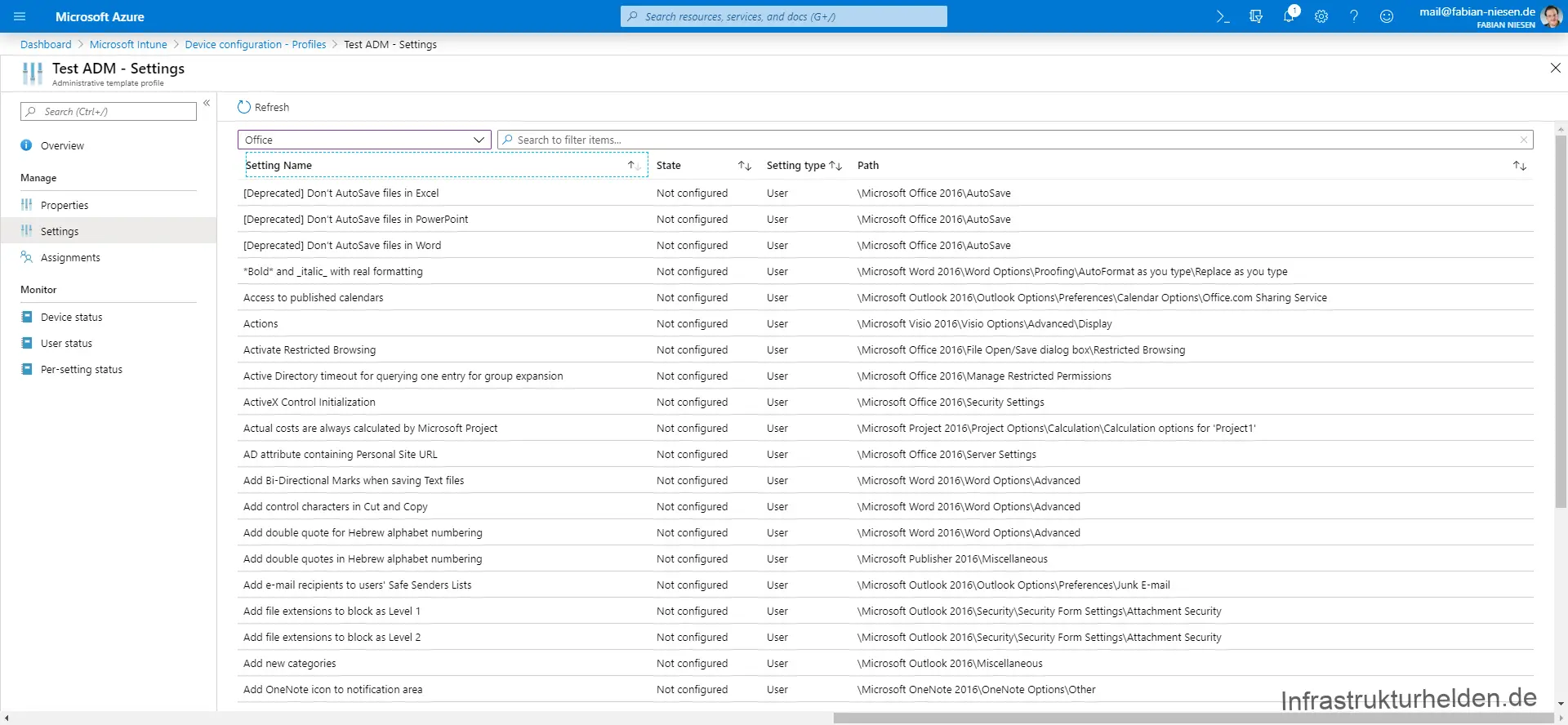
Schreibe einen Kommentar